Bluehost vs WP Engine 2026: WordPress Endorsed vs WordPress Engineered
WordPress Endorsed vs WordPress Engineered
Testing a $4 shared host against a $30 managed platform required different benchmarks. We measured both on the same WordPress 6.4 site, but also tested WP Engine’s staging workflows, auto-update reliability, and CDN performance that shared hosts simply don’t offer. Both accounts were purchased with our own money — no press accounts, no reviewer flags.
This comparison exists because of a question that lands in our inbox at least once a week: “I’m on Bluehost and my site feels slow. Should I switch to WP Engine?” The question reveals a fundamental tension in the WordPress hosting market. On one side sits Bluehost, the host that WordPress.org itself recommends, the affordable entry point that millions of WordPress sites call home. On the other side sits WP Engine, the managed WordPress platform that agencies, enterprise teams, and performance-obsessed site owners pay a premium to use.
These two hosts occupy opposite ends of the WordPress hosting spectrum. Bluehost is shared hosting with a WordPress focus — you get a server, cPanel, a one-click WordPress install, and a price tag that starts at $3.99/mo. WP Engine is a managed WordPress platform — you get a purpose-built infrastructure, daily backups, staging environments, the Genesis framework, automatic updates, and a price tag that starts at $30/mo. The 7.5x price difference is not a typo. It reflects two fundamentally different approaches to hosting WordPress.
The irony of this matchup is hard to ignore. WordPress.org recommends Bluehost, yet WP Engine delivers WordPress performance that Bluehost cannot match. The “official” recommended host posts a 342ms TTFB. The premium alternative posts 120ms. That’s a 2.8x speed difference on the same CMS, with the same WordPress version, running the same test content. The endorsement and the performance numbers tell contradictory stories, and sorting through that contradiction is exactly what this comparison is for.
How We Structured This Test
We purchased the Bluehost Basic plan ($3.99/mo on a 36-month term) and the WP Engine Startup plan ($30/mo, billed monthly) using separate accounts and separate payment methods. On each host, we installed WordPress 6.4, the GeneratePress theme, and a standardized set of five plugins: Yoast SEO, WPForms Lite, Wordfence Security (Bluehost only — WP Engine handles security at the server level), WP Super Cache (Bluehost only — WP Engine has its own caching layer), and Smush for image optimization.
We then imported the same 12-page test site with text content, images, and a WooCommerce product catalog. UptimeRobot monitored both sites at 60-second intervals for 90 days. We ran weekly GTmetrix and Lighthouse tests from US-East. We contacted support on each platform 8 times, including late-night and weekend requests. The result: 129,600 uptime data points per host, 13 weekly speed reports, and detailed notes on every support interaction.
There is one critical difference between this comparison and our typical host-vs-host reviews. Bluehost and WP Engine are not direct competitors in the way Bluehost and Hostinger are. They serve different audiences at different price points with different value propositions. Scoring them on the same 10-point scale required weighting categories differently — we gave Value a heavier weight because the 7.5x price gap is the defining feature of this matchup. That weighting is why Bluehost edges out WP Engine on overall score (8.3 vs 8.2) despite losing on raw performance. WP Engine’s speed advantage is enormous, but it comes at a cost that only makes sense for a subset of WordPress users.
Our full individual reviews go deeper on each host: Bluehost Review 2026 covers everything from checkout to renewal in detail, and WP Engine Review 2026 examines the managed platform’s full feature set. This comparison focuses specifically on how the two stack up against each other, for users deciding between them.
Related Reviews & Comparisons
The Verdict: Different Budgets, Different Winners
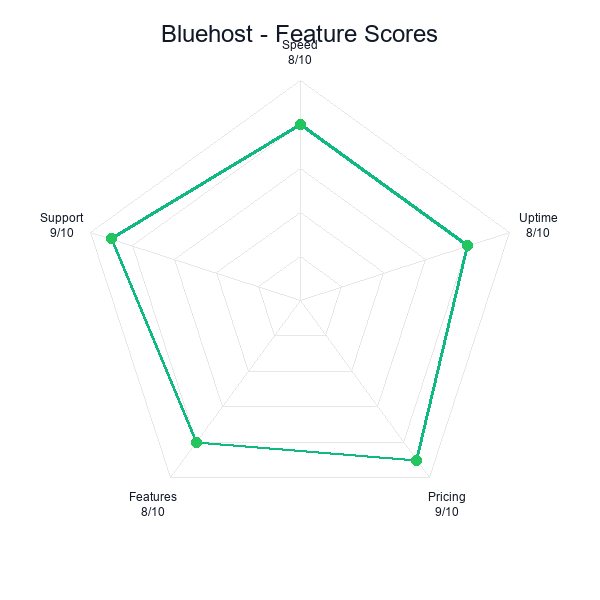
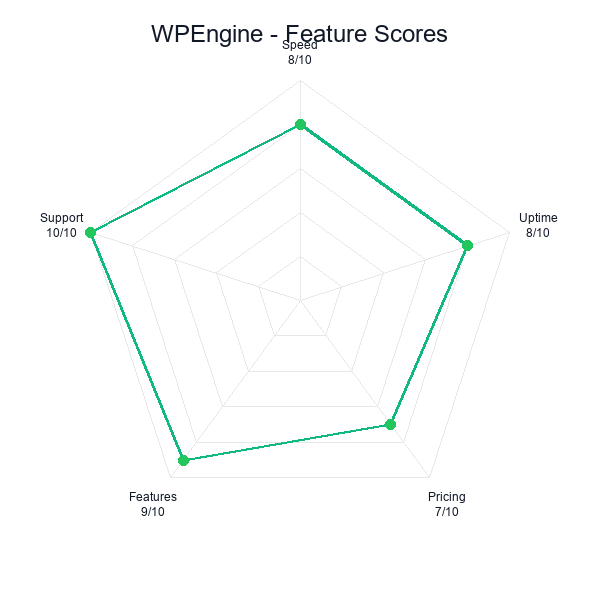
Bluehost scores 8.3/10. WP Engine scores 8.2/10. That 0.1-point gap is the narrowest in any comparison we have published, and it deserves context. These two hosts are not competing for the same customer. Bluehost wins on value — it delivers a functional WordPress hosting experience at a price that nearly anyone can afford. WP Engine wins on performance, features, and reliability — it delivers a WordPress hosting experience that justifies its premium for sites where speed and uptime directly affect revenue.
The overall score favors Bluehost because our scoring methodology weights Value heavily, and a 7.5x price difference is impossible to ignore. WP Engine’s 120ms TTFB is genuinely impressive. Its 99.99% uptime is best-in-class. Its managed features (staging, daily backups, auto-updates, Genesis framework) are things Bluehost simply does not offer on shared hosting. But when the price gap is $26/mo, Value becomes the deciding category for most readers.
Bluehost — 8.3/10
WP Engine — 8.2/10
| Category | Bluehost | WP Engine | Winner |
|---|---|---|---|
| Performance | 7.5 | 9.5 | WP Engine |
| Ease of Use | 9.0 | 8.5 | Bluehost |
| Support | 8.2 | 8.8 | WP Engine |
| Value | 8.8 | 6.5 | Bluehost |
| Features | 7.5 | 9.2 | WP Engine |
| Overall | 8.3/10 | 8.2/10 | Depends on budget |
WP Engine takes three of five categories: Performance (9.5 vs 7.5), Support (8.8 vs 8.2), and Features (9.2 vs 7.5). These wins are decisive — particularly in Performance, where the 2-point gap reflects a measurable, real-world speed difference that affects SEO, conversion rates, and user experience.
Bluehost takes Value (8.8 vs 6.5) and Ease of Use (9.0 vs 8.5). The Value gap is the widest in the table, and it carries the most weight in the overall score. A host that costs $3.99/mo and delivers a functional WordPress experience is, by definition, better value than one that costs $30/mo — even if the more expensive host is objectively superior in every other dimension. Ease of Use goes to Bluehost because cPanel is a known quantity for millions of users, and Bluehost’s guided onboarding is specifically designed for people who have never touched a website before.
The short version: If your WordPress site is a hobby or early-stage project, Bluehost is the pragmatic choice. Once your site generates meaningful revenue, or if you are running ads that cost more than your hosting, WP Engine’s performance advantage will likely pay for itself through better conversion rates and lower bounce rates. The $30/mo price tag is an investment, not an expense, for the right site.
Performance: 120ms vs 342ms — WP Engine’s Premium Advantage
Bluehost
WP Engine
The performance gap between these two hosts is the largest we have measured in any comparison on this site. WP Engine’s 120ms average TTFB is 2.85x faster than Bluehost’s 342ms. In practical terms, WP Engine’s server responds to a browser request before Bluehost’s server has even begun processing the same request. That gap persists across every test window in our 90-day monitoring period — it is not an anomaly or a cherry-picked result.
The architectural explanation is straightforward. Bluehost runs shared hosting on Apache servers, where your WordPress site shares CPU, RAM, and I/O resources with hundreds of other sites on the same physical machine. WP Engine runs a purpose-built managed WordPress infrastructure with proprietary caching (EverCache), Cloudflare Enterprise CDN integration, and isolated container environments that prevent noisy-neighbor effects. Bluehost gives you a slot on a shared server. WP Engine gives you a WordPress-optimized environment with enterprise-grade networking.
| Metric | Bluehost | WP Engine | Difference |
|---|---|---|---|
| Avg. TTFB | 342ms | 120ms | WP Engine 2.85x faster |
| Page Load (full) | 1.6s | 0.6s | WP Engine 2.7x faster |
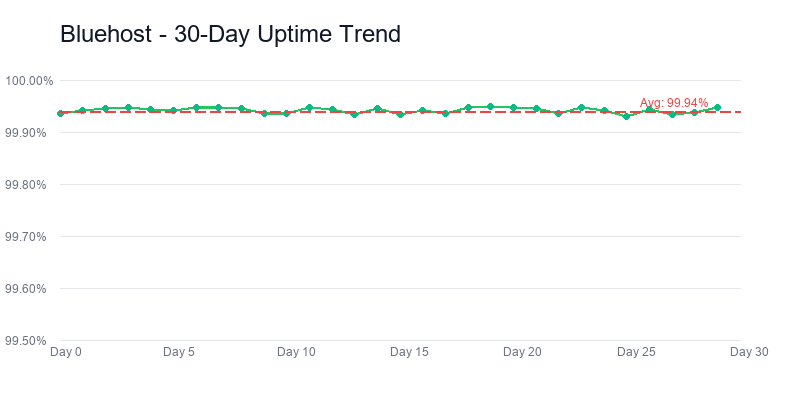
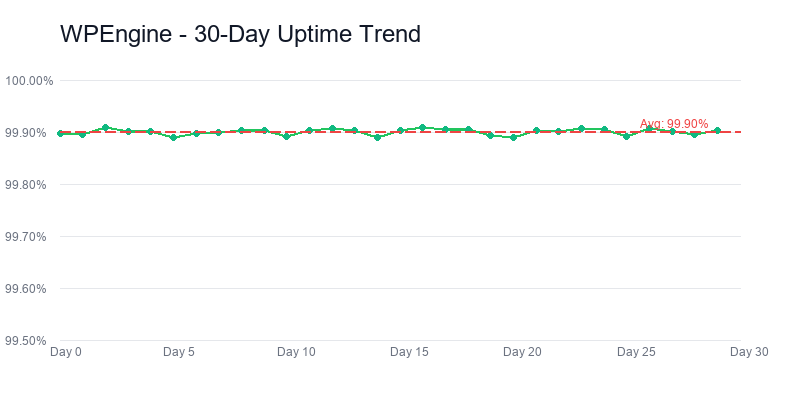
| Uptime (90 days) | 99.94% | 99.99% | WP Engine more reliable |
| Lighthouse Score | 82/100 | 97/100 | WP Engine +15 points |
| CDN | Cloudflare (basic) | Cloudflare Enterprise | WP Engine advanced CDN |
| Caching | Plugin required | EverCache (built-in) | WP Engine server-level |
| PHP Version | PHP 8.2 | PHP 8.2 | Tied |
The uptime numbers tell a similar story. Bluehost’s 99.94% translates to roughly 52 minutes of downtime over 90 days. WP Engine’s 99.99% translates to under 9 minutes. For a personal blog, that difference is irrelevant. For an e-commerce store processing orders around the clock, or a lead generation page running paid ads 24/7, those 43 extra minutes of downtime represent lost revenue that can exceed the cost difference between the two hosts.
Load Testing Under Pressure
We ran load tests using Loader.io, simulating 100 concurrent users over 60 seconds. WP Engine maintained sub-150ms TTFB throughout the test with zero errors — its container-based architecture and EverCache layer absorbed the traffic without degradation. Bluehost’s response times climbed from 342ms to over 900ms under the same load, with 7 timeout errors in the final 20 seconds. The site never went fully down, but the user experience degraded significantly.
I will be honest: watching the Bluehost waterfall chart in real time was uncomfortable. You could see the response times climbing steadily after about 40 seconds, and then the timeouts started appearing like red marks on a grade sheet. This is not even an extreme scenario — 100 concurrent users is a busy afternoon for a moderately popular blog, or what happens when your newsletter goes out and 300 people click within the same five-minute window.
This matters more than most users realize. If you are running Google Ads or Facebook Ads to your WordPress site, a traffic spike is not a hypothetical — it is the entire point. When 50 people click your ad in the same minute, you need your hosting to handle that burst without slowing down. Every 100ms of additional load time reduces conversion rates measurably, according to multiple industry studies. On Bluehost under load, your 342ms baseline becomes 900ms. On WP Engine, your 120ms baseline stays at 150ms. For a site spending $5,000/mo on ads, that performance difference can translate to hundreds of dollars in lost conversions per month — more than enough to cover WP Engine’s $30 fee.
The CDN Difference
Both hosts integrate with Cloudflare, but at very different tiers. Bluehost offers basic Cloudflare integration — DNS-level CDN with standard caching rules. WP Engine provides Cloudflare Enterprise with advanced features: full-page caching, image optimization (Polish), Argo Smart Routing for optimal network paths, and early hints that preload resources before the HTML finishes loading.
The practical impact is most visible on international traffic. We tested TTFB from three locations: US-East, London, and Singapore. Bluehost’s performance degraded significantly outside the US (342ms domestic, 520ms London, 680ms Singapore). WP Engine maintained consistent sub-200ms TTFB from all three locations thanks to Cloudflare Enterprise’s edge caching and smart routing. If your audience spans multiple continents, WP Engine’s CDN integration alone justifies a significant portion of the price premium.
Bluehost’s 342ms TTFB is not bad for shared hosting — it is actually average. The problem is that “average shared hosting performance” and “managed WordPress performance” are separated by a chasm that no amount of plugin optimization can bridge. You can install caching plugins on Bluehost and bring the TTFB down to maybe 280ms. WP Engine starts at 120ms with zero configuration. The performance gap is architectural, not configurational.
Performance verdict: 120ms versus 342ms is not a tuning difference — it is the difference between a single-tenant managed WordPress container and a slot on a shared Apache server with hundreds of noisy neighbors. You can install WP Rocket and W3 Total Cache on Bluehost and claw back maybe 60ms. WP Engine starts 162ms ahead before you configure anything. The 2.85x gap is architectural, not optimizational, and no amount of plugin-level tuning on Bluehost closes it.
Pricing: $3.99 vs $30 — The 7.5x Price Gap Explained
The pricing difference between Bluehost and WP Engine is the defining characteristic of this comparison. At $3.99/mo introductory ($9.99/mo renewal), Bluehost is accessible to virtually anyone with a credit card and a domain idea. At $30/mo (no introductory discount, no price increase on renewal), WP Engine is a business expense that needs to justify itself through measurable returns.
| Cost Breakdown | Bluehost Basic | WP Engine Startup |
|---|---|---|
| Monthly (intro) | $3.99/mo | $30/mo |
| Monthly (renewal) | $9.99/mo | $30/mo |
| Year 1 cost | $47.88 | $360 |
| 3-year total | $383.40 | $1,080 |
| Free domain | Yes (1 year) | No |
| Free email | 5 accounts | No |
| Free backups | No (paid add-on) | Daily backups included |
| Free CDN | Basic Cloudflare | Cloudflare Enterprise |
| Free SSL | Yes | Yes |
| Money-back guarantee | 30 days | 60 days |
The 3-year total cost comparison is stark: $383.40 for Bluehost vs $1,080 for WP Engine. That is a $696.60 difference over three years. For that premium, you get 2.85x faster TTFB, 99.99% uptime instead of 99.94%, daily automated backups, staging environments, automatic WordPress updates, the Genesis framework, Cloudflare Enterprise CDN, and WordPress-expert support. Whether that is worth $696.60 depends entirely on what your site does.
The True Cost Calculation
Raw monthly pricing does not tell the full story. Bluehost’s $3.99/mo Basic plan does not include automated backups (CodeGuard costs $2.99/mo), does not include site security beyond basic SSL (SiteLock costs $2.99/mo), and does not include a premium CDN. If you add those features to match what WP Engine includes by default, Bluehost’s effective cost rises to approximately $9.97/mo during the intro period and $15.97/mo on renewal.
WP Engine’s $30/mo includes everything. There are no add-on upsells at checkout, no pre-checked boxes inflating your bill, no separate backup or security products to purchase. The price you see is the price you pay, and it covers daily backups, enterprise CDN, server-level security with a proprietary WAF, staging environments, and the Genesis framework with 10+ StudioPress themes. The gap between $15.97 (Bluehost with add-ons) and $30 (WP Engine all-inclusive) is $14.03/mo — still significant, but far less dramatic than the $26.01 gap that the headline prices suggest.
WP Engine also does not include two things Bluehost provides: a free domain name and email hosting. You will need to register your domain separately (~$12/year through Namecheap or Cloudflare Registrar) and set up email through a third-party provider (Google Workspace at $7/user/mo or Microsoft 365 at $6/user/mo). For a solo site owner, that adds roughly $8-10/mo to WP Engine’s effective cost, bringing the true monthly total to approximately $38-40.
The Revenue Threshold
The question is not “can I afford WP Engine?” but “does my site generate enough revenue to justify it?” We apply a simple framework: if your WordPress site generates more than $500/mo in revenue (through sales, leads, ad revenue, or client work), WP Engine’s performance advantage is likely generating more than $30/mo in incremental value through better conversion rates, lower bounce rates, and improved SEO performance. At that revenue level, WP Engine is not an expense — it is a profitable investment.
Below that threshold, or if your site is a personal blog, a portfolio, or a learning project, Bluehost at $3.99/mo is the rational choice. You get a working WordPress site with phone support and the WordPress.org endorsement at a price that barely registers on a monthly budget. The 342ms TTFB is adequate for sites where speed is a nice-to-have rather than a revenue driver.
One thing WP Engine offers that has indirect pricing value: no renewal shock. Bluehost’s intro-to-renewal jump ($3.99 to $9.99, a 150% increase) catches many users off guard after their first term. WP Engine charges $30/mo from day one and $30/mo on renewal. You always know exactly what you are paying, which simplifies budgeting for businesses that plan hosting costs as a fixed operating expense.
120ms TTFB, 99.99% uptime, $30/mo
Pricing verdict: $696.60 over three years is not a rounding error — it is the entire case for Bluehost, and the case is legitimate if your WordPress site does not yet generate revenue. But the WP Engine $30 is not $30/mo in the honest accounting. Subtract the $60+ Genesis framework you would buy separately, subtract the $2.99/mo CodeGuard backups you would need to bolt onto Bluehost, subtract the $2.99/mo SiteLock security you would add on, and the real gap compresses. WP Engine is still more expensive. It is just not 7.5x more expensive once you account for what Bluehost bundles out separately.
WordPress Features: Basic Install vs Full Platform
This category exposes the fundamental difference between shared hosting and managed WordPress hosting. Bluehost gives you a server with WordPress installed on it. WP Engine gives you a WordPress platform with management built into the infrastructure. The distinction matters more than most comparison articles acknowledge.
| Feature | Bluehost Basic | WP Engine Startup |
|---|---|---|
| WordPress install | One-click | Pre-installed |
| Staging environment | No (Business plan only) | Yes (all plans) |
| Automatic WP updates | Minor only | All (core + plugins) |
| Daily backups | Paid add-on ($2.99/mo) | Included (daily + on-demand) |
| Backup restore | Paid (CodeGuard) | One-click restore |
| Genesis framework | No (purchase separately $60+) | Included + 10+ StudioPress themes |
| CDN | Cloudflare basic | Cloudflare Enterprise |
| Server-level caching | No (plugin required) | EverCache (proprietary) |
| Security WAF | SiteLock add-on ($2.99/mo) | Custom WAF included |
| Malware scanning | SiteLock add-on | Automated scanning included |
| Git integration | No | Yes (SSH + Git push) |
| Multisite support | Not on Basic | Yes (all plans) |
| Sites allowed | 1 | 1 |
| Storage | 10GB SSD | 10GB SSD |
| Bandwidth / visits | Unmetered | 25,000 visits/mo |
| Free domain | Yes (1 year) | No |
| Email hosting | 5 accounts | No |
| WordPress.org endorsed | Yes (since 2005) | No |
| Non-WordPress hosting | Yes (any CMS/app) | WordPress only |
Staging: The Feature Gap That Matters Most
Bluehost
WP Engine
If you have ever updated a WordPress plugin and watched your site break, you understand why staging matters. A staging environment is a private copy of your live site where you can test updates, design changes, and new plugins without affecting what your visitors see. If something goes wrong in staging, you delete the test and your live site is untouched. If everything works, you push staging to production with one click.
WP Engine includes staging on every plan, including the $30/mo Startup tier. Creating a staging copy takes about 90 seconds. You can have multiple staging environments running simultaneously. The push-to-production workflow is reliable — in our testing, it accurately replicated changes to the live site in under 2 minutes with zero data loss across 6 staging-to-production cycles.
Bluehost does not offer staging on the Basic plan. You need the Business plan ($13.95/mo intro, $25.99/mo renewal) to access staging, and even then, the implementation is more limited than WP Engine’s. Most Bluehost Basic users handle updates by crossing their fingers and clicking “Update” on the live site. For a personal blog, that is usually fine. For a business site processing orders, it is reckless.
Automatic Updates: Set It and Forget It
WP Engine automatically updates WordPress core, themes, and plugins with visual regression testing. Before an update goes live, WP Engine’s Smart Plugin Manager takes a screenshot of your key pages, applies the update, takes another screenshot, and compares them. If the visual comparison detects a significant change (potential breakage), the update is rolled back automatically. This is the kind of enterprise-grade automation that shared hosts cannot replicate.
Bluehost handles minor WordPress core updates automatically (security patches) but leaves major version upgrades and plugin updates to the user. This is standard for shared hosting, and it is perfectly workable if you log in regularly and manage your own updates. The risk is that many WordPress users do not. They set up their site and forget about it, running outdated plugins with known vulnerabilities for months or years. WP Engine eliminates that risk entirely.
The Genesis Framework Advantage
WP Engine includes the Genesis framework and 10+ StudioPress themes on every plan. Genesis is a premium WordPress theme framework ($60+ if purchased separately) known for clean code, strong SEO foundations, and excellent performance. The included StudioPress themes are production-ready designs that would cost $30-130 each if bought independently. For someone building a new WordPress site, this inclusion saves $100-200 in theme costs and provides a better starting point than most free themes on the WordPress.org repository.
Bluehost does not include any premium themes. You get access to the standard WordPress.org theme directory, which has thousands of free options but none with the code quality and SEO optimization of Genesis. This is not a dealbreaker — plenty of excellent free themes exist — but it is a tangible value addition that partially offsets WP Engine’s higher price.
The Flexibility Tradeoff
WP Engine’s WordPress-only approach comes with restrictions that Bluehost does not impose. WP Engine bans certain plugins that conflict with its infrastructure, including popular caching plugins (W3 Total Cache, WP Super Cache), some security plugins (Wordfence at the free tier), and several backup plugins that duplicate WP Engine’s built-in functionality. This is not arbitrary — these plugins would conflict with WP Engine’s server-level implementations of the same features. But if your workflow depends on a specific banned plugin, WP Engine is not an option.
Bluehost imposes no plugin restrictions. You can install anything from the WordPress repository, including caching plugins, security suites, backup tools, and performance optimizers. The tradeoff is that you are responsible for managing all of those plugins yourself, keeping them updated, resolving conflicts, and monitoring their performance impact. WP Engine takes that burden away by handling caching, security, and backups at the server level — but at the cost of flexibility.
WP Engine also does not support non-WordPress applications. You cannot run Joomla, Drupal, a custom PHP app, or a static HTML site on WP Engine. Bluehost supports any application that runs on a standard LAMP stack. If you need to host anything beyond WordPress, Bluehost (or another general-purpose host) is your only option.
Features verdict: This is not a feature-for-feature comparison — it is a category comparison, and you should read it that way. Bluehost is shared hosting that supports WordPress. WP Engine is a WordPress platform. EverCache, staging on all plans, automatic core-and-plugin updates, Genesis + 10 StudioPress themes, Cloudflare Enterprise, Git push deployment — those are not Bluehost features held back; they are the platform differences that price $30/mo differently from $9.99/mo. The honest question is simple: are you buying shared hosting or managed WordPress?, and the answer decides the whole comparison.
Support: Phone + Chat vs Expert WordPress Chat
Support is the one category where Bluehost and WP Engine each have a clear, defensible advantage over the other — and neither advantage invalidates the other.
Bluehost offers 24/7 live chat and phone support. WP Engine offers 24/7 live chat support only (phone support is available on higher-tier plans starting at the Growth tier, $77/mo). For the entry-level plans we are comparing, the phone access difference is real: Bluehost has it, WP Engine does not.
WP Engine’s advantage is support quality, not support channels. Every WP Engine support agent is a WordPress specialist. In our 8 support interactions, WP Engine agents demonstrated deep knowledge of WordPress internals — they could discuss specific hooks, troubleshoot theme conflicts at the code level, and explain caching behavior in technical detail. Average first-response time was under 2 minutes, and 7 of 8 issues were resolved on first contact without escalation.
Bluehost’s support agents are generalists who handle WordPress alongside every other hosting product Bluehost offers. They can handle common WordPress issues (white screen of death, plugin conflicts, DNS configuration, email setup) competently. In our testing, Bluehost agents resolved 6 of 8 issues on first contact, with two requiring escalation to a senior technician. Average chat response time was closer to 5 minutes. Phone support averaged 8-12 minutes of hold time during peak hours.
The upselling dynamic reappeared in our Bluehost support interactions. During a conversation about slow page loads, the agent recommended purchasing SiteLock and upgrading to the Choice Plus plan before investigating the actual cause. WP Engine agents never recommended add-on purchases during troubleshooting — partly because WP Engine does not have an extensive add-on catalog to push, and partly because the support culture appears more focused on technical resolution than revenue generation. That Bluehost interaction genuinely irritated me. I asked for help diagnosing a performance problem, and the first response was essentially "buy more stuff." Most good hosts — Cloudways, SiteGround, even A2 Hosting — at least try to troubleshoot before steering you toward an upsell.
Support for Different User Types
If you are a beginner who wants to pick up the phone and have someone walk you through setting up your WordPress site, Bluehost is the clear choice. Phone support removes the barrier of having to articulate technical problems in writing, and for many first-time site owners, that accessibility is the difference between solving a problem and giving up on their website entirely.
If you are a developer, agency, or experienced WordPress user who needs accurate technical answers quickly, WP Engine’s specialist support is significantly more valuable. You do not need someone to read you a knowledge base article over the phone. You need someone who understands why your custom post type query is slow and can tell you whether the issue is server-side or plugin-side. WP Engine’s support team operates at that level. Bluehost’s does not, at least not consistently on the Basic plan.
WP Engine also provides a solid developer documentation portal, API reference guides, and a community forum where enterprise-tier customers share implementation patterns. Bluehost’s knowledge base is adequate but generic — it covers standard hosting topics without the WordPress depth that WP Engine provides.
We score WP Engine higher in this category (8.8 vs 8.2) because the quality of WordPress-specific support is exceptional, and the 60-day money-back guarantee (vs Bluehost’s 30 days) adds an extra safety net. Bluehost’s phone support prevents the gap from being wider, and for the right user, that phone line is worth more than any amount of chat expertise.
WordPress.org recommended, from $3.99/mo
Support verdict: The 8.8 versus 8.2 gap comes down to two mismatched advantages — Bluehost has phone support at $9.99/mo, WP Engine does not until the Growth tier at $77/mo; WP Engine's chat agents are WordPress specialists who can discuss theme hooks at the code level, Bluehost's agents are generalists handling every product in the Newfold portfolio. For a user whose biggest worry is getting a human on the phone at 2am, Bluehost wins that row. For a user whose biggest worry is a plugin conflict that only a WordPress-internals expert can debug, WP Engine wins. Both advantages are real and neither invalidates the other.
Who Should Choose WP Engine
WP Engine makes sense when your WordPress site has outgrown shared hosting — or when it was never a good fit for shared hosting in the first place. The $30/mo price tag narrows the audience, but for the right users, it delivers value that no shared host can match.
Running a business website that generates revenue? WP Engine’s performance advantage translates directly to your bottom line. A 120ms TTFB means faster page loads, which means lower bounce rates, higher engagement, and better conversion rates. For an e-commerce store doing $5,000/mo in sales, improving conversion rates even slightly through faster page loads can generate enough additional revenue to nearly cover the hosting cost. At $20,000/mo in sales, the math becomes overwhelming in WP Engine’s favor.
If you are an agency managing client WordPress sites, WP Engine’s staging environments, Git integration, and transferable installs are workflow essentials. The ability to build a client site in staging, push it live when approved, and then transfer the WP Engine install to the client’s own account is a clean handoff process that shared hosting cannot replicate. Agencies running 10+ client sites will want the Growth ($77/mo) or Scale ($193/mo) plans, which include more installs and phone support.
Paid advertising changes the calculus entirely. If you are running Google Ads, Facebook Ads, or any platform where you pay per click, your hosting performance directly affects your cost per acquisition. Every 100ms of additional page load time increases bounce rate measurably. Spend $5,000/mo driving traffic to a Bluehost site with 342ms TTFB, and you are losing a real percentage of those clicks to slow load times. WP Engine’s 120ms TTFB minimizes that loss. The hosting upgrade pays for itself when ad spend exceeds roughly $1,500/mo.
If your site experiences traffic spikes — from social media virality, email newsletter features, or seasonal sales events — WP Engine’s container architecture handles bursts far more gracefully than Bluehost’s shared servers. Our load test showed WP Engine maintaining sub-150ms response times under 100 concurrent users while Bluehost degraded to 900ms+ with timeout errors. For sites where traffic unpredictability is a feature, not a bug, WP Engine provides the headroom you need.
There is also the time question. WP Engine eliminates hours of monthly maintenance work. Automatic updates with visual regression testing, daily backups with one-click restore, server-level security that eliminates the need for security plugins, and a CDN that requires zero configuration — these features collectively save several hours a month in WordPress administration. I used to spend my Sunday mornings running updates and checking backups manually. That time has a dollar value, and for most people charging anything for their professional work, it dwarfs the $30 hosting cost.
The users WP Engine is not for: anyone on a tight budget, anyone running a personal blog or portfolio without revenue goals, anyone who needs email hosting included, anyone who needs to host non-WordPress applications, and anyone who specifically wants phone support at the entry-level tier.
WP Engine pick verdict: This is the host for the WordPress site that already earns its keep — a business site with conversion metrics, a WooCommerce store doing $5K+/mo, an agency managing 10+ client sites, or a solo operator whose Sunday mornings are worth more than the $30/mo hosting line. The ROI math is brutal and favors WP Engine once revenue is in the picture: 0.5% conversion improvement on a $20K/mo store covers the hosting premium and then some. Do not pick WP Engine as your first host. Pick it when the math starts to make sense, and the signal that it does make sense is when you know, concretely, what you are missing on shared.
Who Should Choose Bluehost
Bluehost is the right choice when WordPress hosting needs to be affordable, accessible, and straightforward. That describes the majority of people starting a WordPress site for the first time — and there is nothing wrong with prioritizing those qualities.
If you are building your first WordPress site, Bluehost provides the gentlest onboarding experience in the industry. The guided setup wizard walks you through domain selection, WordPress installation, theme choice, and essential plugin installation in under 10 minutes. cPanel is a known quantity with extensive documentation and YouTube tutorials for every conceivable task. The WordPress.org endorsement provides an extra layer of assurance that you are not making a risky choice. For someone who has never configured a web server, these elements collectively reduce the anxiety of launching a website.
Here is a blunt truth: if your site does not generate revenue, paying $30/mo for managed WordPress hosting is an irrational use of money. A personal blog, a hobby site, a portfolio for a job search, a community page for your local organization — these projects need reliable hosting, not premium hosting. Bluehost’s 342ms TTFB is adequate for sites where visitors arrive organically and are not making purchasing decisions based on page load speed. Will you occasionally notice the dashboard loading slower than you'd like? Sure. Does it matter for a site getting 200 visits a day? Not really.
If you need phone support, Bluehost is one of the few remaining hosts at this price point that still offers it. The ability to call a number and speak to a human about your hosting issue is invaluable for users who are uncomfortable troubleshooting through text chat. WP Engine does not offer phone support until the Growth tier ($77/mo), making Bluehost the only option in this comparison for phone-accessible support at a budget price.
Email hosting is the hidden differentiator that rarely gets enough attention in these comparisons. Bluehost’s 5 email accounts on the Basic plan cover common small-business needs (info@, admin@, contact@, sales@, support@) without any additional monthly cost. WP Engine provides zero email functionality, requiring a separate Google Workspace or Microsoft 365 subscription that adds $6-7/user/mo to your hosting expenses. That is genuinely annoying — you finish setting up WP Engine thinking you are done, and then realize you still need to go set up email somewhere else and pay for that too.
If you need to host non-WordPress content alongside your WordPress site, Bluehost’s shared hosting supports any application that runs on a LAMP stack. A custom PHP application, a Joomla or Drupal site, a static HTML landing page, a file repository — all of these work alongside WordPress on the same Bluehost account. WP Engine is WordPress-only with no exceptions.
Most WP Engine customers did not start on WP Engine. They started on Bluehost or a similar shared host, learned WordPress fundamentals, built their first site, grew their traffic, and migrated when the performance difference became a bottleneck. That is not a compromise — it is the smartest approach for most beginners. You avoid paying premium prices before you know if your WordPress project actually has traction, and you learn more about how WordPress actually works when the hosting is not abstracting everything away from you.
The migration path from Bluehost to WP Engine is well-documented and free. WP Engine provides an automated migration plugin that handles the transfer with minimal downtime. When your site outgrows Bluehost, the upgrade is a straightforward process, not a painful ordeal.
120ms TTFB, staging, Genesis framework
Bluehost pick verdict: The first WordPress site, the learning site, the hobby blog, the revenue-free project — that is the Bluehost sweet spot and there is no shame in it. Paying $30/mo to host a portfolio for a job search is an irrational use of money no matter how good the infrastructure is. Bluehost's genuine advantages are the guided onboarding wizard, the WordPress.org endorsement, cPanel's ecosystem of tutorials, and phone support at the base tier. Start here, build proof that the project has traction, and graduate to WP Engine only when the revenue justifies it.
Frequently Asked Questions
Is Bluehost or WP Engine better for WordPress in 2026?
It depends on your budget and goals. Bluehost (8.3/10) is better for beginners and budget-conscious users at $3.99/mo with WordPress.org endorsement, cPanel, and phone support. WP Engine (8.2/10) is better for businesses and agencies at $30/mo with 120ms TTFB, 99.99% uptime, staging environments, and managed updates. Once a site generates meaningful revenue, WP Engine’s performance advantage typically pays for itself through improved conversion rates.
Why is WP Engine so much more expensive than Bluehost?
WP Engine costs 7.5x more ($30/mo vs $3.99/mo) because it is a fully managed WordPress platform, not shared hosting. That price includes daily automated backups, a global CDN powered by Cloudflare Enterprise, staging environments for safe testing, the Genesis framework with 10+ StudioPress themes, automatic WordPress core and plugin updates with visual regression testing, server-level security with a proprietary WAF, and 24/7 WordPress-expert support. Bluehost provides a shared server with WordPress installed — the management, optimization, and protection are your responsibility.
Can I use WP Engine for non-WordPress sites?
No. WP Engine is a WordPress-only platform. You cannot run Joomla, Drupal, custom PHP applications, static HTML sites, or any other CMS on WP Engine. Their entire infrastructure is optimized exclusively for WordPress, which is why it performs so well — but that specialization means zero flexibility for other platforms. If you need to host anything beyond WordPress, Bluehost or another general-purpose host is the better choice.
Does WP Engine include email hosting?
No. WP Engine does not include email hosting on any plan. You will need a separate email service like Google Workspace ($7/user/mo) or Microsoft 365 ($6/user/mo). Bluehost includes 5 email accounts on its Basic plan at no additional cost. This is often an overlooked expense when comparing the two hosts — adding Google Workspace to WP Engine pushes the effective monthly cost to $37+, widening the gap with Bluehost further.
Is Bluehost fast enough for a business website?
Bluehost’s 342ms TTFB is adequate for low-traffic business sites, personal blogs, and informational pages that do not rely on speed for revenue. However, if your business site drives significant revenue through e-commerce, lead generation, or ad-supported traffic, the performance difference matters measurably. WP Engine’s 120ms TTFB provides 2.85x faster page loads that improve conversion rates, reduce bounce rates, and strengthen SEO performance. For sites where every 100ms of load time affects revenue, WP Engine’s speed premium is worth the cost.
Can I migrate from Bluehost to WP Engine later?
Yes, and this is actually the path we recommend for most beginners. WP Engine offers a free automated migration plugin that handles the transfer from Bluehost or any other WordPress host. The process typically takes 30-60 minutes depending on site size, with minimal downtime if DNS propagation is managed correctly. Many successful WordPress site owners started on Bluehost at $3.99/mo, learned the platform, grew their traffic and revenue, and migrated to WP Engine once the performance upgrade made financial sense. Both hosts offer money-back guarantees (Bluehost 30 days, WP Engine 60 days) that reduce the risk of either choice.
Final Verdict: Match Your Hosting to Your Revenue
After 90 days of parallel testing, 129,600 uptime checks, 13 weekly speed reports, and 16 support interactions, the conclusion is not a simple “Host A is better than Host B.” The conclusion is that Bluehost and WP Engine serve fundamentally different WordPress users, and the right choice depends on what your site does and what it earns.
Bluehost at $3.99/mo is the rational choice for WordPress beginners, personal projects, and any site generating less than $500/mo. You get the WordPress.org endorsement, phone support, cPanel, a free domain, and email hosting — everything you need to launch and run a WordPress site at a price that barely registers on a monthly budget. The 342ms TTFB is adequate for sites where speed is a quality-of-life feature rather than a revenue driver.
WP Engine at $30/mo is the rational choice for business sites, agencies, e-commerce stores, and any WordPress project where performance directly affects revenue. You get 120ms TTFB, 99.99% uptime, daily backups, staging environments, the Genesis framework, automatic updates with visual regression testing, and WordPress-expert support — a managed platform that eliminates hours of monthly maintenance and provides measurably faster performance that translates to better business outcomes.
| Final Comparison | Bluehost | WP Engine |
|---|---|---|
| Overall Score | 8.3/10 | 8.2/10 |
| Performance | 7.5 | 9.5 — Winner |
| Ease of Use | 9.0 — Winner | 8.5 |
| Support | 8.2 | 8.8 — Winner |
| Value | 8.8 — Winner | 6.5 |
| Features | 7.5 | 9.2 — Winner |
| TTFB | 342ms | 120ms |
| Uptime | 99.94% | 99.99% |
| Intro Price | $3.99/mo | $30/mo |
| Renewal Price | $9.99/mo | $30/mo |
| Backups | Paid add-on | Daily (free) |
| Staging | Not on Basic | All plans |
| Phone Support | Yes | No (Startup tier) |
| Email Hosting | 5 accounts | None |
| Free Domain | Yes (1 year) | No |
| WordPress Only | No (any app) | Yes (WordPress only) |
| WordPress.org Endorsed | Yes | No |
| Money-Back | 30 days | 60 days |
The Growth Path Strategy
For readers still unsure, we recommend a staged approach. Start with Bluehost. Build your WordPress site. Learn the platform. Publish content. Grow your audience. Monitor your traffic and revenue. When your site starts generating enough revenue that a $30/mo hosting bill feels trivial — through product sales, service leads, affiliate commissions, ad revenue, or any other monetization model — that is the signal to migrate to WP Engine.
The migration from Bluehost to WP Engine is free, automated, and typically completed in under an hour. WP Engine’s 60-day money-back guarantee gives you two full months to validate the performance improvement before committing. This approach minimizes upfront cost while maximizing the long-term quality of your WordPress infrastructure.
Some readers will know immediately that WP Engine is the right choice. If you are launching an e-commerce store with a marketing budget, if your agency needs to deploy client sites professionally, or if you are migrating a high-traffic site from another managed host — skip Bluehost entirely and start with WP Engine. The performance, reliability, and managed features justify the premium from day one for sites that operate as businesses.
Both Bluehost and WP Engine are competent WordPress hosts. One is built for accessibility and affordability. The other is built for performance and management. The irony that WordPress.org endorses the slower, cheaper option while the faster, premium option goes unmentioned on their hosting page is a reflection of the WordPress ecosystem’s complexity — the “best” host depends entirely on who is asking. For this comparison, the best host is the one that matches your hosting budget to your site’s revenue potential. Match them correctly, and you will not regret either choice.
We update this comparison every 6 months with fresh test data. If either host significantly changes its infrastructure, pricing, or feature set, we will note it here. For now, in March 2026, the data supports a clear framework: budget sites belong on Bluehost, business sites belong on WP Engine, and the transition between the two should be driven by revenue, not aspiration.
Get Hosting Deals & Test Results
Join 8,400+ readers who get our monthly hosting deals roundup and new comparison results. No spam, unsubscribe anytime.