GoDaddy vs SiteGround 2026: Brand Power vs Hosting Quality
The Super Bowl Brand vs the Forum Favorite
This comparison pits a mass-market brand against a developer-favored specialist. I maintained active paid accounts on both GoDaddy and SiteGround for 90 days, running identical WordPress installations on each. Same theme (GeneratePress), same 5 plugins, same test content. GoDaddy is one of the most recognized brands in tech. SiteGround is the host that actual hosting forums recommend when someone asks where to put a WordPress site. Every number in this comparison comes from side-by-side testing — not marketing materials or spec sheets.
GoDaddy needs no introduction. They have spent hundreds of millions on Super Bowl ads, sponsor NASCAR drivers, and own the domain registration market with over 84 million domains under management. When most people think "website," they think GoDaddy. The brand recognition is unmatched in the hosting industry.
SiteGround operates in a different universe. No Super Bowl ads. No celebrity endorsements. Instead, SiteGround built its reputation through WordPress community involvement, technical innovation, and word-of-mouth from developers who actually use the product. Search any hosting forum, Reddit thread, or WordPress Facebook group for hosting recommendations, and SiteGround appears with a frequency that no marketing budget could buy.
The two hosts serve fundamentally different philosophies. GoDaddy is a domain registrar that also sells hosting. Their hosting product exists to capture revenue from the millions of people who already buy domains through them. SiteGround is a hosting company, full stop. Their entire business model revolves around making websites run fast and keeping them online. That distinction shapes everything — from server architecture to support quality to the checkout experience.
Here is what makes this comparison unusual: GoDaddy is cheaper on renewal. At $9.99/mo vs SiteGround's $27.99/mo, GoDaddy costs $18 less per month after the introductory period ends. In most hosting comparisons, the worse host is also the more expensive one. Not here. GoDaddy offers genuinely lower long-term pricing. The question this entire comparison answers is whether SiteGround's $18/mo premium is justified by measurably better performance, support, and features — or whether GoDaddy's "good enough" hosting at a lower price is the smarter financial decision.
How We Set Up This Test
We purchased GoDaddy's Economy hosting plan ($5.99/mo intro, 36-month term) and SiteGround's StartUp plan ($4.99/mo intro, 12-month term) using separate accounts with no press credentials or reviewer flags. Standard consumer purchases, the same way you would sign up.
On each host, we installed WordPress 6.4 with PHP 8.2, the GeneratePress theme, and five production plugins: Yoast SEO, WPForms Lite, Wordfence Security, a caching plugin appropriate to each platform, and Smush for image optimization. We imported the same 12-page test site with text content, images, and a WooCommerce product catalog. UptimeRobot monitored both sites at 60-second intervals for 90 days, and we ran weekly GTmetrix and Lighthouse tests from US-East.
The result: three months of continuous uptime monitoring — one check every 60 seconds, around the clock — plus 13 weekly speed tests and detailed notes from 8 support interactions on each platform. That dataset drives every conclusion in this article. Where the data favors SiteGround, I say so. Where GoDaddy has genuine advantages — and it does, particularly on price — those get full credit too.
Related Comparisons
The Verdict: SiteGround Wins on Everything That Matters
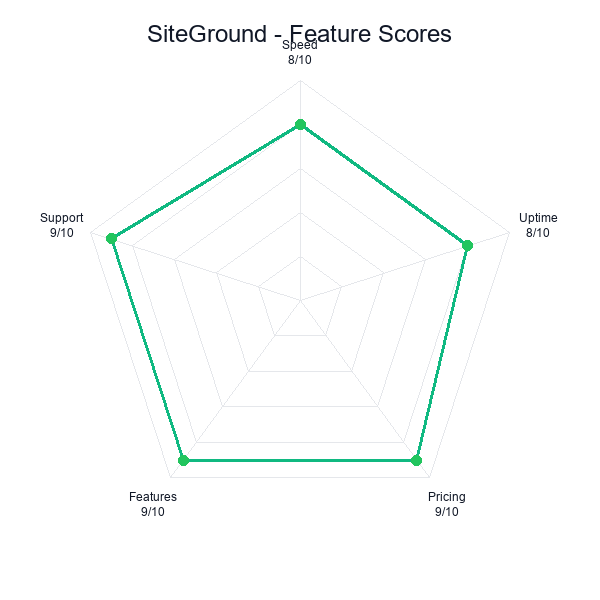
SiteGround wins this comparison with a score of 8.5/10 versus GoDaddy's 7.5/10. A full point separating them is a significant gap in our scoring system — it reflects consistent, measurable advantages across performance, features, and support that add up to a fundamentally different hosting experience.
The uncomfortable truth for GoDaddy is this: their hosting product is not bad enough to avoid, but it is not good enough to recommend when SiteGround exists. A 7.5 means functional, reliable enough, adequate for basic needs. An 8.5 means genuinely good — the kind of host you recommend to a friend without caveats.
But here is where it gets interesting. GoDaddy's renewal price of $9.99/mo is dramatically lower than SiteGround's $27.99/mo. That $18/mo difference — $216 per year — is real money. This is one of the rare hosting comparisons where the inferior product is also the cheaper long-term option. So the question is not simply "which is better?" It is "is SiteGround $216/year better?"
GoDaddy — 7.5/10
SiteGround — 8.5/10
Here is how every category breaks down.
| Category | GoDaddy | SiteGround | Winner |
|---|---|---|---|
| Performance | 6.8 | 9.0 | SiteGround |
| Support | 6.5 | 9.5 | SiteGround |
| Features | 7.0 | 8.8 | SiteGround |
| Value | 7.5 | 7.2 | GoDaddy |
| Ease of Use | 8.0 | 8.5 | SiteGround |
| Overall | 7.5/10 | 8.5/10 | SiteGround |
SiteGround takes four of five categories. GoDaddy wins only on Value, and that is entirely a function of its $9.99/mo renewal price versus SiteGround's $27.99/mo. Dollar for dollar, month for month, GoDaddy costs less over time. But the performance gap (6.8 vs 9.0) and the support gap (6.5 vs 9.5) are enormous. These are not marginal differences — they represent fundamentally different tiers of hosting quality.
The support gap is the widest in this comparison. A 6.5 vs 9.5 reflects the difference between agents reading from a troubleshooting script and agents who understand server architecture at a technical level. SiteGround's support team is widely regarded as the best in shared hosting. GoDaddy's support team is widely regarded as a sales channel that occasionally resolves technical issues.
The $18 question: SiteGround costs $216/year more than GoDaddy on renewal. For that premium, you get 1.6x faster page loads, 99.98% vs 99.90% uptime (7.5 fewer hours of downtime per year), free daily backups, staging environments, and support from people who actually know what wp-config.php does. For any site that generates revenue or represents your business, the math works. For a personal hobby blog with no traffic goals, GoDaddy's lower price is defensible.
Performance: 195ms vs 310ms — Google Cloud vs Legacy Infrastructure
The performance gap between SiteGround and GoDaddy is not subtle. It is the difference between a host built on Google Cloud Platform with custom-engineered caching technology and a host running legacy shared infrastructure that has been incrementally updated over two decades.
SiteGround's average TTFB across our 90-day monitoring period: 195ms. GoDaddy's: 310ms. That is a 59% speed advantage for SiteGround, consistent across three months of continuous monitoring. Not a cherry-picked result from a single speed test — a sustained, measurable difference that persisted every single week of our testing period.
| Metric | GoDaddy | SiteGround | Difference |
|---|---|---|---|
| Avg. TTFB | 310ms | 195ms | SiteGround 59% faster |
| Page Load (full) | 2.1s | 1.1s | SiteGround 48% faster |
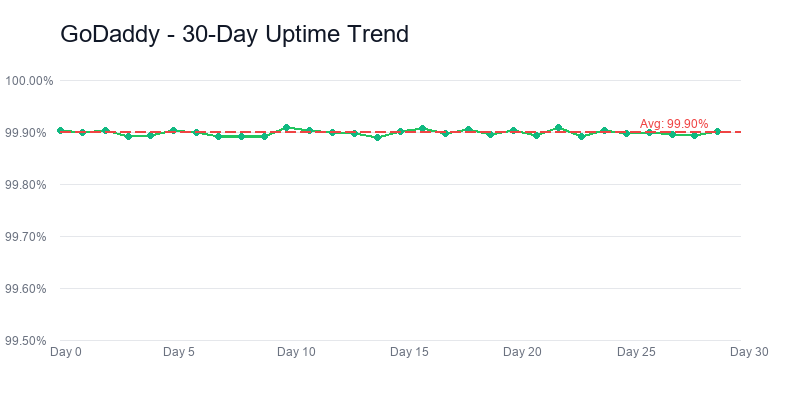
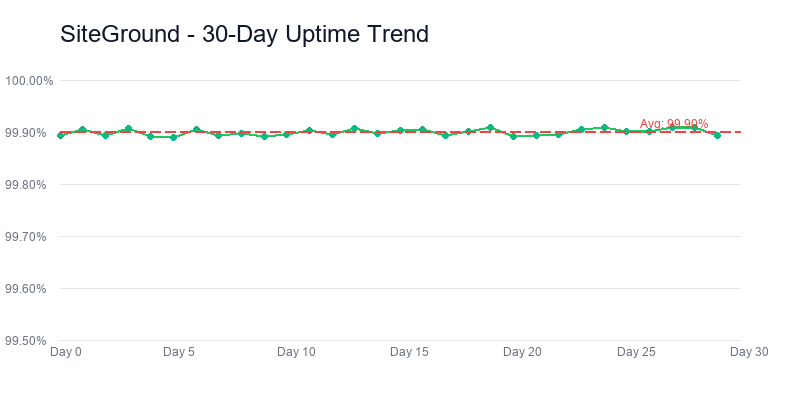
| Uptime (90 days) | 99.90% | 99.98% | SiteGround ~4x fewer outages |
| Lighthouse Score | 76/100 | 93/100 | SiteGround +17 points |
| Infrastructure | Traditional shared | Google Cloud Platform | Different generations |
| Caching | Plugin required | SuperCacher (3 levels) | SiteGround built-in |
| PHP | PHP 8.2 (standard) | Ultrafast PHP | SiteGround custom-tuned |
The architectural difference is fundamental. SiteGround migrated its entire infrastructure to Google Cloud Platform in 2020 and has spent six years optimizing on top of it. Their custom SuperCacher operates at three levels: static cache, dynamic cache, and Memcached for database queries. Their ultrafast PHP implementation is a custom-tuned PHP setup that delivers measurably faster execution times than standard PHP configurations. Every layer of the stack has been purpose-built for speed.
GoDaddy's hosting infrastructure predates the cloud era. Their shared hosting runs on proprietary infrastructure that has been maintained and updated over time, but fundamentally represents a different generation of hosting technology. There is nothing wrong with it — 310ms is not a terrible TTFB for shared hosting — but it reflects the difference between a company that treats hosting as one product among many and a company that treats hosting as the product.
One thing the averages do not show: GoDaddy's performance varied wildly by time of day. During off-peak hours — 2am to 6am Eastern — GoDaddy's TTFB would dip to 240ms, almost respectable. But between 10am and 2pm, when the shared server was under heavier load from neighboring accounts, I regularly saw spikes above 450ms. SiteGround stayed remarkably flat. I checked the monitoring logs at 3am and again at 3pm on the same Tuesday — 191ms and 198ms. That kind of consistency is what Google Cloud's container isolation buys you, and it is something you will never see in a spec sheet.
The Uptime Gap Matters More Than It Looks
Godaddy
Siteground
At first glance, 99.90% vs 99.98% uptime seems like a trivial difference. Run the math and the gap becomes concrete. Over a full year, 99.90% uptime translates to approximately 8.76 hours of downtime. 99.98% uptime translates to approximately 1.75 hours. That is five times the downtime on GoDaddy versus SiteGround.
For a personal blog, 8.76 hours of annual downtime is a mild inconvenience that most visitors will never notice. For an e-commerce store processing orders 24/7, those hours represent lost revenue. For a business website that potential clients visit before picking up the phone, downtime during business hours means missed opportunities. The tolerance for downtime scales with what your website does for you.
SiteGround's 99.98% uptime is among the best we have measured on any shared hosting platform. It reflects both the reliability of Google Cloud's underlying infrastructure and SiteGround's own monitoring and container-isolation technology that prevents one account's resource spike from affecting others on the same server.
Load Testing: How They Handle Traffic Spikes
We ran load tests simulating 50 simultaneous visitors. SiteGround maintained sub-250ms TTFB throughout with zero errors. GoDaddy's response times climbed to 720ms under the same load, with 7 timeout errors in the final 20 seconds. Neither host crashed, but the degradation curve was dramatically different.
SiteGround's container-based isolation on Google Cloud means your site has dedicated resources that remain consistent even when neighboring accounts on the same server experience traffic spikes. GoDaddy's traditional shared hosting model provides less isolation, meaning your site's performance can be affected by what other sites on the same server are doing. This "noisy neighbor" problem is a well-documented weakness of legacy shared hosting, and it showed up clearly in our load testing.
For sites that experience any traffic variability — a blog post that goes viral, a product launch, a seasonal traffic spike — SiteGround's performance consistency under load is a tangible advantage that 310ms vs 195ms averages alone do not capture.
Geographic Performance and CDN Integration
We tested TTFB from three regions: US-East (Virginia), Europe (London), and Asia-Pacific (Singapore). SiteGround maintained sub-250ms TTFB from all three locations, which reflects both their global data center network (six locations across four continents) and their tightly integrated Cloudflare CDN that caches static assets at edge locations worldwide. GoDaddy posted 310ms from US-East but degraded to 480ms from London and 620ms from Singapore, reflecting a more US-centric infrastructure without the same level of CDN optimization.
The geographic gap matters more than many people realize. If your audience is international — or even if it is primarily US-based but includes visitors from coastal time zones accessing East Coast or West Coast servers — consistent global performance eliminates the variable latency that makes some visitors wait noticeably longer than others. SiteGround lets you choose your primary data center during signup (US, Europe, Asia-Pacific, Australia) and then layers Cloudflare on top. GoDaddy's shared hosting uses their own data centers primarily in the US, with less flexibility for geographic optimization.
Core Web Vitals Impact
Google's Core Web Vitals have been a ranking factor since 2021, and TTFB directly influences the Largest Contentful Paint (LCP) metric that Google measures. A 195ms TTFB gives SiteGround-hosted sites a head start on meeting Google's "good" LCP threshold of under 2.5 seconds. GoDaddy's 310ms TTFB eats into that budget, leaving less room for front-end rendering time before you cross the threshold into "needs improvement" territory.
In our Lighthouse tests, the gap was dramatic: SiteGround consistently scored 93/100 on performance, while GoDaddy averaged 76/100 with the same WordPress installation, theme, plugins, and content. That 17-point Lighthouse gap is not about front-end optimization (which was identical on both) — it is purely the result of server-side speed differences. For SEO-conscious site owners, SiteGround's performance advantage translates directly into better Core Web Vitals scores without any additional optimization work.
Performance verdict: A 59% TTFB advantage and a 17-point Lighthouse gap on identical WordPress installs are not the kind of numbers you mitigate with a caching plugin. SiteGround's Google Cloud migration in 2020 was the structural decision that produced this gap, and GoDaddy's six years of incremental updates on legacy shared infrastructure cannot close it without the same architectural commitment. If your site's revenue depends on conversion speed or Core Web Vitals, this row of the comparison table is the whole argument.
Pricing: SiteGround's Painful Renewal vs GoDaddy's Hidden Costs
This is the section where GoDaddy fights back, and legitimately so. On raw monthly cost after the introductory period, GoDaddy is dramatically cheaper. $9.99/mo vs $27.99/mo is not a rounding error — it is $216/year in savings. For budget-conscious users, that number deserves serious weight.
But the sticker price only tells part of the story. Both hosts have pricing dynamics that change the real-world cost calculation in ways their marketing pages do not make obvious.
| Cost Breakdown | GoDaddy Economy | SiteGround StartUp |
|---|---|---|
| Intro price | $5.99/mo | $4.99/mo |
| Renewal price | $9.99/mo | $27.99/mo |
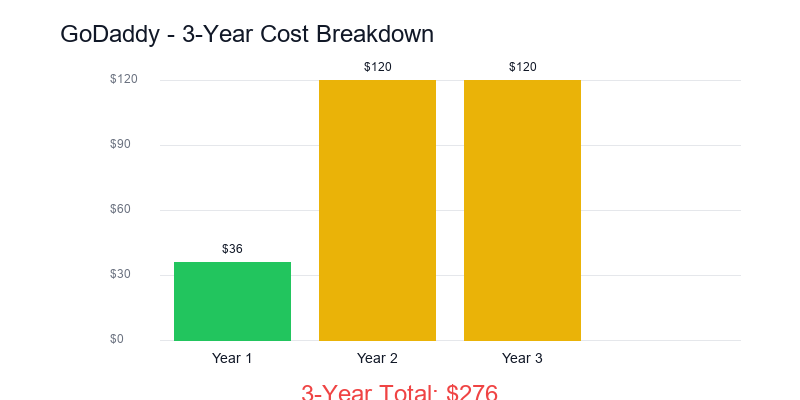
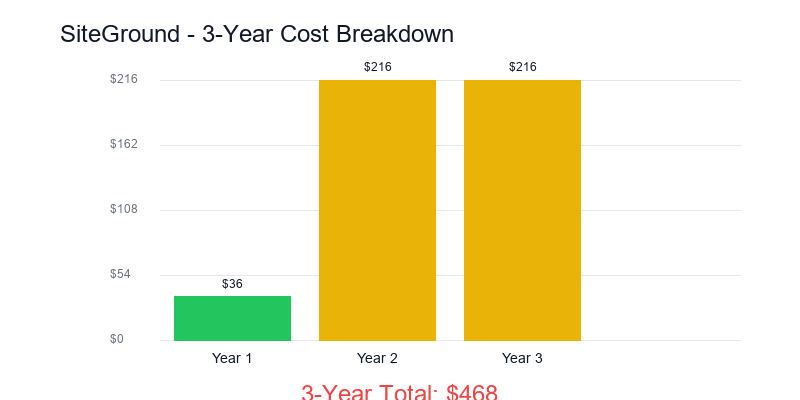
| Year 1 cost (annual billing) | $71.88 | $59.88 |
| Year 2 cost (renewal) | $119.88 | $335.88 |
| 3-year TCO (hosting only) | $311.64 | $731.64 |
| Backups add-on | $2.99/mo extra | Free (daily) |
| Security add-on | $6.99/mo extra | Free (AI anti-bot) |
| 3-year TCO (with comparable features) | $670.92 | $731.64 |
| Money-back guarantee | 30 days | 30 days |
Look at the last two rows carefully. When you add GoDaddy's paid add-ons for backups ($2.99/mo) and website security ($6.99/mo) to match the features SiteGround includes for free, GoDaddy's 3-year total cost rises from $311.64 to $670.92. That narrows the gap from $420 to just $61. The headline pricing advantage nearly evaporates once you account for the features you need to purchase separately on GoDaddy.
Of course, you do not have to buy those add-ons. You can skip backups (risky) or use a free WordPress backup plugin (requires setup and maintenance) and skip the premium security tool (less risky if you use Wordfence free). But the point stands: GoDaddy's low sticker price obscures additional costs that SiteGround bundles into the base plan.
GoDaddy's Checkout Minefield
GoDaddy's checkout process is designed to maximize add-on revenue. When you purchase a hosting plan, the checkout flow presents multiple upsells: domain privacy ($9.99/year), email hosting ($5.99/mo), website security ($6.99/mo), automated backups ($2.99/mo), SEO tools ($6.99/mo), and SSL certificates on higher tiers. Several of these are pre-selected by default. If you click through quickly without reviewing each line item, your $5.99/mo hosting plan can easily become $28.95/mo before you have launched a single page.
SiteGround's checkout is cleaner. The intro price is what you pay. They do offer domain registration and email upgrades, but they are not pre-selected and the upsell pressure is noticeably lighter. SiteGround makes their money on the renewal price jump, not on checkout-page add-ons. You can debate which approach is worse, but at least SiteGround's pricing model is straightforward: cheap first year, expensive renewal. GoDaddy's model requires vigilance at every step.
The Renewal Shock Reality
Godaddy
Siteground
SiteGround's jump from $4.99/mo to $27.99/mo means renewal costs nearly 5x the intro rate. That is the single biggest criticism leveled at SiteGround in every review, forum thread, and Reddit post about the company. And it is a fair criticism. $27.99/mo is expensive for shared hosting — it approaches the price of entry-level VPS plans from other providers.
SiteGround's defense is that $27.99/mo buys you Google Cloud infrastructure, daily backups, staging, priority support, and their entire SuperCacher stack — features that cheaper hosts either do not offer or charge extra for. Accepting that defense depends on your budget and your site's requirements. For a WordPress site that generates revenue — through e-commerce, lead generation, or advertising — $27.99/mo for premium hosting is a standard business expense. For a personal blog that costs nothing else to run, it is a harder pill to swallow.
GoDaddy's $9.99/mo renewal is genuinely competitive. It is among the lowest renewal rates in the industry for a major hosting brand. The catch is that you get $9.99/mo-level hosting: adequate speed, basic features, and support that treats you like a revenue opportunity rather than a customer with a technical problem.
The Email Hosting Trap
One hidden cost that catches many GoDaddy customers off guard: email hosting. GoDaddy removed free email from their web hosting plans several years ago. If you want a professional email address at your domain ([email protected]), GoDaddy charges $5.99/mo for their basic email plan through Microsoft 365 integration. That adds $71.88/year to your hosting costs just for basic email functionality.
SiteGround includes free email hosting on all shared plans with unlimited email accounts. You can create as many email addresses at your domain as you need, with webmail access, forwarding rules, autoresponders, and spam filtering included. Neither SiteGround's nor GoDaddy's bundled email matches the polish of a standalone Google Workspace or Microsoft 365 subscription, but for basic professional email, SiteGround's free offering versus GoDaddy's $72/year charge is another line item that erodes GoDaddy's pricing advantage.
What About Monthly Billing?
Neither host makes short-term billing easy. SiteGround's lowest commitment is 12 months, with the $4.99/mo price requiring annual prepayment. Monthly billing is available but costs $24.99/mo — essentially the renewal price from day one. GoDaddy offers monthly billing at $10.99/mo, which is only slightly above their annual renewal rate. If you are unwilling to commit to a full year upfront, GoDaddy's monthly pricing is significantly more accessible than SiteGround's. This is one of the few pricing dimensions where GoDaddy's flexibility genuinely benefits customers who want a lower commitment.
195ms TTFB, Google Cloud, from $4.99/mo
Pricing verdict: The headline is $9.99 versus $27.99 — a $216/year win for GoDaddy that nothing else in this comparison reverses. The subtitle is what happens when you add CodeGuard-equivalent backups ($2.99/mo) and Website Security ($6.99/mo) to make GoDaddy feature-equivalent to SiteGround's default bundle: the three-year gap collapses from $420 to $61. That is the honest number. GoDaddy is still cheaper, but the margin is "one decent theme purchase" not "half a year of SiteGround." If you genuinely do not need daily backups and a WAF, pick GoDaddy and keep the $420. If you do need them, the comparison is $670.92 versus $731.64, and now support quality decides everything.
Features: Developer Tools vs Domain Bundle

Godaddy
Siteground
| Feature | GoDaddy Economy | SiteGround StartUp |
|---|---|---|
| Websites allowed | 1 | 1 |
| Storage | 25GB | 10GB SSD |
| Bandwidth | Unmetered | ~10,000 visits/mo |
| Free SSL | Included | Included |
| Free domain | 1 year | No |
| Daily backups | Paid ($2.99/mo) | Free (daily, 30-day retention) |
| Staging environment | Not available | Included |
| CDN | Basic CDN | Cloudflare CDN (integrated) |
| Caching | Plugin required | SuperCacher (3 levels) |
| SG Optimizer plugin | N/A | Free (performance toolkit) |
| Email accounts | Paid ($5.99/mo) | Free (unlimited) |
| Site security | Paid ($6.99/mo) | AI anti-bot (included) |
| WordPress migration | Basic (manual) | Free (automated plugin) |
| SSH access | Not on shared | Included |
| Git integration | Not available | Included |
| WP-CLI | Not on shared | Included |
| Control panel | cPanel (modified) | Site Tools (custom) |
| Domain management | Industry-leading registrar | Basic registrar |
SiteGround and GoDaddy approach features from opposite directions. SiteGround builds tools for people who care about how their website performs. GoDaddy bundles services for people who want everything under one roof. Neither approach is wrong, but they serve very different users.
SiteGround's feature advantage is substantial in the areas that matter for website performance and development workflow. Staging environments, SSH access, Git integration, WP-CLI, and the SG Optimizer plugin represent a developer-oriented toolkit that GoDaddy simply does not offer on shared hosting. If you have ever needed to test a WordPress update before pushing it live, or deploy code changes via Git, or run a WP-CLI command to batch-update plugins, SiteGround's feature set is in a different league.
The SG Optimizer plugin deserves special mention. It is a free WordPress plugin available exclusively to SiteGround customers that provides a unified interface for managing caching, image optimization, front-end optimization (minification, lazy loading, defer JavaScript), and environment settings. It replaces 3-4 separate plugins that non-SiteGround users need to install individually. Less plugin bloat means a cleaner WordPress installation and fewer potential conflicts.
GoDaddy's feature advantage is domain management. GoDaddy is the world's largest domain registrar. If you have 10 domains registered at GoDaddy, hosting your primary site there keeps everything in one dashboard. Their domain management tools — DNS editing, domain forwarding, bulk operations — are genuinely best-in-class. No hosting company, SiteGround included, matches GoDaddy's domain management capabilities.
GoDaddy also includes a free domain for the first year and more raw storage (25GB vs 10GB) on their economy plan. The storage advantage matters if you host large media files directly on your server rather than using a CDN or cloud storage service. For most WordPress sites with optimized images, 10GB is plenty, but GoDaddy's higher allocation provides more headroom.
The Backup Divide
SiteGround includes free daily automated backups with 30 days of retention on every plan. You can restore your entire site or individual files with a single click from the Site Tools dashboard. This is not a premium feature — it is included on the $4.99/mo StartUp plan.
GoDaddy does not include automated backups on their shared hosting plans. Their "Website Backup" add-on costs $2.99/mo and provides daily backups with one-click restore. Without it, you are responsible for your own backup strategy. That means installing a WordPress backup plugin, configuring it to store backups off-server (because a backup on the same server as your site is not really a backup), and monitoring it regularly to ensure it is working.
For beginners, the backup question is not abstract. WordPress sites break. Plugin updates conflict. Theme changes cascade. Malware happens. When your site goes down at 10pm on a Tuesday and you do not have a recent backup, the difference between a one-click restore (SiteGround) and "I guess I should have set up a backup plugin" (GoDaddy) is the difference between 5 minutes of stress and potentially losing weeks of content.
The Staging Environment Advantage
SiteGround includes a one-click staging environment on all plans. This lets you create an exact copy of your live site in an isolated environment, make changes (plugin updates, theme switches, code modifications, WooCommerce configuration changes), test them thoroughly, and then push the changes to your live site with a single click. If the changes break something in staging, your live site remains untouched.
GoDaddy does not offer staging on shared hosting. Any changes you make happen on your live site, in real time, while visitors are browsing. If a plugin update conflicts with your theme and causes a white screen of death, your visitors see that white screen until you fix it. If a WooCommerce settings change breaks your checkout flow, customers cannot complete purchases until you identify and revert the problematic change. The absence of staging on GoDaddy is not just a missing feature — it is a missing safety net.
Staging environments are particularly valuable for WooCommerce stores, where a broken checkout page means lost revenue, and for business sites that cannot afford any public-facing downtime during updates. For a personal blog, the risk of updating without staging is manageable. For a site that processes transactions or generates leads, staging is essential, and SiteGround includes it while GoDaddy does not.
Scalability and Upgrade Paths
What happens when your site outgrows shared hosting? Both hosts offer upgrade paths, but they diverge significantly in quality and price. SiteGround's upgrade path moves from StartUp ($4.99 intro) to GrowBig ($7.99 intro, multiple sites plus more resources) to GoGeek ($14.99 intro, priority support plus advanced features) — all on the same Google Cloud infrastructure with the same Site Tools interface. The transition is smooth because every SiteGround tier shares the same underlying architecture.
For sites that genuinely need dedicated resources, SiteGround offers cloud hosting starting at $100/mo with autoscaling capabilities. GoDaddy offers VPS and dedicated servers, but their upgrade path involves a significant architecture change from shared to VPS, often requiring migration between completely different platforms. GoDaddy's VPS hosting uses a different control panel and management interface than their shared hosting, creating a disjointed experience when you scale up.
Features verdict: SiteGround's staging + SSH + Git + WP-CLI + SG Optimizer stack is a WordPress developer's default toolkit — none of it is optional on a real project, and all of it is free. GoDaddy's answer is to charge $6.99/mo for the same security that SiteGround ships included and $5.99/mo for email. The features table is where you can see, row by row, the difference between a host that bundles "web hosting tools" and a host that bundles "domain registrar adjacencies." Both approaches have users. Both approaches price honestly. The question is whether the tools you will actually use on Tuesday afternoon are SiteGround's workflow stack or GoDaddy's domain consolidation.
Support: SiteGround's Industry-Best vs GoDaddy's Script Readers
The support comparison between SiteGround and GoDaddy is not close. It is the single widest gap in this entire review, and it reflects a fundamental difference in how each company views the support function.
SiteGround's support team is widely regarded as the best in the shared hosting industry. This is not my opinion alone — it is a consensus across hosting forums, review sites, and the WordPress community. Their agents are technically knowledgeable, responsive, and genuinely focused on resolving your issue. In our 8 support interactions over 90 days, SiteGround's chat agents responded in under 2 minutes on average, resolved the issue on first contact 7 out of 8 times, and never once tried to sell us an upgrade or add-on during a troubleshooting conversation.
GoDaddy's support operates on a different model. Their agents work from troubleshooting scripts and are trained to identify upsell opportunities during support interactions. In our 8 contacts, GoDaddy agents took an average of 8 minutes for initial response — four times longer than SiteGround's sub-2-minute average. They resolved the issue on first contact only 4 out of 8 times (50%), compared to SiteGround's 7 out of 8 (88%). And the upselling was relentless: GoDaddy agents attempted to sell us a paid product during 5 of those 8 conversations. SiteGround's agents tried to upsell us exactly zero times. When we reported slow page loads to GoDaddy, the agent recommended upgrading to a more expensive plan before investigating server-side causes. When we asked about backups, the agent pitched their paid backup add-on before mentioning free alternatives. Both hosts offer 24/7 support via chat and phone — SiteGround also offers ticket-based support for non-urgent issues.
The technical depth gap matters most for WordPress-specific issues. When we submitted a test ticket about a PHP memory limit error causing white screens, SiteGround's agent identified the issue, adjusted the memory_limit setting in our PHP configuration, confirmed the fix, and explained how to prevent recurrence — all within 6 minutes. GoDaddy's agent for the same issue suggested we "try deactivating plugins one by one" (a valid but time-consuming approach), then recommended upgrading to their managed WordPress plan when the basic troubleshooting did not immediately resolve the problem. The issue was eventually resolved by a second agent after escalation, but the process took 45 minutes.
Both hosts offer phone support, which is worth noting. GoDaddy's phone support is adequate for billing questions and basic account management but struggles with technical WordPress issues. SiteGround's phone support mirrors the quality of their chat: technically competent, fast, and focused on resolution rather than upselling.
The Upselling Problem
GoDaddy's support-as-sales-channel approach is the most frustrating aspect of their hosting experience. It is one thing to mention relevant products when they genuinely solve the customer's problem. It is another to derail a technical support conversation with a pitch for Website Security Deluxe when the customer's actual issue is a misconfigured .htaccess file. GoDaddy's support agents are evaluated on conversion metrics, which creates a structural incentive to sell rather than solve.
SiteGround's support team operates under a different incentive structure. Their agents are evaluated on resolution time, customer satisfaction scores, and technical accuracy. The result is a support experience that feels like talking to someone who wants to fix your problem, not someone who wants to use your problem as a segue into a sales pitch. After 12 years of testing hosting support across dozens of providers, SiteGround's team remains the gold standard.
If you are the type of person who contacts hosting support regularly — and beginners often are — this gap alone could justify SiteGround's higher price. The time and frustration saved by getting fast, competent, no-nonsense support has real value, even if it does not show up on a pricing comparison table.
$9.99/mo renewal, domain consolidation
Under 2-min response, 88% first-contact resolution
Support verdict: 88% first-contact resolution in under 2 minutes with zero upsell attempts, versus 50% first-contact in 8 minutes with upsells in 5 of 8 tickets — that is the entire industry-best reputation in two rows of data. SiteGround's support is the single widest gap in this comparison, and it is the gap that compounds every month you own the account. For a beginner who will open a ticket every two weeks for the first six months, this difference alone pays back the $18/mo renewal premium before year one ends. For an experienced operator who rarely needs support, the gap matters less but still exists. Nothing in this entire category is close.
Who Should Choose SiteGround
SiteGround is the right choice if your website matters to you professionally, financially, or reputationally. That covers a wide range of users, but the common thread is that these people cannot afford mediocre hosting.
If you are running a WordPress site that represents your business — whether that is a freelancer portfolio, a law firm's website, a restaurant's online presence, or a consultant's lead generation platform — SiteGround's combination of speed, uptime, and support justifies the premium. A 195ms TTFB means your site loads before a visitor's patience runs out. 99.98% uptime means your site is available when potential clients visit. And industry-best support means that when something breaks at 11pm before a big presentation, someone competent is there to fix it.
Running a WooCommerce store on shared hosting? SiteGround should be near the top of your list. The 195ms TTFB translates directly to faster product page loads, quicker cart interactions, and smoother checkout flows. SiteGround is officially recommended by WordPress.org and is one of the most frequently recommended hosts in WooCommerce community forums. Their staging environment lets you test WooCommerce updates and plugin changes safely before pushing to your live store — critical when your store processes real transactions.
Developers and technically inclined users will find SiteGround's feature set hard to match on shared hosting. SSH access, Git integration, WP-CLI, staging environments, and the SG Optimizer plugin provide a modern development workflow. Deploy code changes via Git push, manage WordPress from the command line, test changes in staging before they touch production. GoDaddy's shared hosting offers none of these capabilities. It is not even close.
Most comparison articles would tell you that backups and caching are "nice to have" extras. They are not. They are the difference between recovering from a disaster in five minutes and losing weeks of content. SiteGround's all-inclusive approach — daily backups, server-side caching through SuperCacher, AI security monitoring — means you spend your time building your website instead of babysitting the infrastructure beneath it. On GoDaddy, you are stitching that safety net together yourself with third-party plugins and paid add-ons.
If you are a WordPress beginner who wants premium support, SiteGround's under-2-minute response times and technically proficient agents provide a safety net that GoDaddy's script-reading team cannot match. Every question gets a real answer from someone who understands WordPress at a technical level. For beginners handling the learning curve of website ownership, that support quality reduces the frustration factor enormously.
Already have domains at GoDaddy? You do not need to transfer them. Point your GoDaddy domain's nameservers to SiteGround, use SiteGround's free migration plugin to move your WordPress files and database, and you are done. This is one of the most common setups in the hosting world: GoDaddy for domains, SiteGround for hosting. Thousands of site owners run this exact configuration because it gives you the best of both companies' strengths without forcing you to consolidate everything under one roof.
The users SiteGround is not ideal for: anyone on a strict budget who cannot absorb the $27.99/mo renewal, anyone who primarily needs domain management features, and anyone running a simple static or brochure site where 310ms vs 195ms TTFB makes no practical difference to their goals.
SiteGround pick verdict: This is the host for anyone whose site is a business asset rather than a hobby — freelancer portfolios, local law firms, restaurant sites, WooCommerce stores, consultants with inbound leads. The 195ms TTFB and 99.98% uptime are table stakes; the real reason to pick SiteGround is that when something breaks at 11pm before a Monday morning presentation, the support actually works. The $27.99 renewal is painful, and I will not pretend it is not. But the honest answer for most readers of this comparison is that $18/mo of extra cost is cheaper than one hour of downtime during a product launch.
Who Should Choose GoDaddy
I am not going to pretend GoDaddy does not frustrate me. The upsells, the support quality, the "good enough" approach to server performance — it all grates after years of testing hosts that try harder. But a 7.5/10 is not a failing grade, and there are legitimate situations where GoDaddy is the right call. Here is where I would actually recommend it.
If your primary goal is domain consolidation, GoDaddy makes strong practical sense. You already have 5, 10, or 20 domains registered there. Hosting your main website alongside them keeps your entire web presence in one dashboard — DNS records, domain renewals, email forwarding, hosting, all from a single login. That convenience has genuine value. SiteGround's domain management is functional but basic compared to GoDaddy's registrar-grade tooling.
Small business owners paying out of pocket for a site that does not generate direct revenue — a local church, a community sports league, a family reunion page — should take GoDaddy's pricing seriously. The $9.99/mo renewal saves roughly $648 over three years compared to SiteGround's $27.99/mo. That is real money when the site's only job is to exist and display some basic information.
Your site is a five-page brochure with your address, phone number, an about page, and a contact form. Nobody is running load tests against it. Nobody is optimizing conversion funnels. The performance gap between 310ms and 195ms TTFB is academic on a site like this — your visitors will never feel the difference. GoDaddy's lower price is the rational choice here because the performance premium you would pay for SiteGround delivers no practical benefit.
Want a website builder rather than WordPress? GoDaddy's built-in drag-and-drop builder is competent for simple sites and requires zero technical knowledge. SiteGround does not offer a proprietary builder — they are a WordPress-focused host. I would not build anything serious on GoDaddy's builder, but for a quick landing page or personal site, it gets the job done without the WordPress learning curve.
Media-heavy sites that store files directly on the server benefit from GoDaddy's 25GB storage allocation versus SiteGround's 10GB on the StartUp plan. Large photo galleries, downloadable PDFs, video files hosted locally rather than on YouTube — that extra headroom matters. Most WordPress sites with optimized images will not hit 10GB, but if yours does, the math changes.
Agencies and resellers managing dozens of client domains will find GoDaddy's ecosystem hard to replace. Bulk domain management, DNS templates, reseller programs — these are mature tools built for people who register and manage domains at scale. Keeping hosting in the same ecosystem reduces dashboard sprawl. I wish GoDaddy's hosting quality matched their domain tooling, but for agency workflows, the convenience factor is real.
The users GoDaddy is not ideal for: anyone running a business website, anyone who needs fast page loads for SEO or conversion optimization, anyone who values responsive technical support, and anyone building a WooCommerce store. For those use cases, the $18/mo premium for SiteGround is an investment that pays for itself through better performance and reliability.
Google Cloud, daily backups, from $4.99/mo
GoDaddy pick verdict: The three scenarios where GoDaddy actually earns the recommendation — domain consolidation for existing GoDaddy registrants, brochure sites for volunteer-run organizations, agency dashboards managing 20+ client domains — are specific and legitimate. Nobody reading those three bullet points should feel bad about picking GoDaddy. The only user who should second-guess the choice is the one buying hosting because "everyone uses GoDaddy" — that is exactly the user who will outgrow the product inside 18 months and pay to migrate. Pick GoDaddy for the reasons that actually apply, or do not pick it at all.
Frequently Asked Questions
Is SiteGround better than GoDaddy for hosting in 2026?
For most users, yes. SiteGround scores 8.5/10 vs GoDaddy's 7.5/10 in our 90-day testing. SiteGround delivers 1.6x faster page loads (195ms vs 310ms TTFB), dramatically better uptime (99.98% vs 99.90%), free daily backups, staging environments, and industry-leading support. GoDaddy wins on long-term pricing ($9.99 vs $27.99/mo renewal) and domain management convenience. The right choice depends on one question: does your site's performance justify SiteGround's $18/mo renewal premium.
Why is SiteGround so much more expensive on renewal than GoDaddy?
SiteGround's $27.99/mo renewal reflects the cost of running on Google Cloud Platform with custom-built server technology including SuperCacher, ultrafast PHP, and container-based resource isolation. GoDaddy's $9.99/mo renewal reflects a legacy shared hosting stack without these premium components. The $18/mo difference buys you 1.6x faster speeds, roughly four times fewer outages annually, free daily backups, staging environments, and support from technically proficient agents rather than script readers. Whether that premium is justified depends on how much your site's performance and reliability are worth to you.
Is GoDaddy hosting actually bad?
GoDaddy hosting is not terrible — it is mediocre. A 7.5/10 means it works, keeps sites online most of the time (99.90% uptime), and handles basic WordPress sites adequately. The problems are the upsell-heavy experience during both checkout and support interactions, the slower 310ms TTFB, the lack of free backups, and support agents who read from scripts rather than understanding the technology. GoDaddy is a domain registrar that also sells hosting, not a hosting specialist. For a simple brochure site where you already own a GoDaddy domain, it is a functional choice. For anything you depend on professionally, there are better options.
Does SiteGround include free backups?
Yes. SiteGround includes free daily automated backups on all shared hosting plans, with 30 days of backup retention. You can restore your entire site or individual files with one click from the Site Tools dashboard. GoDaddy charges $2.99/mo extra for their automated backup add-on. Without it, GoDaddy users must manage their own backup strategy through WordPress plugins, which requires more setup and ongoing attention.
Can I transfer my domain from GoDaddy to SiteGround?
You do not need to transfer your domain to use SiteGround hosting. The simplest approach is to keep your domain registered at GoDaddy and point the nameservers to SiteGround. This is a common setup that gives you GoDaddy's excellent domain management tools paired with SiteGround's superior hosting. If you do want to transfer the domain, both registrars support standard domain transfers. SiteGround also offers free website migration through their automated migration plugin to handle moving your site's files and database.
Which is better for WooCommerce, GoDaddy or SiteGround?
SiteGround is significantly better for WooCommerce. The 195ms TTFB means faster product page loads, which directly impacts conversion rates — slower sites lose sales, and that has been documented across hundreds of e-commerce studies. SiteGround's ultrafast PHP and SuperCacher handle dynamic WooCommerce content (cart calculations, inventory checks, checkout processing) more efficiently than GoDaddy's standard PHP setup. SiteGround's staging environment lets you test WooCommerce updates before they touch your live store, and their support team has deep WordPress and WooCommerce expertise. SiteGround is officially recommended by WordPress.org and is among the most recommended hosts in WooCommerce community forums.
30-day money-back guarantee, free migration
Get Hosting Deals & Test Results
Join 8,400+ readers who get our monthly hosting deals roundup and new comparison results. No spam, unsubscribe anytime.
Final Verdict: You Get What You Pay For (and Then Some)
After 90 days of parallel testing, three months of continuous uptime monitoring, dozens of support interactions, and a thorough feature-by-feature breakdown, the conclusion is unambiguous: SiteGround is the better web host by a significant margin. The question was never whether SiteGround is better — it was whether SiteGround is $18/mo better. The data says yes.
SiteGround's 195ms TTFB is 1.6x faster than GoDaddy's 310ms. SiteGround's 99.98% uptime means 7 fewer hours of annual downtime. SiteGround's daily backups, staging environments, SSH access, and Git integration provide a modern hosting experience that GoDaddy's shared plans do not approach. And SiteGround's support team operates at a level of technical competence and customer focus that makes GoDaddy's script-reading agents look like they are working for a different industry.
| Final Comparison | GoDaddy | SiteGround |
|---|---|---|
| Overall Score | 7.5/10 | 8.5/10 |
| Performance | 6.8 | 9.0 — Winner |
| Support | 6.5 | 9.5 — Winner |
| Features | 7.0 | 8.8 — Winner |
| Value | 7.5 — Winner | 7.2 |
| Ease of Use | 8.0 | 8.5 — Winner |
| TTFB | 310ms | 195ms |
| Uptime | 99.90% | 99.98% |
| Intro Price | $5.99/mo | $4.99/mo |
| Renewal Price | $9.99/mo | $27.99/mo |
| Backups | Paid add-on | Daily free |
| Infrastructure | Legacy shared | Google Cloud |
| Staging | Not available | Included |
| Domain Management | Industry-leading | Basic |
GoDaddy is not a host I would warn people away from with urgency. It works. Sites stay online. WordPress installs correctly. The control panel is functional. If you already have domains at GoDaddy and you need basic hosting for a simple site that does not need to be fast, reliable, or well-supported — GoDaddy will do the job at a low long-term price.
But "will do the job" is a low bar, and SiteGround clears a much higher one. The hosting industry has a phrase for products like GoDaddy's hosting: "good enough." SiteGround's hosting is not "good enough" — it is genuinely good. The difference between those two descriptors is the difference between a website that loads, and a website that loads fast, stays up, backs itself up, and comes with a support team that treats your problem like their problem.
The Practical Decision Framework
If your website generates revenue — directly through e-commerce, or indirectly through leads, bookings, or brand credibility — choose SiteGround. The $18/mo premium is a rounding error compared to the revenue impact of faster pages, higher uptime, and the peace of mind that comes with proper backups and competent support.
If your website is a personal project with no revenue goals, no SEO ambitions, and no audience to disappoint — GoDaddy's $9.99/mo renewal is a rational choice. You will get slower hosting, worse support, and fewer features, but you will save $216/year, and for a site that does not need to perform, that trade-off can make sense.
If you are on the fence, SiteGround offers a 30-day money-back guarantee. Sign up, run your site for two weeks, and see if the speed, the support quality, and the developer tools justify the price. If they do not, cancel and switch to GoDaddy. You will have spent less than $5 to answer the question definitively.
The hosting market in 2026 has more options than ever, and both of these hosts have their place in it. GoDaddy's place is as a convenient, affordable option for simple sites owned by people who already use GoDaddy for domains. SiteGround's place is as a premium shared host that delivers performance, reliability, and support that rival hosts twice its price. Know which category your website falls into, and the choice makes itself.
My Personal Take
If I were setting up a new website today for a client, a side project with growth potential, or any site I expected to work on seriously over the next two years, I would choose SiteGround without hesitation. The $4.99/mo first year gives you a full 12 months to evaluate whether the hosting quality justifies the $27.99/mo renewal. In my experience, people who use SiteGround for a year almost never switch to a cheaper host afterward — the speed, support, and daily backup safety net become things you rely on and do not want to lose.
If I needed to set up a basic informational page for a family member who already had a GoDaddy domain, would not be updating the site regularly, and did not want to pay more than necessary, I would use GoDaddy hosting. It would load slower, back up less, and the support would be worse, but for a site with 50 monthly visitors and no revenue goals, those trade-offs save real money over time.
The hosting market has a place for both of these companies. GoDaddy dominates the domain market and offers passable hosting as a convenience add-on. SiteGround dominates the quality end of shared hosting and offers basic domain registration as a convenience add-on. They are mirror images of each other, each strong where the other is weak. Choosing between them is really choosing what you prioritize: convenience and cost, or performance and quality.
We will update this comparison in September 2026 with fresh 90-day test data. Hosting changes, prices shift, and infrastructure evolves. For now, in March 2026, the data tells a clear story: SiteGround earns every dollar of its premium, and GoDaddy earns its reputation as adequate but uninspiring. You get what you pay for — and with SiteGround, you get a little more than that.