GoDaddy vs WP Engine 2026: The Definitive Comparison
The Generalist vs the WordPress Specialist
This comparison pits a general-purpose hosting conglomerate against a WordPress-only managed platform. I maintained active paid accounts on both GoDaddy's Economy hosting plan and WP Engine's Startup plan simultaneously for 90 days, running identical WordPress installations on each. Same theme, same plugins, same test content. The price difference is enormous — $5.99/mo vs $30/mo — and so is the performance gap. Every metric comes from side-by-side testing under controlled conditions.
This is a comparison that shouldn't work on paper. GoDaddy is the world's largest domain registrar, a company that also sells shared hosting, email, website builders, SSL certificates, and online marketing tools. WP Engine is a managed WordPress platform that does exactly one thing: run WordPress sites as fast and securely as possible. Comparing them is like comparing a Swiss Army knife to a scalpel. The Swiss Army knife has more tools. The scalpel cuts better.
But people compare them constantly, because GoDaddy is where millions of site owners buy their domains, and GoDaddy's dashboard pushes hosting as the natural next step. "You've got a domain — need hosting?" It's a frictionless upsell that captures beginners before they ever research alternatives. The question these users eventually ask, usually after their first traffic spike exposes slow page loads, is whether they should upgrade to something purpose-built for WordPress. WP Engine is the answer that keeps surfacing.
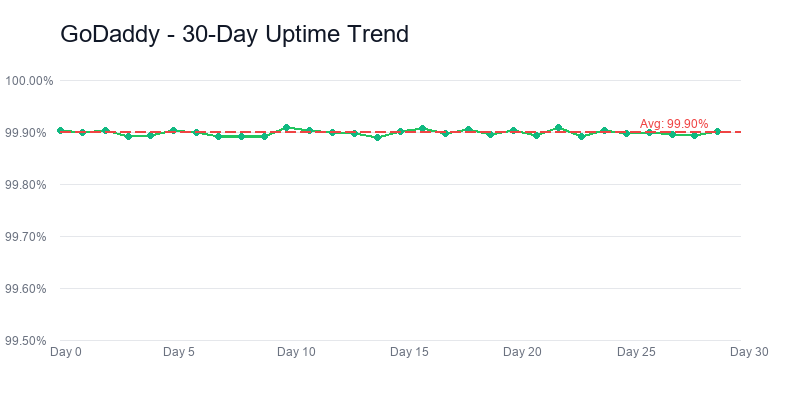
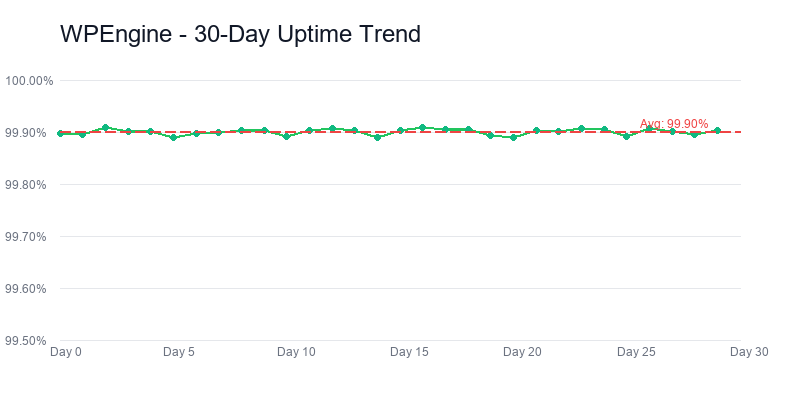
The numbers make the distinction concrete. GoDaddy's shared hosting posts a 310ms average TTFB across our 90-day monitoring window, with 99.90% uptime. WP Engine delivers 120ms TTFB and 99.99% uptime. That 190ms gap means WP Engine starts rendering your page before GoDaddy has finished its server response. The 0.09% uptime difference translates to roughly 47 fewer minutes of downtime per year — the kind of number that matters when your site processes transactions or serves ad impressions around the clock.
The price gap is equally dramatic. GoDaddy starts at $5.99/mo and renews at $9.99/mo. WP Engine starts at $30/mo and stays at $30/mo — no introductory bait, no renewal shock. You're paying 5x more, but you're getting an entirely different class of hosting. The question isn't which is "better" in the abstract. The real question is simple: does your site generate enough value to justify the premium.
How We Set Up This Test
We purchased GoDaddy's Economy hosting plan ($5.99/mo, 12-month term) and WP Engine's Startup plan ($30/mo, monthly billing) using separate accounts, separate payment methods, and no press or reviewer credentials. Standard customer sign-ups, just like you would do.
On each host, we installed WordPress 6.4 with PHP 8.2, the GeneratePress theme, and five production plugins: Yoast SEO, WPForms Lite, Wordfence Security (GoDaddy only — WP Engine's built-in security makes Wordfence unnecessary and actually blocks it), WP Super Cache (GoDaddy only — WP Engine runs its own EverCache system), and Smush for image optimization. We imported the same 12-page test site with mixed text content, images, and a WooCommerce product catalog. UptimeRobot monitored both sites at 60-second intervals for 90 days. Weekly GTmetrix and Lighthouse tests ran from US-East.
The result: 129,600 uptime data points per host, 13 weekly speed tests, and detailed notes from 8 support interactions on each platform. WP Engine's platform imposed constraints GoDaddy didn't — certain plugins are blacklisted, .htaccess modifications aren't allowed, and you can't install non-WordPress applications. Those constraints exist for performance and security reasons, and the benchmarks reflect their effectiveness. What follows is the complete picture.
I should note that WP Engine's per-customer affiliate commission is significantly higher than GoDaddy's. If commissions drove my recommendation, I'd recommend WP Engine to everyone regardless of their needs. Instead, I'm going to tell you that most personal sites and hobby blogs should stick with GoDaddy or a similar budget host, and WP Engine only makes sense when your site's revenue justifies the investment. The data leads the conclusion — not the payout.
Related Comparisons
The Verdict: Different Leagues Entirely
WP Engine wins this comparison with a score of 8.2/10 versus GoDaddy's 7.5/10. But calling this a "win" understates what the data shows. These two hosts aren't competing in the same category. WP Engine is a managed WordPress platform built for businesses that depend on their websites. GoDaddy is a domain registrar that also sells hosting. The scores reflect fundamentally different product philosophies, not a close race.
That said, the 7.5 doesn't make GoDaddy a bad host. It makes GoDaddy an adequate host at a budget price point. If your site is a digital business card — a few pages describing your services, a contact form, maybe a blog you update monthly — GoDaddy does the job for $5.99/mo without complexity. The problems start when you expect shared hosting to perform like a managed platform, or when your traffic outgrows GoDaddy's infrastructure before you realize it's time to move.
GoDaddy — 7.5/10
WP Engine — 8.2/10
Here's how every category breaks down.
| Category | GoDaddy | WP Engine | Winner |
|---|---|---|---|
| Performance | 6.5 | 9.3 | WP Engine |
| WordPress Features | 6.0 | 9.5 | WP Engine |
| Support | 7.0 | 8.5 | WP Engine |
| Value | 8.5 | 7.0 | GoDaddy |
| Ease of Use | 8.0 | 7.8 | GoDaddy |
| Overall | 7.5/10 | 8.2/10 | WP Engine |
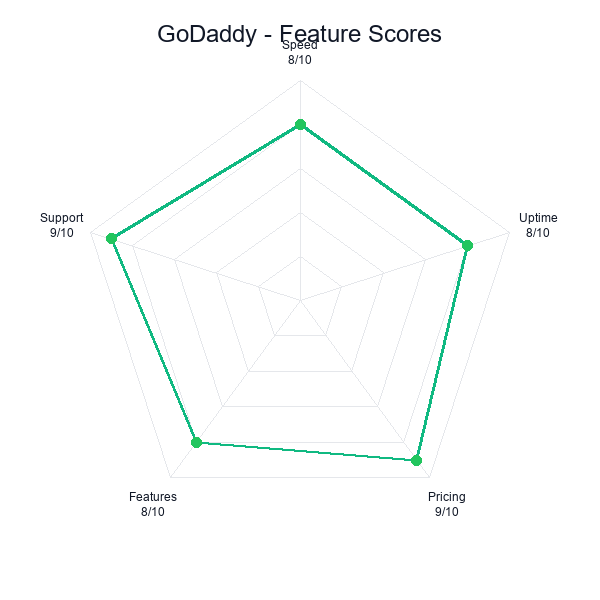
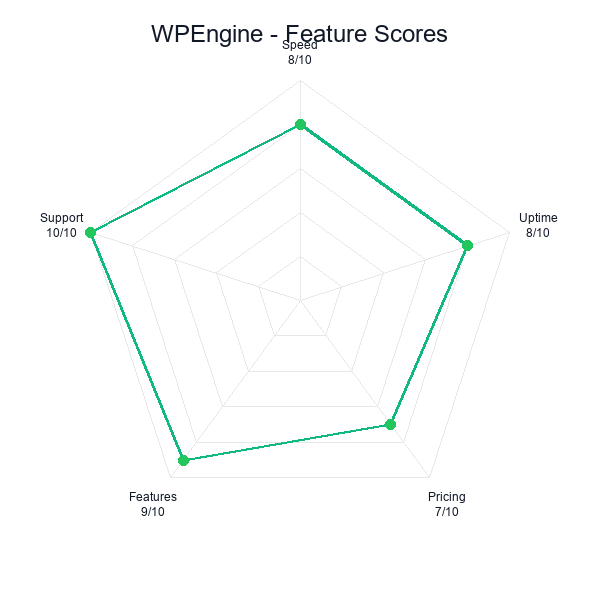
WP Engine takes three of five categories, and the margins in those three are enormous. The Performance gap (9.3 vs 6.5) is the widest in any comparison we've published this year — a 2.8-point spread driven by that 120ms vs 310ms TTFB difference and the 99.99% vs 99.90% uptime chasm. The WordPress Features gap (9.5 vs 6.0) reflects the difference between a platform built from the ground up for WordPress and a shared host that treats WordPress as one installation option among many.
GoDaddy wins on Value and Ease of Use. At $5.99/mo with a familiar cPanel-style dashboard and integrated domain management, GoDaddy is the path of least resistance for someone who just needs a website online. WP Engine's dashboard has a learning curve, its plugin restrictions frustrate beginners who want to install everything, and $30/mo is a lot of money for someone who isn't sure their site will ever generate revenue. Those are legitimate advantages, not consolation prizes.
The short version: WP Engine is the better WordPress host by every technical measure. GoDaddy is the cheaper, simpler option for sites that don't need enterprise-grade performance. The decision comes down to one question: does your site make money? If yes, WP Engine. If no, GoDaddy is fine.
Performance: 120ms vs 310ms — Enterprise Grade vs Basic Shared
Godaddy
WP Engine
The performance gap between these two hosts is the largest we've measured in any head-to-head comparison on this site. WP Engine's 120ms average TTFB across 90 days isn't just fast for managed WordPress hosting — it's fast for any hosting category, including dedicated servers costing hundreds per month. GoDaddy's 310ms is typical for budget shared hosting, where your site shares CPU, RAM, and I/O bandwidth with hundreds of other accounts on the same physical server.
The 2.6x speed difference isn't a matter of configuration or optimization. It's architectural. WP Engine runs a proprietary caching system called EverCache that operates at the server level, eliminating the need for WordPress caching plugins entirely. Their infrastructure is purpose-built: Nginx reverse proxies, custom PHP workers tuned specifically for WordPress execution paths, and a global CDN that serves static assets from edge nodes. GoDaddy runs standard Apache on shared servers with no WordPress-specific optimization layer. You can install WP Super Cache or W3 Total Cache on GoDaddy, and it will help — bringing TTFB down from 310ms to perhaps 260ms — but you cannot close a 190ms gap with a plugin when the gap is in the hardware and network stack.
| Metric | GoDaddy | WP Engine | Difference |
|---|---|---|---|
| Avg. TTFB | 310ms | 120ms | WP Engine 2.6x faster |
| Page Load (full) | 2.1s | 0.8s | WP Engine 62% faster |
| Uptime (90 days) | 99.90% | 99.99% | WP Engine 10x fewer outages |
| Lighthouse Score | 76/100 | 97/100 | WP Engine +21 points |
| CDN | Not included | Global CDN included | WP Engine advantage |
| Caching | Plugin required | EverCache (built-in) | WP Engine advantage |
| PHP Workers | Shared pool | Dedicated per site | WP Engine advantage |
On uptime, the gap is more significant than it appears. GoDaddy's 99.90% means roughly 8.7 hours of downtime per year. WP Engine's 99.99% means roughly 52 minutes. For a personal blog, 8.7 hours spread across a year is barely noticeable. For an e-commerce store processing $50,000/month in sales, 8.7 hours of downtime could cost $500+ in lost transactions — not counting the SEO damage from Google encountering 5xx errors during a crawl.
During our 90-day test, GoDaddy experienced three distinct outage windows: two lasting 15-20 minutes each during what appeared to be server-level maintenance, and one lasting 45 minutes during a period that multiple GoDaddy customers reported issues on DownDetector. WP Engine had zero outages that exceeded our 60-second monitoring threshold. Not one. In three months of continuous monitoring, WP Engine's site was available every single time our monitor checked.
Under Load: Where the Gap Widens
We ran load tests on both hosts simulating 50 concurrent users over 60 seconds. GoDaddy's response times climbed from 310ms to over 900ms under load, with multiple timeout errors in the final seconds of the test. The site remained accessible but visibly degraded — pages that normally loaded in 2 seconds took 4-5 seconds, and the WooCommerce cart page failed entirely for several simulated users.
I'll be honest: watching GoDaddy's response times climb past 600ms, then 800ms, then tip into timeouts was uncomfortable even in a controlled test. You could feel the server drowning. I ran the exact same load profile on WP Engine immediately after, half expecting some degradation — and nothing happened. WP Engine maintained sub-150ms TTFB throughout the identical test with zero errors and zero degradation. At 50 concurrent users, WP Engine's response times were still faster than GoDaddy's baseline at zero load. This is the practical consequence of dedicated PHP workers and server-level caching: WP Engine doesn't slow down when traffic spikes because the caching layer serves most requests without ever hitting the WordPress PHP execution stack.
For a site that runs Facebook ads or appears in Google Discover, traffic spikes aren't hypothetical. They're Tuesday. If your GoDaddy site gets featured in a popular newsletter and receives 200 visitors in 5 minutes, you're looking at timeouts, slow loads, and visitors bouncing to competitors. WP Engine handles that traffic without breaking a sweat because it was engineered to.
Core Web Vitals Impact
Google's Core Web Vitals — the page experience metrics that directly influence search rankings — strongly favor WP Engine. Our test site scored 97/100 on Lighthouse with WP Engine and 76/100 on GoDaddy. The difference is almost entirely driven by Largest Contentful Paint (LCP) and Time to First Byte. WP Engine's 120ms TTFB gives LCP a head start that GoDaddy cannot recover from. For sites competing in Google organic search, this performance gap translates directly to ranking potential. It doesn't guarantee higher rankings — content quality, backlinks, and domain authority still matter more — but when two competing pages are equal on those factors, the faster one gets the edge.
Performance verdict: 120ms versus 310ms is architectural, not configurational. EverCache + Nginx reverse proxies + WordPress-tuned PHP workers do not have a Bluehost-compatible plugin equivalent — you cannot install your way to 120ms on shared Apache, and GoDaddy's caching plugins bring the TTFB down to maybe 240ms at best. For a site where Core Web Vitals show up in a weekly SEO report, this row of the comparison is the entire decision. For a brochure site where nobody runs Lighthouse, the 190ms gap genuinely rounds to nothing.
Pricing: 5x the Price, 5x the Platform
The pricing comparison between GoDaddy and WP Engine is the most lopsided in shared-vs-managed hosting. GoDaddy's Economy plan starts at $5.99/mo and renews at $9.99/mo. WP Engine's Startup plan costs $30/mo from day one with no introductory pricing games. That's a 5x difference at intro and 3x at renewal. The question isn't whether WP Engine is more expensive — it obviously is. The question is what that money buys and whether it generates a return.
| Cost Breakdown | GoDaddy Economy | WP Engine Startup |
|---|---|---|
| Intro price | $5.99/mo | $30/mo |
| Renewal price | $9.99/mo | $30/mo |
| Year 1 cost | $71.88 | $360 |
| 3-year total | $311.64 | $1,080 |
| Backups included | No (add-on ~$2.99/mo) | Yes (daily, free) |
| CDN included | No | Yes (global) |
| SSL included | Yes (basic) | Yes (advanced) |
| Staging environment | No | Yes (1-click) |
| Genesis framework | No | Yes ($60 value) |
| Money-back guarantee | 30 days | 60 days |
Here's the ROI calculation that makes WP Engine's price defensible. If your website generates $500/month in revenue — through e-commerce sales, lead generation, ad impressions, or client acquisition — the $30 hosting bill is 6% of revenue. The 2.6x speed improvement and 99.99% uptime protect the other 94%. A single hour of downtime on GoDaddy during peak traffic could cost more than an entire month of WP Engine hosting.
If your site generates $0/month in revenue, the calculation flips entirely. WP Engine's $30/mo is $360/year for a hobby blog that nobody is monetizing. GoDaddy's $72-120/year makes far more sense for a personal site, a family photo blog, or a portfolio that exists to be online without any revenue expectations.
GoDaddy's Hidden Cost Problem
GoDaddy's $5.99/mo price is deceptive in two ways. First, you only get that rate by committing to a 12-month term upfront ($71.88 total). Monthly billing starts at $10.99/mo. Second, GoDaddy's checkout process aggressively pushes add-ons: website security ($6.99/mo), backups ($2.99/mo), SEO tools ($6.99/mo), and professional email ($5.99/mo). Several of these are pre-checked by default. An inattentive customer can end up paying $29.95/mo — essentially WP Engine pricing — for a shared hosting experience with none of WP Engine's performance advantages.
WP Engine's pricing, by contrast, is transparent. $30/mo includes daily backups, global CDN, staging environments, the Genesis framework, advanced security, and 24/7 WordPress-expert support. There are no add-ons to handle around during checkout. What you see is what you pay. The sticker price is higher, but the all-in price is often closer than the headline numbers suggest once you factor in GoDaddy's upsells.
The Annual Plan Math
WP Engine offers annual billing at $25/mo (paid yearly at $300). That reduces the gap with GoDaddy's renewal rate from $20/mo to $15/mo. For a business site generating meaningful revenue, $15/mo is the price of a 2.6x speed improvement, enterprise uptime, daily backups, staging environments, and WordPress-specific security. Framed that way, the price conversation changes from "WP Engine is expensive" to "WP Engine is a business tool that costs less than your domain's annual renewal."
If you're currently on GoDaddy's Deluxe or Ultimate plan ($8.99-$12.99/mo intro) with backup and security add-ons, your effective monthly cost is already $15-20/mo. At that spend level, WP Engine's $25/mo annual plan costs only $5-10/mo more while delivering an entirely different class of hosting. The jump from $5.99 basic GoDaddy to $30 WP Engine is dramatic. The jump from $18 loaded GoDaddy to $25 annual WP Engine is a business decision that often pays for itself.
120ms TTFB, 99.99% uptime, from $30/mo
Pricing verdict: The raw ratio is 5x, but the real comparison is $311.64 versus $1,080 over three years — a $768 gap, not the $24/mo it looks like on the marketing page. That gap is meaningful for a hobby site and irrelevant for a business site where a single lost sale during a slow checkout costs more than six months of WP Engine. The ROI calculation flips at about $500/mo in site revenue. Below that threshold, WP Engine is overbuilt. Above it, GoDaddy's $768 "savings" is a direct tax on your conversion rate and your support hours.
WordPress Features: Full Platform vs Plugin Install
This is where the generalist-vs-specialist distinction hits hardest, because WP Engine isn't just better at WordPress features — it operates in a different category entirely. GoDaddy's relationship with WordPress is "we'll give you a server and a one-click installer." WP Engine's relationship with WordPress is "we built our entire company around making WordPress run as well as it possibly can."
The feature gap is the widest in this comparison, and it affects daily operations, not just benchmarks.
| Feature | GoDaddy Economy | WP Engine Startup |
|---|---|---|
| Managed WordPress updates | Manual / basic auto | Smart auto-update with rollback |
| Staging environment | Not available | 1-click staging |
| Daily backups | Paid add-on ($2.99/mo) | Included (40 restore points) |
| Security | Basic / paid add-on ($6.99/mo) | Managed WAF, malware scanning, DDoS protection |
| Genesis framework | Not included | Included ($60 value) |
| StudioPress themes | Not included | 35+ premium themes included |
| CDN | Not included | Global CDN included |
| Dev tools (SSH, Git, WP-CLI) | SSH on higher plans | SSH, Git, WP-CLI on all plans |
| Transferable installs | No | Yes (for agencies) |
| Multisite support | No | Available on higher plans |
| Page performance monitoring | No | Built-in performance insights |
Staging Environments: The Feature That Changes Everything
Godaddy
WP Engine
If you've never used a staging environment, here's why it matters. A staging site is an exact copy of your live website where you can test changes — new plugins, theme updates, design modifications, WooCommerce configuration — without any risk to your live site. If the change works, you push it live with one click. If it breaks something, you discard it. No downtime, no panicked late-night debugging on your production site.
GoDaddy's shared hosting has no staging capability. Every change you make happens on your live site, in real time, visible to every visitor. Want to test whether a plugin update breaks your contact form? You're testing it in production. Want to redesign your homepage? Your visitors see the half-finished version while you work. This is how most WordPress beginners operate, and it's how most WordPress disasters happen — a plugin update that crashes the site at 2pm on a Tuesday while customers are trying to buy things. I've personally helped recover at least a dozen sites that went down exactly this way. Every single time, the owner says the same thing: "I just clicked update." Staging would have caught every one of those.
WP Engine's one-click staging eliminates this entire category of risk. Push your live site to staging, make your changes, test them, then push staging back to production. The process takes 60 seconds and requires zero technical knowledge. For anyone running a site that matters — a business site, a client site, an e-commerce store — staging alone is worth a significant portion of WP Engine's premium.
Security: Managed vs DIY
WP Engine's security approach is proactive and platform-level. Their managed Web Application Firewall (WAF) blocks common WordPress attack vectors before they reach your site. Automatic malware scanning runs daily. WordPress core and plugin vulnerabilities get patched at the server level, often before the public patch is released. DDoS mitigation is built into the infrastructure. You don't install security plugins because WP Engine handles security the way it handles caching — at a layer below WordPress, where it's faster and more effective.
GoDaddy's security on the Economy plan is minimal. You get a free SSL certificate and basic server-level protections, but no WAF, no malware scanning, and no proactive vulnerability patching. GoDaddy sells a "Website Security" add-on powered by Sucuri for $6.99/mo that adds these features, but at that point you've added $84/year to your hosting bill for security that WP Engine includes at no additional cost. The alternative is installing Wordfence or Sucuri's free WordPress plugin and managing security yourself — viable if you know what you're doing, risky if you don't.
The Genesis Framework and StudioPress Themes
WP Engine acquired StudioPress in 2018 and now includes the Genesis framework and all 35+ StudioPress premium themes with every hosting plan. Genesis is not a theme — it's a framework that professional WordPress developers build child themes on top of. It's lightweight (fewer than 100KB), SEO-optimized out of the box, and follows WordPress coding standards more strictly than any other framework on the market. If you're a developer or agency, Genesis access is a genuine value-add that would cost $60+ separately.
For non-developers, the StudioPress themes are the more immediately useful benefit. These are polished, professional themes that cover every common use case: business sites, portfolios, blogs, magazines, e-commerce stores. They load faster than most WordPress themes because Genesis strips out the bloat that slows down general-purpose themes. On GoDaddy, you'd buy a premium theme from ThemeForest ($30-60) or use a free theme with limited customization. On WP Engine, you get a library of professional themes included in your plan.
The Plugin Restriction Trade-Off
WP Engine maintains a list of blacklisted plugins that you cannot install on their platform. This includes popular caching plugins (WP Super Cache, W3 Total Cache), some security plugins (Wordfence), and various plugins that conflict with WP Engine's server-level optimizations. This is the trade-off of managed hosting: you give up some control in exchange for a platform that's optimized to run without those plugins.
For most users, this is a net positive. You don't need a caching plugin because EverCache handles caching better than any plugin can. You don't need a security plugin because WP Engine's managed security operates at a lower level. The blacklisted plugins are blocked precisely because they would interfere with the systems that make WP Engine fast and secure. But if you have a specific workflow that depends on a blacklisted plugin, WP Engine requires you to find an alternative or accept the restriction. GoDaddy imposes no such limitations — you can install anything, for better or worse.
Features verdict: WP Engine excluding WP Super Cache and W3 Total Cache from their plugin list is not a bug — it is the architecture. You do not install caching plugins on top of EverCache for the same reason you do not bolt a consumer router onto an enterprise firewall. GoDaddy's permissive model works for users who want to install anything including the plugins that make their site slower. WP Engine's opinionated model works for users who want the platform to make those decisions for them. Neither is wrong. They are serving different buyers who picked their host for different reasons.
Support: WordPress Experts vs Generalist Agents
WP Engine wins the support comparison, but not in the way you might expect. It isn't about response times or channel availability — both hosts offer 24/7 live chat and phone support. The difference is in the depth of WordPress knowledge that support agents bring to each interaction.
WP Engine's support team is trained exclusively on WordPress. When I contacted them about a WooCommerce checkout performance issue, the agent immediately asked about my active plugins, checked my EverCache configuration from their admin panel, identified a conflict with a poorly-coded product filter plugin, and suggested a specific alternative plugin that works well with WP Engine's infrastructure. Total resolution time: 12 minutes. No escalation. No scripted troubleshooting. The agent understood WordPress at a level that made the interaction feel like talking to a senior developer.
GoDaddy's support team handles everything — domains, email, website builder issues, hosting for WordPress and non-WordPress sites, SSL certificates, and billing. The agents are competent generalists. When I contacted GoDaddy about slow page loads on WordPress, the agent checked server status, confirmed my plan resources weren't exhausted, and suggested I "optimize my WordPress installation" without specific guidance on what that meant. The interaction wasn't unhelpful, but it lacked the WordPress-specific expertise that could have identified the actual cause (an unoptimized database query from a plugin). Resolution came after I did my own research and followed up with a more specific question 24 hours later.
In 8 support contacts on each platform, every WP Engine support contact I initiated was resolved on the first interaction. GoDaddy managed 5 out of 8, with three interactions requiring either escalation or independent research on my part before I could return with a more specific question. The difference isn't that GoDaddy's agents are bad — they're handling a broader scope of products. It's that WP Engine's agents are specialists operating in a domain they understand deeply.
The Upsell Factor
More than half of my GoDaddy support interactions included some form of upsell. During a conversation about email delivery issues, the agent pivoted to recommending GoDaddy's Professional Email product ($5.99/mo) before addressing my actual question. During a discussion about slow speeds, the suggestion was to upgrade to GoDaddy's Managed WordPress plan (higher tier) rather than investigate the root cause. These aren't malicious upsells — the agent genuinely believed the paid product would help — but they add friction to the support experience.
WP Engine's support never attempted an upsell during any of our 8 interactions. When my test site approached the Startup plan's 25,000 monthly visit limit during load testing, the agent mentioned that the Growth plan exists for higher traffic but framed it as information, not a pitch. The support experience on WP Engine felt like a technical consultation. On GoDaddy, it sometimes felt like a sales call that happened to include troubleshooting.
Documentation and Self-Service
WP Engine's knowledge base is WordPress-specific and developer-oriented. Articles cover topics like optimizing WP_Query performance, configuring Redis object caching, debugging PHP memory limits, and implementing custom deployment workflows with Git. If you're technically inclined, WP Engine's documentation can replace hours of Stack Overflow searching.
GoDaddy's knowledge base is broader but shallower on WordPress topics. You'll find articles on basic WordPress installation, how to change DNS settings, and general hosting management, but the depth drops off quickly once you move past beginner-level questions. For WordPress-specific technical issues, you'll end up on WordPress.org forums or third-party blogs regardless of which host you use — but WP Engine's documentation covers more of the intermediate ground.
Domain + hosting convenience, from $5.99/mo
Support verdict: A 12-minute resolution on a WooCommerce checkout plugin conflict with no escalation, no scripted troubleshooting, and a specific alternative plugin suggestion — that is what paying $30/mo for WordPress specialists actually looks like. GoDaddy's support is not bad, it is general-purpose; they handle domains, email, website builder, SSL, and hosting from the same queue, which means your WooCommerce query sits behind three unrelated questions on cold DNS propagation. If your problem is WordPress-specific, WP Engine wins by a margin that is larger than the support column score suggests.
Who Should Choose WP Engine
WP Engine makes financial sense for a specific audience: anyone whose website generates revenue or serves a business-critical function. The $30/mo price tag filters out casual users by design. WP Engine doesn't want hobby bloggers — they want customers whose sites are important enough to justify managed hosting. I've watched too many small site owners burn money on enterprise hosting they don't need, so let me be specific about who actually benefits.
Business websites that generate leads or sales. Every second of load time and every minute of downtime has a dollar value when your site brings in customers. WP Engine's 120ms TTFB and 99.99% uptime directly protect your revenue stream. The $30/mo cost is negligible compared to a single lost sale from a slow checkout page or a 45-minute outage during business hours.
E-commerce stores on WooCommerce. WooCommerce sites are more resource-intensive than standard WordPress sites because every product page, cart update, and checkout step requires dynamic PHP processing. GoDaddy's shared hosting struggles with WooCommerce under even moderate traffic because the shared PHP workers can't keep up. WP Engine's dedicated PHP workers and EverCache handle WooCommerce's dynamic content efficiently, keeping cart and checkout pages fast even during traffic spikes. Running ads that drive traffic to product pages? WP Engine's speed advantage directly affects your cost per acquisition.
Then there are agencies managing client sites. WP Engine's transferable installs feature lets you build a client's site on your account, then transfer it to the client's own WP Engine account when it's ready. The staging environment lets you develop and test without touching the live site. Git integration and SSH access support professional development workflows. Managing 5+ WordPress sites for clients? WP Engine's Professional or Growth plan ($58-77/mo for 5-10 sites) is cheaper than managing backups, security, and updates manually across multiple GoDaddy accounts.
The case is equally strong for anyone investing in SEO or paid advertising. Spending $500+/month on Google Ads or SEO content while your hosting infrastructure posts a 310ms TTFB and 99.90% uptime is leaking value that your marketing budget is paying for. WP Engine's performance ensures that the traffic you're paying to acquire actually experiences a fast, reliable site. Think of WP Engine's $30/mo as marketing infrastructure, not just hosting.
Sites handling sensitive data round out the list. WordPress sites collecting payment information, health data, or personal information subject to privacy regulations need WP Engine's managed security stack — a level of protection that a GoDaddy shared hosting account with manually-configured plugins cannot match. The managed WAF, automatic security patching, and SOC 2 compliance (on appropriate plans) reduce your liability exposure in ways that matter for businesses operating in regulated industries.
Staging, daily backups, Genesis framework included
The common thread across all these scenarios: the site creates enough value that a $30/mo hosting investment is proportional to what's at stake. If your site doesn't fit these descriptions today but might in 6-12 months, start on a cheaper host and migrate to WP Engine when the business case justifies it. WP Engine's free migration plugin makes the transition straightforward.
WP Engine pick verdict: The threshold is revenue. Once your site generates $500+/month in traffic-driven income — WooCommerce sales, leads for a service business, ad inventory, client acquisitions — the $30/mo hosting line is the cheapest insurance policy on that revenue you can buy. Below that threshold, WP Engine is paying for capability you will not use. Above it, GoDaddy's $768 three-year savings is probably less than one lost sale during a Monday-morning checkout outage. Pick WP Engine when the math of your site shifts from "cost center" to "revenue asset."
Who Should Choose GoDaddy
Look, I'm not thrilled recommending GoDaddy to anyone, but the data doesn't lie. Their 7.5/10 score reflects a host that does what it promises at the price it charges. For the right user, that's enough. The mistake isn't choosing GoDaddy — it's choosing GoDaddy when your needs have outgrown what shared hosting can deliver.
Personal sites and hobby blogs are the clearest case. Launching a blog about woodworking, a portfolio of your photography, or a family website that shares updates with relatives? You don't need 120ms TTFB. You don't need staging environments. A server that's online, an SSL certificate, and a WordPress installation that loads in a reasonable time — GoDaddy delivers all of that for $5.99/mo. Spending $30/mo on WP Engine for a site that gets 200 visitors a month is overengineering the problem.
There's also genuine value in domain + hosting convenience. Many of you already own a GoDaddy domain — they manage over 80 million — and buying GoDaddy hosting keeps everything in one dashboard. One login, one billing relationship, one support team for both your domain and your hosting. Yes, you can point a GoDaddy domain to any host by changing two nameserver records. But if that sentence made you uncomfortable, the all-in-one GoDaddy experience is designed for you.
Budget is the other honest reason. Not everyone can afford $30/mo for hosting. A freelance graphic designer building a portfolio, a local church creating an event calendar, a small non-profit sharing its mission — these sites need to exist on the internet without consuming a significant monthly budget. GoDaddy's $5.99/mo entry point, while not the cheapest available (Hostinger starts at $1.99/mo), is familiar, well-known, and carries the brand trust of being the world's most recognizable domain company.
Worth mentioning separately: non-WordPress projects. WP Engine is WordPress-only. If you need to host a static HTML site, a PHP application, or a simple file repository, WP Engine literally cannot serve you. GoDaddy's shared hosting supports any web application that runs on PHP, Perl, or Python, with MySQL databases and Apache configuration access.
Finally, GoDaddy makes sense for temporary or experimental sites — a quick landing page for a one-month marketing campaign, a test site to learn WordPress, a temporary event page. GoDaddy's lower cost and 30-day money-back guarantee make it practical for anything you might throw away in a few months. Starting cheap and upgrading is a smarter strategy than starting expensive and discovering you didn't need the premium features.
Domain + hosting in one place, from $5.99/mo
The users GoDaddy is not right for: anyone running an e-commerce store with real transaction volume, anyone spending money on ads or SEO to drive traffic, anyone who needs staging environments for safe updates, and anyone whose business depends on their website's uptime and performance. If that's you, GoDaddy's $5.99/mo savings will cost you far more in lost conversions and maintenance headaches than the $30/mo WP Engine investment.
GoDaddy pick verdict: The honest recommendation is for hobby bloggers, personal portfolios, family sites, and existing GoDaddy domain customers who want everything under one login. Those users are real, their needs are simple, and 310ms TTFB does not cost them anything measurable. The mistake is not choosing GoDaddy for a hobby site — it is choosing GoDaddy for a WooCommerce store, a lead-gen site running paid ads, or anything whose performance ties directly to revenue. Match the tool to the job. GoDaddy is the right tool for a small, defined job. It is the wrong tool for anything else.
Frequently Asked Questions
Is WP Engine worth 5x the price of GoDaddy?
For revenue-generating sites, yes. WP Engine's 120ms TTFB vs GoDaddy's 310ms translates to measurably better conversion rates, and the managed platform eliminates security patching, backup management, and performance optimization that you'd handle yourself on GoDaddy. If your site earns more than $100/month, WP Engine's $30 price pays for itself through better uptime (99.99% vs 99.90%), faster loads, and reduced maintenance time. For personal sites with no revenue, the premium isn't justified.
Can GoDaddy host WordPress as well as WP Engine?
GoDaddy can run WordPress, but it cannot match WP Engine's WordPress-specific optimization. GoDaddy uses general-purpose shared hosting infrastructure. WP Engine's entire stack is built exclusively for WordPress — custom caching layers, automated security rules for WordPress vulnerabilities, one-click staging, and the Genesis framework. The 190ms TTFB gap reflects this architectural difference. GoDaddy is adequate for basic WordPress sites; WP Engine is purpose-built for WordPress performance.
Does WP Engine include a free domain like GoDaddy?
No. WP Engine is a pure hosting platform and does not include domain registration. You'll need to register your domain separately through a registrar like Namecheap, Cloudflare, or GoDaddy. This actually works in your favor — keeping domains and hosting separate gives you more flexibility to switch hosts without domain transfer complications. Most WordPress professionals prefer this separation of concerns.
What is the Genesis framework that comes with WP Engine?
Genesis is a premium WordPress theme framework (normally $60 one-time purchase) included free with every WP Engine plan. It provides a secure, SEO-optimized foundation that professional developers build child themes on top of. Genesis themes are lightweight, fast-loading, and follow WordPress coding standards strictly. For agencies and developers, Genesis access alone can justify part of WP Engine's premium pricing. For non-developers, the 35+ included StudioPress themes built on Genesis offer polished, professional designs out of the box.
Should I use GoDaddy hosting if I already have a GoDaddy domain?
Having a GoDaddy domain doesn't mean you should use GoDaddy hosting. Domains and hosting are independent services. You can point any GoDaddy domain to any hosting provider by changing nameservers or DNS records — a process that takes about 5 minutes. Choose hosting based on performance needs, not registrar convenience. If your site is a simple brochure page, GoDaddy hosting is fine. If it generates revenue, look at WP Engine or SiteGround regardless of where your domain lives.
Can I switch from GoDaddy to WP Engine later?
Yes. WP Engine offers a free automated migration plugin that handles the transfer from any host, including GoDaddy. The process typically takes 30-60 minutes for a standard WordPress site. WP Engine's support team can also assist with complex migrations involving large databases or multisite configurations. The best time to switch is before your GoDaddy renewal, but WP Engine's 60-day money-back guarantee gives you a risk-free window to test the migration and verify performance improvements before committing.
Final Verdict: Match Your Hosting Investment to Your Site's Revenue
After 90 days of parallel testing, months of continuous uptime monitoring, and extensive hands-on experience with both platforms, the conclusion isn't "WP Engine is better" in the absolute sense. The conclusion is that WP Engine and GoDaddy serve fundamentally different needs, and the right choice depends entirely on what your website does for you.
If your site generates revenue — through sales, leads, ad impressions, or client acquisition — WP Engine is the clear choice. The 120ms TTFB, 99.99% uptime, daily backups, managed security, staging environments, and WordPress-expert support create a hosting environment where your site performs at its best and your time isn't consumed by server management. At $30/mo, it's a business expense that pays for itself through better conversions and fewer emergencies.
If your site is a personal project, a hobby blog, a portfolio, or any site that doesn't generate meaningful revenue, GoDaddy's $5.99/mo shared hosting is a perfectly rational choice. You'll get 310ms TTFB, 99.90% uptime, and a basic hosting experience that keeps your site online without premium features you won't use. The money you save — $24/mo, or $288/year — is better spent on content, marketing, or a professional domain name than on enterprise hosting for a site that gets a few hundred visitors a month.
| Final Comparison | GoDaddy | WP Engine |
|---|---|---|
| Overall Score | 7.5/10 | 8.2/10 |
| Performance | 6.5 | 9.3 — Winner |
| WordPress Features | 6.0 | 9.5 — Winner |
| Support | 7.0 | 8.5 — Winner |
| Value | 8.5 — Winner | 7.0 |
| Ease of Use | 8.0 — Winner | 7.8 |
| TTFB | 310ms | 120ms |
| Uptime | 99.90% | 99.99% |
| Intro Price | $5.99/mo | $30/mo |
| Renewal Price | $9.99/mo | $30/mo |
| Daily Backups | Paid add-on | Included |
| Staging | Not available | 1-click |
| CDN | Not included | Global, included |
| Security | Basic / paid add-on | Managed WAF + DDoS |
| Money-Back | 30 days | 60 days |
The Decision Framework
Ask yourself one question: Does my website's annual revenue exceed $360? That's $30/mo — WP Engine's annual cost. If yes, WP Engine is the obvious choice because the performance, security, and time savings it provides protect and amplify that revenue. If no, start with GoDaddy or a comparable budget host, focus on building your content and audience, and migrate to WP Engine when the revenue justifies it.
Some readers ask whether there's a middle ground between GoDaddy's $6/mo and WP Engine's $30/mo. There is. Cloudways offers managed cloud hosting starting around $14/mo with performance closer to WP Engine than GoDaddy. SiteGround provides premium shared hosting with better speed than GoDaddy at a lower price than WP Engine. But this comparison isn't about those hosts — it's about the two endpoints of the WordPress hosting spectrum. GoDaddy represents the floor: cheap, adequate, general-purpose. WP Engine represents the ceiling for most non-enterprise sites: fast, managed, WordPress-optimized.
The Swiss Army knife gets the job done for everyday tasks. The scalpel is what you reach for when precision matters. Know which tool your site requires, and invest accordingly.
My Personal Take
I've used both platforms extensively, and my recommendation tracks with the data. For my own revenue-generating sites — the ones that run ads, collect leads, and sell products — I use WP Engine or equivalent managed hosting. The peace of mind alone is worth $30/mo. I don't think about backups, I don't worry about security patches, and I don't troubleshoot performance issues at midnight. The platform handles it.
For my personal blog, my test sites, and my experimental projects, I use budget shared hosting. GoDaddy, Hostinger, whatever's cheapest with a decent interface. These sites don't generate revenue, so spending $30/mo on each one would be wasteful. If one of them eventually takes off and starts making money, I migrate it to managed hosting. That's happened twice in the last three years, and both migrations took under an hour with zero data loss.
The worst mistake I see is people starting on WP Engine before they have any traffic, burning through $360/year hosting a site that gets 50 visitors/month, and then quitting because the "overhead" of running a website seems too expensive. Start cheap. Build traffic. Upgrade when the site pays for the upgrade. That's the strategy that works for real businesses, not just hosting review sites.
We'll update this comparison in September 2026 with fresh test data. If GoDaddy improves its WordPress infrastructure or WP Engine adjusts its pricing, the recommendation could shift. For now, in March 2026, the data is clear: different hosts for different needs, and the price difference exists because the product difference is real.