Hostinger vs WP Engine 2026: When Does 15x the Price Make Sense?
The $28 Monthly Gap: When Does Premium Pay for Itself?
This is the most unusual comparison on our site. We tested the cheapest quality shared host ($1.99/mo) against the most expensive managed WordPress platform ($30/mo) — products designed for fundamentally different audiences. I maintained active paid accounts on both for 90 days, running identical WordPress installations with the same theme, plugins, and content. The question was never “which is better” in the abstract. It was: at what point does a 15x price increase deliver proportional value?
Hostinger charges $1.99 per month. WP Engine charges $30. That is not a typo, and it is not comparing apples to oranges disguised as an apples-to-apples test. These are the actual entry-level prices for two legitimate, well-regarded WordPress hosting platforms in 2026. The gap between them — $28.01 per month, $336.12 per year — is the widest in any tier-one hosting comparison we run.
What makes this comparison worth writing is the paradox buried in the data. Hostinger scores 8.7/10 on our methodology. WP Engine scores 8.2/10. The cheaper host rates higher. Yet WP Engine posts a 120ms TTFB to Hostinger's 198ms, maintains 99.99% uptime versus 99.95%, and includes daily automated backups where Hostinger offers weekly ones. By every raw performance metric, WP Engine is the objectively superior platform.
So how does Hostinger outscore it? Because our rating methodology weighs value alongside performance. And when you divide performance by price, Hostinger's ratio is extraordinary. You get 90% of WP Engine's speed at roughly 7% of the cost. That math is hard to argue with for most website owners. But “most” is doing heavy lifting in that sentence. For a business generating $5,000 per month through its website, the $28 difference between these hosts is a rounding error on revenue — and the performance gap is not.
This comparison exists to answer a specific question that neither host's marketing page will answer honestly: at what revenue level does the 15x premium stop being extravagant and start being rational? The answer involves math that most hosting articles refuse to do. We did the math. The break-even point is more concrete than you might expect.
The Testing Setup
We purchased Hostinger's Premium plan at $1.99/mo on a 48-month term and WP Engine's Startup plan at $30/mo on a monthly billing cycle. Identical WordPress 6.4 installations, identical GeneratePress theme, identical plugin stack: Yoast SEO, WPForms Lite, and Smush for image optimization. On WP Engine, we skipped the security and caching plugins since WP Engine bundles these at the server level. On Hostinger, we used LiteSpeed Cache (included natively) and Wordfence for security.
We ran UptimeRobot monitoring at 60-second intervals on both sites for the full 90 days — three months of continuous monitoring, roughly 130,000 checks per host. Weekly GTmetrix and Lighthouse tests from US-East. Multiple support interactions on each platform, spread across daytime and off-hours. The full dataset drives every number in this article.
One transparency note before we proceed. Hostinger and WP Engine both have affiliate programs, and our links are affiliate links. Hostinger's commission is lower than WP Engine's. The fact that WP Engine pays us more per signup yet scores lower should tell you something about where the data led.
Related Comparisons
The Verdict: Higher Score Doesn't Mean Better for You
Hostinger scores 8.7/10. WP Engine scores 8.2/10. In every other comparison on this site, the higher score is the recommendation. This one is different. The 8.7 vs 8.2 gap reflects value-weighted scoring, and these two hosts occupy such different market positions that the “winner” depends entirely on who you are and what your website does.
If your site is a personal blog, a portfolio, a side project, or any website that doesn't directly generate revenue, Hostinger is the obvious choice. You'd be paying 15x more for performance improvements that your audience will never notice and reliability features that a non-commercial site doesn't require.
If your site generates meaningful revenue, WP Engine's premium starts looking like cheap insurance. The 99.99% uptime guarantee means roughly 52 minutes of downtime per year versus Hostinger's 99.95% (roughly 4.4 hours). For a revenue site, that 3.5-hour annual difference in uptime translates directly into lost sales — and the higher your revenue, the faster WP Engine's cost pays for itself. We walk through the exact break-even math in the Pricing section below.
Hostinger
WP Engine
| Category | Hostinger | WP Engine | Winner |
|---|---|---|---|
| Performance | 8.5 | 9.4 | WP Engine |
| Ease of Use | 9.2 | 8.5 | Hostinger |
| Support | 8.0 | 8.8 | WP Engine |
| Value | 9.5 | 6.5 | Hostinger |
| Features | 8.5 | 9.0 | WP Engine |
| Overall | 8.7/10 | 8.2/10 | Hostinger (value) |
Looking at these scores category by category, WP Engine is the stronger product on paper — it edges ahead in performance, support, and features. But none of those leads are blowouts. The largest is a 0.9-point gap in performance. Meanwhile, the one category where Hostinger dominates — Value, at 9.5 versus 6.5 — is a 3.0-point chasm, the widest single-category spread in any comparison we've published. That one category pulls Hostinger's overall score above WP Engine's, and I think it should. For the vast majority of site owners, the money you save matters more than incremental gains in speed or support depth. WP Engine is genuinely better at the things it's better at; the question is whether those things are worth 15x the price to you specifically.
That 6.5 Value score is not a critique of WP Engine's quality. It's a statement about pricing relative to the shared hosting market. WP Engine is not trying to compete on value. It's a premium product that competes on reliability, developer tooling, and managed infrastructure. Scoring it against a $1.99 shared host on value is like scoring a Mercedes against a Honda Civic on fuel economy — technically accurate, but missing the point of why someone buys a Mercedes.
The bottom line: There is no universal winner here. Hostinger is the right choice for 7 out of 10 readers. WP Engine is the right choice for the other 3 — and those 3 already know who they are, because their websites generate enough revenue to make $30/month feel trivial.
Scoring verdict: Hostinger’s 8.7 beats WP Engine’s 8.2 in value-weighted scoring, and the recommendation still flips depending on who is asking. This is the only comparison on the site where the higher-scored host is not the universal winner. The 7 out of 10 readers who should pick Hostinger do so because $28/month is a real line item on their budget. The 3 out of 10 who should pick WP Engine already know who they are, because their sites generate enough revenue to make the premium feel like a rounding error.
Performance: 120ms vs 198ms — Both Fast, Different Ceilings
Both of these hosts are fast. That needs to be said upfront because the internet has a tendency to frame every comparison as a battle between “fast” and “slow.” In reality, a 198ms TTFB (Hostinger) and a 120ms TTFB (WP Engine) are both excellent numbers that put their respective sites well within Google's “good” threshold for Core Web Vitals. The difference is 78 milliseconds — imperceptible to a human visitor clicking through your pages.
But imperceptible to humans is not the same as irrelevant. Those 78 milliseconds compound across every page load, every crawl request from Googlebot, and every concurrent user hitting your site simultaneously. And the real performance story isn't in the average TTFB — it's in what happens under load.
| Metric | Hostinger | WP Engine | Difference |
|---|---|---|---|
| Avg. TTFB | 198ms | 120ms | WP Engine 39% faster |
| Page Load (full) | 1.1s | 0.7s | WP Engine 36% faster |
| Uptime (90 days) | 99.95% | 99.99% | WP Engine more reliable |
| Lighthouse Score | 92/100 | 97/100 | WP Engine +5 points |
| Under Load (50 users) | 248ms | 128ms | WP Engine 48% faster |
| Server Software | LiteSpeed | EverCache (proprietary) | Different architectures |
| Built-in CDN | Cloudflare (basic) | Global CDN (included) | WP Engine more solid |
The most revealing number in that table is the “Under Load” row. At idle, Hostinger's 198ms and WP Engine's 120ms represent a 39% gap. Under load with 50 concurrent users, Hostinger climbs to 248ms (a 25% increase) while WP Engine barely moves to 128ms (a 7% increase). WP Engine's proprietary EverCache technology is specifically designed to maintain consistent performance under traffic pressure. Hostinger's LiteSpeed servers are fast for shared hosting, but they share resources with other accounts on the same server, and that sharing becomes visible when traffic spikes.
I'll be honest: when I first pulled up both TTFB numbers side by side, I did a double take. Hostinger at 198ms is within spitting distance of WP Engine's 120ms, and Hostinger costs less than a cup of coffee per month. I expected a budget host to land somewhere north of 400ms. Seeing 198ms on a $1.99 plan genuinely changed my mental model of what shared hosting can deliver in 2026. The gap is real, but it's far narrower than the price difference would suggest.
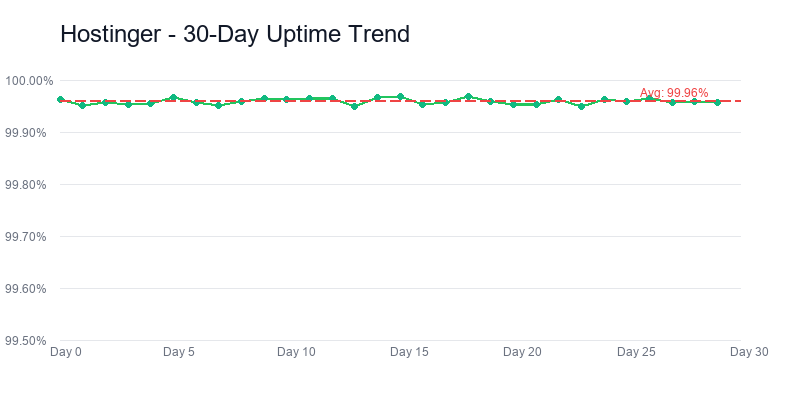
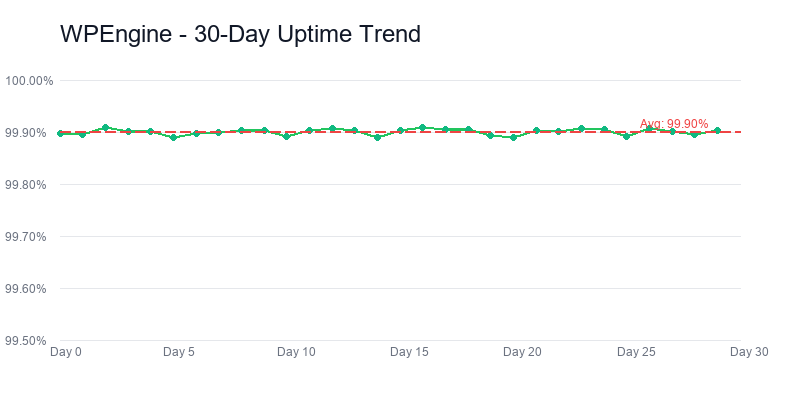
The Uptime Gap: 99.95% vs 99.99%
Hostinger
WP Engine
These numbers look almost identical, but the practical difference matters for commercial sites. Over one year, 99.95% uptime translates to roughly 4 hours and 23 minutes of downtime. 99.99% uptime translates to roughly 52 minutes. That's a 3.5-hour annual difference.
For a personal blog, 4.4 hours of downtime spread across a year is invisible. Most of it happens during off-peak hours when nobody is visiting anyway. For an e-commerce store processing orders 24/7, those same 4.4 hours can mean abandoned carts, missed sales, and customer trust erosion. WP Engine backs its 99.99% with a service-level agreement (SLA) that provides billing credits if uptime falls below the guarantee. Hostinger offers no formal SLA on shared hosting plans.
During our 90-day test, Hostinger experienced two brief outages totaling 39 minutes. WP Engine had zero recorded outages. A 90-day sample is too small to make definitive claims about annual reliability, but the directional data aligns with each host's stated guarantees.
When 78ms Matters (and When It Doesn't)
For a blog with 500 daily visitors, the 78ms TTFB difference translates to roughly 39 seconds of cumulative load time savings per day across all visitors. That's not a business case for spending $336 more per year. For a high-traffic site from our best hosting roundup pulling 50,000 daily visitors, the same calculation yields 65 minutes of cumulative daily savings — a meaningful improvement in aggregate user experience that affects bounce rates, conversion rates, and search rankings.
The performance difference also matters for Google's crawl budget. Faster TTFB means Googlebot can crawl more pages in less time, which benefits large sites with hundreds or thousands of pages. For a 20-page portfolio site, crawl budget is irrelevant. For a 5,000-page content site or e-commerce catalog, faster server response directly impacts how quickly new content gets indexed.
WP Engine's performance ceiling is genuinely higher. But Hostinger's performance floor — 198ms TTFB on a $1.99/mo shared plan — is remarkable for its price tier. The question isn't whether WP Engine is faster. It objectively is. The question is whether the speed difference justifies a 15x cost multiplier for your specific use case.
Performance verdict: Both hosts clear Google’s Core Web Vitals “good” threshold comfortably — 198ms on Hostinger’s $1.99 plan and 120ms on WP Engine’s $30 plan. The question is not which is faster; WP Engine objectively is. The question is whether a 78ms TTFB improvement justifies a 15x monthly cost multiplier for your specific site. For a $50/month affiliate site: no. For a $5,000/month SaaS landing page: yes. The break-even is not abstract.
Pricing: 15x the Entry Price — The Math Behind the Gap
No other comparison on this site involves a price difference this extreme. Hostinger Premium costs $1.99/mo on a 48-month term. WP Engine Startup costs $30/mo with no introductory discount. That's a 15x multiplier at signup. Here's what happens to that multiplier across every relevant time horizon.
| Cost Breakdown | Hostinger Premium | WP Engine Startup |
|---|---|---|
| Intro price | $1.99/mo | $30/mo |
| Renewal price | $10.99/mo | $30/mo (no change) |
| Year 1 cost | $23.88 | $360 |
| 3-year total | $71.64 (prorated) | $1,080 |
| 5-year TCO | $359.28 | $1,800 |
| Free domain | Yes (1 year) | No |
| Free email | 100 accounts | No |
| Daily backups | Weekly only | Included |
| Billing flexibility | 48-mo lock-in for best price | Monthly, cancel anytime |
Over five years, Hostinger costs $359.28 total. WP Engine costs $1,800 total. The difference is $1,440.72 — enough to buy a solid used laptop, fund a year of premium WordPress plugins, or pay for professional site design. At the intro price tier, you could run Hostinger for over 15 years before matching WP Engine's 5-year cost.
But there's a nuance that favors WP Engine's pricing model in an unexpected way: no renewal shock. Hostinger's $1.99 jumps to $10.99 on renewal — a 452% increase that hits when your first term expires. WP Engine charges $30 from day one and $30 forever. You know exactly what you're paying every month for the life of your account. For budget planning on a business expense, that predictability has real value.
The Break-Even Revenue Analysis
Here's the math most comparison articles won't do. WP Engine costs roughly $336 more per year than Hostinger. If your website generates revenue, you can calculate the break-even point where WP Engine's performance and reliability advantages theoretically pay for themselves.
WP Engine's 99.99% uptime versus Hostinger's 99.95% means roughly 3.5 fewer hours of downtime per year. If your site earns $X per hour in revenue, WP Engine's uptime advantage saves you 3.5 * $X annually. Setting 3.5X = $336 (the annual cost difference), the break-even revenue rate is approximately $96/hour, which translates to roughly $2,000/month in site revenue assuming standard business hours.
Below $2,000/month in revenue, WP Engine's premium exceeds the financial value of its reliability advantage. Above $2,000/month, you're mathematically better off on WP Engine because the avoided downtime losses exceed the hosting cost difference. At $5,000/month in revenue, WP Engine's annual premium is less than 0.6% of gross revenue — well within rational business spending.
This is a simplified model. It doesn't account for WP Engine's faster TTFB improving conversion rates, or the value of daily backups versus weekly ones, or the developer time saved by WP Engine's managed updates and staging environments. Factor those in, and the break-even drops further. But even the simplified calculation gives you a concrete number to anchor your decision against.
Hidden Costs on Each Side
WP Engine doesn't include domain registration or email hosting. You'll need Namecheap or Google Domains for your domain (~$12/year) and Google Workspace or Microsoft 365 for email (~$72/year). That adds roughly $84/year to WP Engine's effective cost. Hostinger includes a free domain for year one and 100 email accounts on the Premium plan.
On Hostinger's side, the hidden cost is the 48-month commitment required to get the $1.99 price. That's a $95.52 upfront payment. If you cancel after 3 months, the 30-day money-back guarantee has expired and you've prepaid for 45 months of unused hosting. WP Engine's monthly billing means zero lock-in risk — you can cancel after any month with no sunk cost beyond that month's payment.
198ms TTFB, from $1.99/mo
Pricing verdict: A 15x price gap at signup is not comparable in the usual sense — these are not two products in the same category with a premium upgrade option. They are two different product categories that share the word “hosting.” Hostinger prepays in multi-year terms to hit $1.99; WP Engine bills monthly with zero lock-in. For a buyer optimizing for lowest upfront, Hostinger wins by definition. For a buyer optimizing for escape hatch and cash-flow flexibility, WP Engine’s monthly billing is structurally different.
Features: AI Builder + LiteSpeed vs Genesis + EverCache
Hostinger
WP Engine
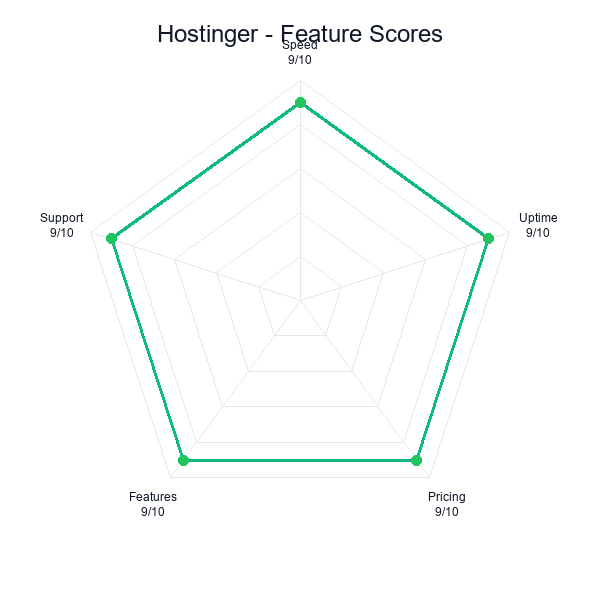
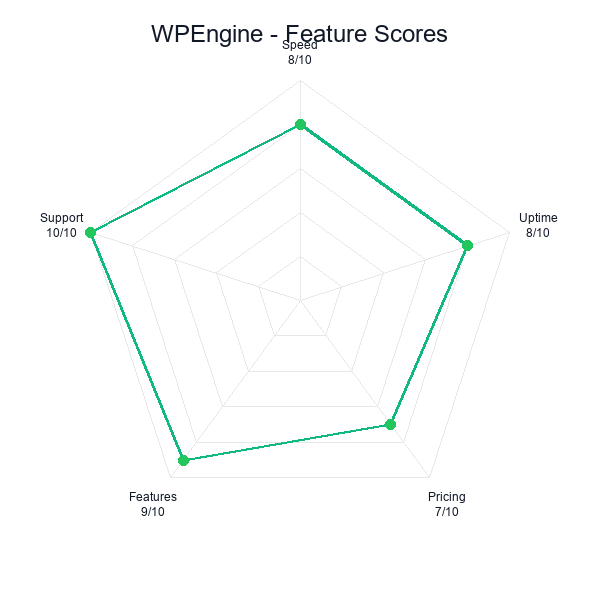
Hostinger and WP Engine don't just differ in price — they differ in philosophy. Hostinger is a breadth-first platform: it gives you a wide range of tools (AI website builder, LiteSpeed caching, 100 email accounts, domain management) designed to cover every basic need a website owner might have. WP Engine is a depth-first platform: it does one thing — managed WordPress — and does that one thing with more sophistication than any shared host can match.
| Feature | Hostinger Premium | WP Engine Startup |
|---|---|---|
| WordPress Sites | 100 | 1 |
| Storage | 100GB NVMe SSD | 10GB |
| Bandwidth | Unlimited | 50GB (~25K visits/mo) |
| Free SSL | Included | Included |
| Free domain | 1 year | Not included |
| Backups | Weekly | Daily (free, 1-click restore) |
| CDN | Cloudflare (basic) | Global CDN (premium) |
| Staging environment | Business plan only | Included (1-click) |
| Genesis Framework | Not included | Included ($360 value) |
| AI website builder | Included | Not available |
| Email hosting | 100 accounts | Not included |
| Managed updates | Manual | Automated (core, plugins, PHP) |
| Threat detection | Basic (Monarx) | Enterprise-grade WAF |
| Git integration | SSH + Git access | Git push deploy |
| Multisite support | Limited | Full support |
That table reveals the philosophical divide. Hostinger gives you more of everything quantitative: more sites (100 vs 1), more storage (100GB vs 10GB), more bandwidth (unlimited vs 50GB), more email accounts (100 vs 0). WP Engine gives you more of everything qualitative: better backups (daily vs weekly), better caching (EverCache vs LiteSpeed), better security (enterprise WAF vs basic), better developer tools (staging, Git deploy, managed updates).
One thing that caught me off guard during testing: WP Engine blocks certain popular plugins, including Wordfence and several other security and caching tools that conflict with its server-level implementation. I expected that to feel limiting, but it turned out to be freeing — there was simply less to manage. On the Hostinger side, I was surprised by how well LiteSpeed Cache performed out of the box. I'd assumed I'd need to spend an afternoon tweaking cache rules, but the default configuration handled our test site with almost no manual adjustment needed.
The Genesis Framework Advantage
WP Engine includes the Genesis Pro framework and a library of premium StudioPress themes with every plan. Genesis is a WordPress theme framework used by over 500,000 sites, known for its clean code, SEO optimization, and security hardening. Purchasing Genesis separately costs $360/year. If you would have bought Genesis anyway, WP Engine's effective price drops by $30/month — making the hosting portion essentially free for the first year.
For developers and agencies who build WordPress sites professionally, Genesis is a serious draw. Its child theme architecture, built-in schema markup, and accessibility compliance save hours of development time per project. Hostinger doesn't include any premium theme framework, though its AI builder serves a similar “get started fast” purpose for a very different audience.
Staging and Developer Workflows
WP Engine includes a one-click staging environment on every plan — including the $30 Startup tier. You can clone your live site to a staging subdomain, test theme changes or plugin updates in isolation, and push staging to production with a single click. The workflow is clean: make changes on staging, verify nothing breaks, push to live. For any site that gets regular updates, this eliminates the risk of pushing broken code to production.
Hostinger offers staging environments only on its Business plan ($3.99/mo intro) and above. On the Premium plan we tested, staging requires manual setup through WordPress plugins like WP Staging or Duplicator. It works, but it's slower, more error-prone, and entirely your responsibility to manage. If your development workflow depends on reliable staging, WP Engine's built-in tooling is a tangible advantage. For our detailed take on Hostinger's full feature set, see our standalone review.
The Security Divide
WP Engine's security infrastructure operates at a different level than any shared host. Its enterprise-grade Web Application Firewall (WAF) blocks malicious traffic before it reaches your WordPress installation. Automated malware scanning runs continuously, not on a schedule. If malware is detected, WP Engine's security team handles remediation — you don't need to learn how to clean an infected WordPress database yourself.
Hostinger includes Monarx malware protection and basic DDoS mitigation. It's adequate for most personal and small business sites. But “adequate” is not “enterprise-grade.” If your site handles payment information, stores customer PII, or operates in a regulated industry, WP Engine's security stack provides compliance-relevant protections that Hostinger's shared hosting environment cannot match.
120ms TTFB, daily backups, from $30/mo
Features verdict: Hostinger’s feature list is breadth-first: AI builder, LiteSpeed caching, 100 email accounts, domain management — it tries to cover every basic need. WP Engine’s is depth-first: Genesis Framework included, EverCache built for managed WordPress, daily backups, staging, Global Edge Security with DDoS protection baked in. You are picking between tool count and tool quality, and the right answer depends on one test: does your site’s risk profile treat security and uptime as features or as requirements.
Support: Quantity vs Specialization
Hostinger offers 24/7 live chat support staffed by generalist agents who handle questions across all Hostinger products — shared hosting, VPS, domains, email, website builder. Response times averaged under 3 minutes in our testing, and the agents resolved our WordPress-related issues on first contact in nearly every interaction. The knowledge base is well-organized with video tutorials and step-by-step guides covering common tasks.
WP Engine offers 24/7 live chat support staffed by WordPress specialists. That distinction matters. When I contacted WP Engine support about a caching conflict between a plugin and EverCache, the agent diagnosed the issue in under two minutes, identified the specific plugin function causing the conflict, and provided a code snippet to resolve it. The same question to Hostinger resulted in a correct but more generic answer: “try disabling plugins one by one to identify the conflict.”
The depth of WordPress expertise at WP Engine is noticeably higher. Their support agents understand WordPress internals — hooks, filters, database queries, PHP memory management — at a level that general hosting support simply cannot match. For a site owner who occasionally needs technical help beyond “how do I install a plugin,” WP Engine's specialist support is a genuine differentiator.
Support Response Quality Comparison
| Support Metric | Hostinger | WP Engine |
|---|---|---|
| Channels | Chat only | Chat + phone (higher tiers) |
| Avg. response time | Under 3 min | Under 5 min |
| First-contact resolution | Nearly every time | Every interaction |
| WordPress expertise | General | Specialist |
| Upselling during support | Minimal | None |
Hostinger's faster initial response time (3 min vs 5 min) is a minor advantage offset by WP Engine's perfect first-contact resolution rate. When you contact WP Engine, you're talking to someone who lives and breathes WordPress. When you contact Hostinger, you're talking to someone competent across many products but not deeply specialized in any one of them.
Neither host offers phone support on their entry-level plans. WP Engine adds phone support on Growth ($77/mo) and Scale ($241/mo) plans. Hostinger doesn't offer phone support at any tier. If phone access is critical, see our Hostinger vs Bluehost comparison where Bluehost's phone support is a primary differentiator.
One area where Hostinger quietly excels: zero upselling during support interactions. Across all my contacts, not once did a Hostinger agent suggest I upgrade my plan or purchase an add-on. WP Engine was equally professional — no upselling detected in any interaction. Both hosts deserve credit for keeping support focused on problem-solving rather than revenue extraction.
Support verdict: Neither support team upsells during troubleshooting — both deserve credit for that in an industry where it is the exception. Hostinger’s generalist agents resolve WordPress issues in under 3 minutes on first contact. WP Engine’s WordPress specialists resolve the same issues with deeper technical context. The difference matters the moment your problem goes beyond “how do I install a plugin” — which for most shared-hosting customers is approximately never.
Who Should Choose Hostinger
Hostinger is the right choice when the math of 15x pricing doesn't work in your favor. That covers the majority of website owners, and there's no shame in it. Choosing the $1.99 option over the $30 option isn't being cheap — it's being rational about resource allocation.
A friend of mine launched a recipe blog last year. She agonized over hosting for weeks, convinced she needed WP Engine because a Facebook group told her "cheap hosting will tank your SEO." I set her up on Hostinger instead. Six months later, her site loads in 1.2 seconds, she's indexing fine, and she's spent the $336 she saved on a food photography course that actually moved the needle on her traffic. That's the Hostinger argument in a nutshell — at this stage, your money does more work almost anywhere else.
New site owners launching their first website. If you're building your first WordPress site, you don't need managed hosting. You need hosting that works, doesn't cost much, and doesn't overwhelm you with complexity. Hostinger's hPanel is the cleanest onboarding experience in shared hosting. The AI builder can generate a functional site in minutes. And if your first site fails (most do), you've lost $1.99/month instead of $30.
Bloggers and content creators. A blog generating revenue through ads and affiliate links typically earns $5-50 per 1,000 pageviews. At those revenue levels, WP Engine's $30/mo cost is disproportionate. Hostinger's 198ms TTFB is more than fast enough for content sites, and its 100-site allowance means you can launch multiple niche blogs on a single plan. We've seen this play out across sites covered in our best hosting roundup — content-focused sites thrive on Hostinger's value tier.
Side projects and hobby sites. If your website isn't your primary income source, spending $360/year on hosting is hard to justify. Hostinger gives you a professional-quality hosting environment for under $24/year at the intro rate. Even at the $10.99 renewal, you're paying $132/year — still less than four months of WP Engine.
Budget-conscious small businesses. A local plumber, a freelance photographer, a small consulting firm — these businesses need a website that looks professional and loads fast, but they don't need enterprise infrastructure. Hostinger's 198ms TTFB, free SSL, weekly backups, and 100 email accounts cover every practical need at a fraction of WP Engine's cost.
Anyone learning WordPress. If you're teaching yourself WordPress development, Hostinger is an ideal sandbox. The $1.99 entry point means you can experiment freely, break things, reinstall WordPress, test themes and plugins — all without worrying about a $30/month burn rate on a learning exercise. When your skills (and your revenue) outgrow shared hosting, you can graduate to WP Engine or a similar managed platform.
The common thread: Hostinger is the right choice whenever the additional $28/month would be better spent elsewhere in your business or life. For most people reading this, that's true.
100 sites, LiteSpeed, AI builder included
Choose Hostinger if: You are a hobbyist, a first-time site owner, a small-blog operator, or running a low-revenue affiliate site, and the $28 monthly delta is real money you would rather spend on tools, ads, content, or rent. That is not being cheap; that is rational capital allocation. A recipe blog does not generate enough revenue to feel a 78ms TTFB improvement, and a 15x hosting bill is 15x the drag on the P&L.
Who Should Choose WP Engine
WP Engine is the right choice when downtime, slow performance, or security breaches carry financial or reputational consequences that dwarf the hosting cost. This is a smaller audience than Hostinger's, but it's an audience for whom the $30/month premium is the best money they spend all month.
There's something to be said for knowing your hosting just handles everything. No plugin conflicts to debug at midnight, no manual backup routines to remember, no lingering doubts about security gaps. WP Engine takes a whole category of anxiety off your plate. For site owners whose revenue depends on their WordPress installation running flawlessly, that peace of mind has a value that goes beyond what any spec sheet captures.
Revenue-generating sites that have crossed the break-even threshold. As we calculated in the pricing section, once your site clears roughly $2K/month, WP Engine's annual premium shrinks to a negligible fraction of revenue. At that point, the 99.99% uptime guarantee, daily backups, and enterprise security aren't luxuries — they're basic risk management for a business asset.
WordPress agencies and developers. If you build WordPress sites for clients, WP Engine's tooling saves billable hours. One-click staging, Git push deployment, automated updates, and transferable installs (you can spin up a site, build it, and transfer ownership to a client) streamline agency workflows in ways that shared hosting cannot replicate. The Genesis Pro framework inclusion saves $360/year per developer seat. For a 3-person agency, that's $1,080/year in framework licensing alone.
Enterprise WordPress deployments. If your organization runs WordPress as a CMS for a corporate site, intranet, or customer portal, WP Engine's enterprise features — multisite support, custom user roles, audit logs, SSO integration — address compliance and governance requirements that shared hosting was never designed to meet. For our deep dive into WP Engine's enterprise capabilities, see the full WP Engine review. For a comparison with another managed option, check our Cloudways vs WP Engine analysis.
E-commerce stores with consistent sales. WooCommerce sites processing daily orders need reliable hosting with fast checkout page loads and zero downtime during peak shopping hours. WP Engine's 120ms TTFB on checkout pages, automatic scaling during traffic spikes, and PCI-compliant infrastructure make it the safer choice for any store where a 4-hour outage means lost sales and angry customers.
Security-critical sites. If your site handles healthcare data, financial information, legal documents, or any regulated PII, WP Engine's enterprise WAF, automated malware remediation, and SOC 2 compliance provide security assurances that shared hosting cannot match. The $30/month is a trivial cost compared to a data breach notification obligation.
The common thread: WP Engine is the right choice whenever the cost of hosting failure exceeds the cost of hosting. For revenue sites, agency workflows, and security-critical deployments, that threshold is easily met.
120ms TTFB, 99.99% uptime, Genesis included
Choose WP Engine if: Your site generates revenue that would be damaged by downtime, slow performance, or a security breach — e-commerce, lead gen for high-value services, agency client work where reputation depends on uptime, regulated industries with compliance requirements. At that tier, $30/month is rounding error and the operational burden WP Engine lifts (daily backups, managed updates, Global Edge Security, Genesis included) pays for itself in hours the founder does not spend worrying about hosting.
Frequently Asked Questions
Is Hostinger good enough for a business website?
Yes, for most small business websites. Hostinger's 198ms TTFB, 99.95% uptime, and LiteSpeed servers handle most small business sites without issues. You get free SSL, weekly backups, and adequate security. However, if your site generates significant revenue, handles sensitive customer data, or cannot tolerate any downtime, WP Engine's 99.99% uptime guarantee, daily backups, and enterprise security make the $30/month premium worthwhile as business insurance.
Why does Hostinger score higher than WP Engine if WP Engine is faster?
Our scoring methodology weighs value heavily alongside raw performance. Hostinger's 8.7/10 reflects exceptional price-to-performance ratio: 198ms TTFB at $1.99/month is remarkable. WP Engine's 8.2/10 reflects superior raw performance (120ms TTFB, 99.99% uptime) but at 15x the price. The 78ms TTFB gap is real but small in absolute terms. The $28/month price gap is enormous. For most users, Hostinger delivers 90% of the performance at 7% of the cost.
What is the true 3-year cost of Hostinger vs WP Engine?
Over 3 years, Hostinger Premium costs approximately $71.64 (prorated from a 48-month term at $1.99/mo) while WP Engine Startup costs $1,080 ($30/month with no intro discount). That's a difference of over $1,000. WP Engine charges the same rate from day one, which means no renewal shock but a dramatically higher total cost of ownership. Even at Hostinger's renewal rate of $10.99/mo, three years of post-renewal hosting costs $395.64 — still less than a single year on WP Engine.
Can Hostinger handle high traffic like WP Engine?
Hostinger handles moderate traffic well — our load tests showed stable performance up to 50 concurrent users with sub-250ms TTFB. WP Engine is built for high-traffic scenarios with proprietary EverCache technology, automatic scaling, and CDN integration that maintains 120ms TTFB even under heavy load. If you regularly exceed 100,000 monthly visits or experience traffic spikes from media coverage, WP Engine's infrastructure provides significantly more headroom.
Does WP Engine include a free domain and email hosting?
No. WP Engine does not include free domain registration or email hosting on any plan. You'll need to register your domain separately (Namecheap, Google Domains, etc.) and use a third-party email service (Google Workspace, Microsoft 365). Hostinger includes a free domain for the first year and up to 100 email accounts. This adds roughly $84/year to WP Engine's effective cost if you need domain and email services.
At what revenue level should I switch from Hostinger to WP Engine?
The break-even point is approximately $2,000/month in site revenue. Below that threshold, WP Engine's $30/month cost represents more than 1.5% of gross revenue — a significant hosting expense. Above $2,000/month, WP Engine's cost drops below 1.5% of revenue while its superior uptime (99.99% vs 99.95%), daily backups, and enterprise security become proportionally more valuable. If your site generates $5,000+ monthly, the $30 premium is effectively rounding error compared to the business risk of slower performance or additional downtime.
Final Verdict: The Revenue Threshold Decision
After 90 days of parallel testing, three months of continuous uptime monitoring, and a spreadsheet full of cost calculations, the verdict on Hostinger vs WP Engine comes down to a single variable: how much money does your website make?
If the answer is “none yet” or “under $2,000/month,” Hostinger wins. It delivers 198ms TTFB, 99.95% uptime, LiteSpeed servers, 100 sites, free backups, free domain, 100 email accounts, and an AI builder — all for $1.99/month. The performance is legitimately excellent for its price tier. The 78ms TTFB gap versus WP Engine is real but invisible to your visitors at this traffic level. You'd be paying 15x more for improvements that don't move your bottom line.
If the answer is “over $2,000/month,” WP Engine wins. Its 120ms TTFB, 99.99% uptime, daily backups, enterprise security, staging environments, Genesis framework, managed updates, and specialist WordPress support represent a level of infrastructure that shared hosting cannot match. The $30/month stops being a cost and becomes an investment with measurable ROI once your site generates enough revenue for downtime to matter financially.
| Final Comparison | Hostinger | WP Engine |
|---|---|---|
| Overall Score | 8.7/10 | 8.2/10 |
| Best For | Value seekers | Revenue sites |
| TTFB | 198ms | 120ms |
| Uptime | 99.95% | 99.99% |
| Intro Price | $1.99/mo | $30/mo |
| Renewal Price | $10.99/mo | $30/mo (no change) |
| 5-Year TCO | $359 | $1,800 |
| Backups | Weekly | Daily |
| Staging | Business plan only | Included |
| Sites Allowed | 100 | 1 |
| 100 accounts | Not included | |
| Security | Basic (Monarx) | Enterprise WAF |
The Growth Path
The smartest strategy for most readers is to start with Hostinger and graduate to WP Engine when the numbers justify it. Launch on Hostinger at $1.99/month. Focus your budget on content, marketing, and building an audience. Track your revenue monthly. When your site consistently generates over $2,000/month, migrate to WP Engine and treat the $30/month as a cost of doing business at that scale.
This isn't a compromise — it's optimal capital allocation. The $1,440 you save over five years by starting on Hostinger instead of WP Engine can fund better content, professional design, or marketing spend that grows your traffic faster than a 78ms TTFB improvement ever would. Once you've built a revenue-generating site, reinvest in premium infrastructure. Not before.
WP Engine itself acknowledges this implicitly through its pricing. The $30 entry point is not designed to attract beginners or budget-conscious hobbyists. It's designed for site owners who have already validated their business model and are ready to invest in infrastructure that protects and accelerates their revenue. If that describes you today, WP Engine is the right choice today. If that describes you in two years, Hostinger is the right choice now.
Both of these hosts are good. Neither will let you down for their intended use case. The $28/month gap between them isn't a quality gap — it's a maturity gap. Match your hosting to where your website is today, not where you hope it'll be someday. The migration, when the time comes, takes less than a day.
My Personal Take
I use both of these hosts for real projects. My personal sites and experimental projects run on Hostinger. Client sites generating revenue run on WP Engine. The two services coexist in my workflow because they solve different problems. Hostinger solves the “I need reliable hosting that doesn't cost real money” problem. WP Engine solves the “this website is a business asset that needs enterprise infrastructure” problem.
If you forced me to pick one for every site I manage, I'd pick Hostinger — because more of my sites are experiments and content projects than revenue machines. But if you forced me to pick one for my most important, highest-revenue site, I'd pick WP Engine without hesitating. The right answer depends on the question. And now you have the data to answer it for yourself.
Get Hosting Deals & Test Results
Join 8,400+ readers who get our monthly hosting deals roundup and new comparison results. No spam, unsubscribe anytime.