Affiliate disclosure: Some links in this article are affiliate links. If you purchase through them, I earn a commission at no extra cost to you. I only recommend services I've personally tested.
The $4 Server That Became a $22 Server
Last fall I was setting up a test environment for a client migration — a medium-traffic WordPress site, nothing crazy, about 15,000 monthly visitors. I went to Kamatera's pricing page, saw "$4/month" in big letters, and thought: this might be the cheapest production-grade cloud server I've ever configured.
Twenty minutes later, I was looking at a $22/month invoice. Not because of hidden fees. Not because of bait-and-switch. Because that $4 price tag is a very specific configuration — 1 vCPU on a shared thread, 1 GB RAM, 20 GB of SSD storage — and the server I actually needed was something else entirely.
Here's what happened between "$4" and "$22," and why understanding that gap matters more than any pricing table.
The Four Servers Hiding Behind One Price Tag
Kamatera doesn't sell hosting plans. They sell server components. You pick CPU type, core count, RAM, storage, bandwidth, OS, and data center — then the configurator spits out a price. This is genuinely different from Vultr or DigitalOcean, where you pick a box from a menu and that's your server.
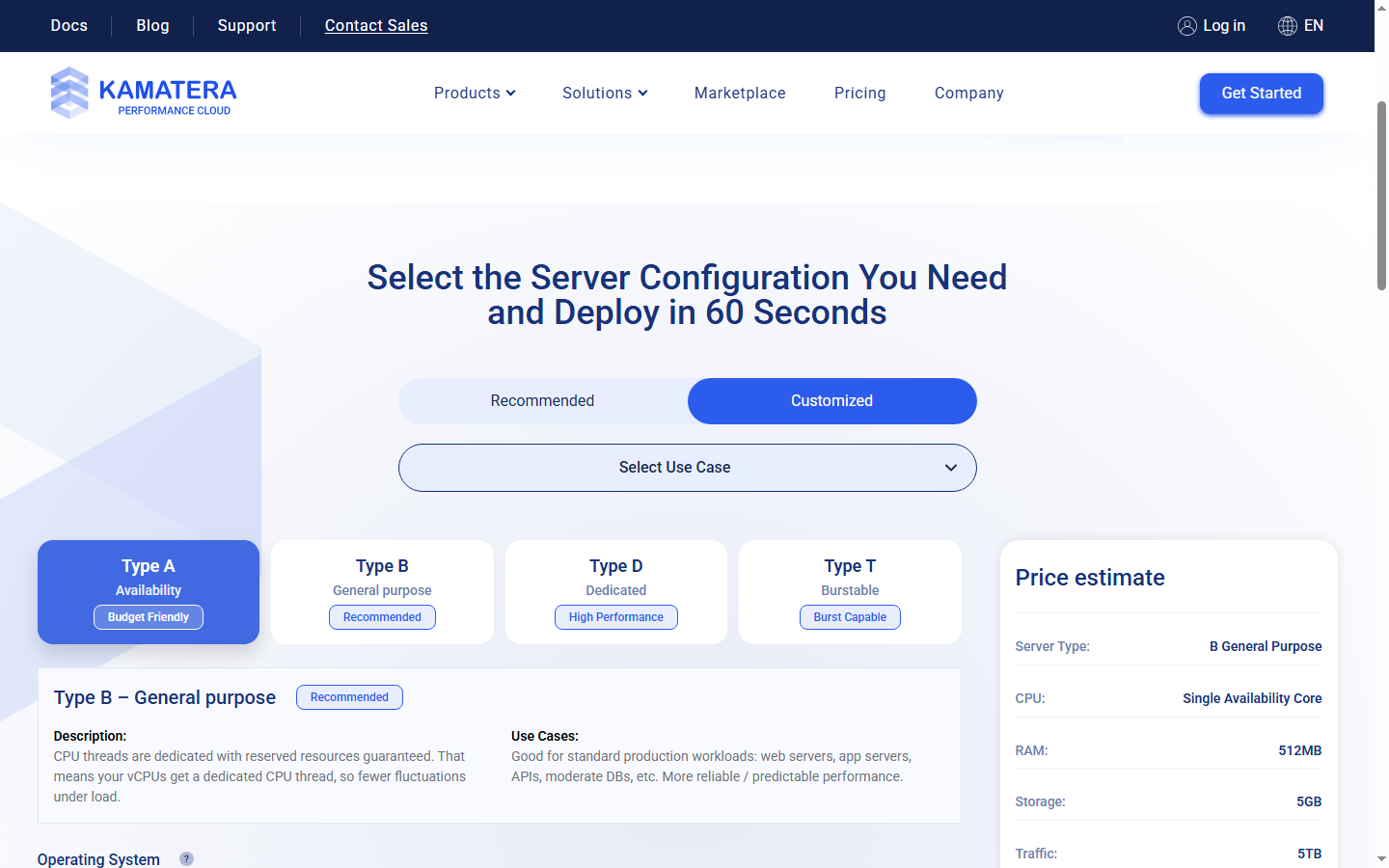
The part that trips people up is the CPU type selector. There are four options, and they're not labeled in a way that makes the price implications obvious:
Type A — Availability. This is the $4/month starting point. Your vCPU runs on a shared physical thread, which means your neighbor's workload can slow yours down. Kamatera's own documentation calls it suitable for "micro-services, small to medium applications, and development environments." Read that last part carefully: development environments. For 1 vCPU and 1 GB RAM, you're paying $4/month.
Type B — General Purpose. Dedicated CPU thread. Reserved resources. This is what most production workloads actually need. Same 1 vCPU and 1 GB RAM? $9/month. That's a 125% price increase over Type A for the same specs on paper — the difference is entirely in CPU isolation.
Type T — Burstable. Starts at $9/month base, then adds $0.041/hour per CPU core whenever you exceed 10% average utilization. If your site has traffic spikes but idles most of the time, this can save money. If your site stays busy, the burst charges pile up and you'd have been better off with Type B.
Type D — Dedicated. Full physical cores, no sharing at all. Enterprise-grade isolation. Pricing jumps again. Most users reading a pricing guide don't need this tier, so I'll leave it at that.
The jump from Type A to Type B is where most of the confusion lives. When review sites say "Kamatera starts at $4/month," they're quoting Type A. When your WordPress site needs consistent performance under load, you need Type B. That gap — $4 to $9 for the same 1 vCPU — is the first price multiplier nobody warns you about.
Three Servers I Actually Configured
Pricing tables are useless without context. Here are three real configurations I priced out on Kamatera's calculator in April 2026, each matching a scenario I've actually needed for client work.
Dev/test sandbox
Just need a box to stage sites before pushing to production. Nobody visits it except me and the client.
Type A Availability, 1 vCPU, 2 GB RAM, 40 GB SSD, Ubuntu 22.04. Monthly billing.
Base config with 20 GB storage came to about $6. Bumping storage to 40 GB added $1/month (20 extra GB × $0.05/GB). One public IP is included. Total: roughly $7/month.
For a staging box that sits idle 80% of the time, this is genuinely cheap. I'm not running production traffic through it, so Type A's shared CPU thread is fine. This is the use case where Kamatera's $4 headline actually holds up — or close to it.
Production WordPress site
A client's business site — WooCommerce with maybe 50 products, 500-800 daily visitors, needs to stay responsive during business hours.
Type B General Purpose, 2 vCPU, 4 GB RAM, 80 GB SSD, Ubuntu 22.04. Monthly billing.
The CPU and RAM on Type B at this config ran about $18-20/month. Storage: 80 GB total means 60 GB beyond the included 20 GB, so add $3/month. Total: roughly $21-23/month.
If I wanted managed services (Kamatera's team handles server updates, security patches, monitoring), that's another $50/month. Per server. I'll come back to that number later because it changes the entire value equation.
Agency running three client sites
Three separate Type B servers — two at 2 vCPU/4 GB for content sites, one at 4 vCPU/8 GB for a busier ecommerce store. Each with 60-100 GB storage.
Server 1: 2C/4GB/60GB Type B ≈ $20/month. Server 2: same config ≈ $20/month. Server 3: 4C/8GB/100GB Type B ≈ $46/month (the 4 vCPU/8 GB jump is where Kamatera's per-component pricing gets noticeably steeper). Total: roughly $86/month for three servers.
Add managed services to all three? That's $150/month on top. Your $86 becomes $236. At that point you need a spreadsheet, not a pricing page.
What Those Same Servers Cost Elsewhere
This is where the "Kamatera is cheap" narrative gets complicated.
Take Scenario 2 — the production WordPress server at 2 vCPU, 4 GB RAM, and enough storage to actually run a site. On Kamatera Type B with 80 GB SSD: about $22/month.
On Vultr, the Regular Cloud Compute plan with 2 vCPU, 4 GB RAM, 80 GB SSD, and 3 TB bandwidth is a flat $20/month. You don't pick components. You click a button. And you get NVMe storage — not just SSD — plus AMD EPYC processors that benchmark significantly faster than what most people land on with Kamatera's Type A.
On DigitalOcean, the Basic Droplet with 2 vCPU, 4 GB RAM, 80 GB SSD, and 4 TB bandwidth costs $24/month. More expensive, but DigitalOcean's developer tooling, managed databases, and App Platform integrations add value that a raw server doesn't capture.
At the 4 vCPU/8 GB tier, the gap narrows or sometimes reverses. Vultr charges $40/month with 160 GB storage. DigitalOcean charges $48/month. Kamatera's Type B with 100 GB storage lands around $46-50/month — right between the two, but with 60 GB less storage than Vultr includes by default.
The storage difference matters more than it sounds. Kamatera's base is 20 GB. Vultr's 4 GB plan comes with 80 GB. That's 60 GB you'd have to buy separately on Kamatera at $0.05/GB/month — $3/month or $36/year to match what Vultr includes free. At the 8 GB tier, Vultr gives you 160 GB; matching that on Kamatera costs $7/month extra. It's not a dealbreaker, but it's a line item that SERP pricing tables consistently ignore.
I'm not saying Kamatera is overpriced. I'm saying it's not the budget option that the $4 headline implies. At the configs most production sites need, you're paying within 10-15% of Vultr and DigitalOcean — sometimes more, sometimes less, depending on how you weight storage versus CPU type versus data center options.
Where Kamatera's Pricing Model Actually Wins
After that comparison, you might wonder why anyone would choose Kamatera over a simpler fixed-plan provider. Fair question. Here are the scenarios where the configurator genuinely saves money or solves a problem the others can't.
Non-standard RAM-to-CPU ratios. Need 1 vCPU with 8 GB RAM for a memory-hungry application like Elasticsearch or a large Redis instance? On Vultr and DigitalOcean, you'd have to buy a plan with more CPU than you need just to get the RAM. Kamatera lets you configure 1C/8GB directly. You pay for the RAM you need without subsidizing CPU cores you'll never touch.
Windows Server VPS. Kamatera's Windows licensing adds $15-25/month depending on core count. That sounds like a lot until you compare it: many VPS providers either don't offer Windows at all (Vultr has it, DigitalOcean doesn't), or charge more for equivalent configs. For .NET shops or businesses that need Windows-specific software, Kamatera is one of the more cost-effective options.
Geographic coverage. 24 data centers across the US, Canada, Europe, Israel, Hong Kong, Singapore, Japan, and Australia. Vultr has 32 locations but gaps in the Middle East. DigitalOcean has 15. If you need a server in Tel Aviv, Tokyo, or Sydney with a provider that isn't AWS or Google Cloud, Kamatera's one of very few options under $50/month.
Hourly billing for short-lived workloads. Spinning up a 4 vCPU server for a 6-hour load test costs about $0.36 on Kamatera. No monthly commitment, no billing for the rest of the month. Vultr and DigitalOcean both offer hourly billing too, but Kamatera bills by the second — so if you kill the server after 47 minutes, you pay for 47 minutes.
The 30-day trial. $100 credit on one server, 1 TB traffic, no charge if you cancel within 30 days. It's enough to actually test a production-grade config (4C/8GB for a month), which is rare — most hosting trials limit you to bottom-tier plans.
The Add-On Costs Nobody Mentions
Kamatera's base pricing is only part of the picture. Several add-ons that you might assume are included — or at least cheap — carry prices that shift the math.
Managed services: $50/month per server. This is Kamatera's team handling server administration — security patches, monitoring, firewall management, the stuff that a Cloudways or RunCloud panel does for $10-15/month. At $50 per server, a three-server agency setup adds $150/month. That's more than the servers themselves cost. For a single production server, it turns a $22/month bill into $72/month — suddenly you're in Kinsta territory, and Kinsta includes a managed dashboard, CDN, staging, and dedicated WordPress optimization.
Backups and snapshots. Creating a snapshot is free. Storing it isn't. The per-GB storage charge ($0.05/month) applies to snapshot storage too. A 60 GB server snapshot sitting in storage costs $3/month. If you keep daily snapshots and retain a week's worth? The math gets uncomfortable fast.
Firewalls and load balancers. Available, but they're add-on services with additional monthly costs. On Vultr, a basic firewall is free and configured through the dashboard. Kamatera's approach — security as an upsell — is the IaaS tradition, but it catches people who expect 2026-era defaults.
This is where the Trustpilot reviews split. Some users call Kamatera's billing "refreshingly transparent." Others describe confusion when add-ons they forgot about show up on invoices, or when snapshot storage quietly accumulates charges. Both groups are right — the pricing is transparent if you read every line, and confusing if you assumed certain things were included.
One recurring complaint I found on Trustpilot: users who stopped using servers but didn't explicitly delete them, then got charged for idle resources. Kamatera bills for provisioned resources, not usage. If the server exists, you're paying — even if it's powered off (monthly billing) or sitting there consuming no traffic. This isn't unusual for IaaS, but it's a trap for people coming from traditional hosting where "canceling" means calling support.
The Verdict: Freedom Has a Learning Curve
Kamatera's pricing is honest. I want to say that clearly, because the tone of this article might suggest otherwise. There's no bait-and-switch. The $4 price is real — for the specific configuration it describes. The configurator works exactly as advertised. The add-on costs are documented if you look for them.
The problem isn't the pricing. It's the distance between the headline and the checkout total.
If you know exactly what you need — CPU type, core count, RAM, storage, bandwidth — Kamatera's configurator gives you surgical control. You can build a server that matches your workload precisely, without paying for resources you won't use. For non-standard configurations, Windows VPS, or data center locations that Vultr and DigitalOcean don't cover, Kamatera is genuinely competitive.
If you're comparing standard configurations — 2 vCPU, 4 GB RAM, 80+ GB SSD — you'll land within 10-15% of what Vultr or DigitalOcean charge for fixed plans. Sometimes slightly cheaper, sometimes slightly more, depending on storage needs and CPU type. The "budget cloud" narrative doesn't hold at these specs.
And if you need managed services, the $50/month per-server fee makes Kamatera one of the more expensive options in the managed space. At that price point, you should be comparing against Cloudways ($14-50/month with a managed dashboard included) or even entry-level Kinsta plans that bundle CDN, staging, and WordPress-specific optimization.
My own setup? I use Kamatera for two things: staging servers (Type A, cheap, disposable) and a client project that needs a Tel Aviv data center (no other affordable option). For production WordPress sites, I run Vultr or Cloudways — not because Kamatera is bad, but because fixed plans mean I know the bill before I click deploy.
That's the real question this article answers. Not "is Kamatera cheap?" — it can be. The question is: do you want to be the person who decides exactly what every line item costs? Some people find that freeing. I find it one more thing to get wrong at 2 AM when a client's server needs scaling.
FAQ
Is Kamatera actually $4 per month?
Technically yes — for a Type A shared-CPU server with 1 GB RAM and 20 GB SSD. Not production-grade. A realistic production config runs $20-22/month.
How does Kamatera's pricing compare to Vultr?
At the 2 vCPU/4 GB tier with comparable storage, Kamatera Type B costs about $22/month versus Vultr's flat $20/month (with 80 GB NVMe included). At 4 vCPU/8 GB, Kamatera runs $46-50/month versus Vultr's $40/month with 160 GB storage. Kamatera wins on configuration flexibility and geographic coverage; Vultr wins on simplicity and storage-inclusive pricing.
What's the difference between Type A and Type B?
Type A (Availability) shares CPU threads with other tenants. Type B (General Purpose) gives you a dedicated CPU thread with guaranteed resources. The price difference is 125% at the entry tier ($4 vs $9 for 1C/1GB). For anything handling real user traffic, Type B is the safe choice. Type A works for staging, development, or low-traffic internal tools.
Is the $50/month managed service worth it?
Depends on what you're comparing it to. If the alternative is hiring a sysadmin or spending your own hours on server maintenance, $50/month is reasonable. But if you're comparing it to managed platforms like Cloudways ($14-50/month with a full dashboard) or RunCloud ($8-13/month as a server panel), Kamatera's managed fee is steep — especially when multiplied across several servers.
Does Kamatera charge for stopped servers?
This one trips people up regularly, and I've seen it in Trustpilot complaints more than once. On monthly billing, yes — you're paying for the server's existence, not its usage. The meter doesn't care whether your server is running or sitting idle. On hourly billing, a stopped server doesn't accrue compute charges, but storage costs continue because your disk space is still reserved.
The only way to fully stop charges is to delete the server entirely — not stop it, not power it down, delete it. If you're coming from traditional shared hosting where "canceling" means emailing support and they handle the rest, this is a different world. IaaS providers bill for provisioned resources, period. My recommendation: if you're spinning up test servers on monthly billing, set a calendar reminder to delete them when you're done. A forgotten 2 vCPU server sitting idle for three months costs you $54-66 for literally nothing.
Can I try Kamatera for free?
They offer a 30-day trial with $100 in credit for one server and 1 TB of traffic. You need a credit card on file, but you won't be charged if you stay within limits and cancel before the trial ends. The $100 credit is enough to test a meaningful configuration — a 4 vCPU/8 GB Type B server for the full month, which is more generous than most hosting trials.