Affiliate disclosure: Some links in this article are affiliate links. If you purchase through them, I earn a commission at no extra cost to you. I only recommend services I've personally tested.
There's a moment every developer hits with Cloudways. You look at your monthly invoice — $56 for a DigitalOcean 2GB droplet that costs $12 direct — and something shifts. You're not angry, exactly. Cloudways earned that markup for a while, when the alternative was SSH-ing into a raw server and configuring Nginx by hand. But now you know enough. You've outgrown the training wheels.
So you search "runcloud review." The pitch is magnetic. Connect your own VPS from Vultr or DigitalOcean. Get a clean dashboard, one-click SSL, automated deployments. Pay $9 or $19/month for the panel instead of a 130% markup on server costs. Keep full control. No middleman.
I went through this exact graduation in late 2023. Moved three client sites from Cloudways to RunCloud on a Vultr instance. The first two weeks were great. Then the edges started showing.
What RunCloud Gets Right
I want to be clear about this: RunCloud's dashboard is the best-looking panel I've used. Better than GridPane's utilitarian interface, better than SpinupWP's sparse layout, miles better than the cPanel relic most people are used to. The team in Cyberjaya clearly cares about UI.
The server setup takes about four minutes. You paste your Vultr API key, pick a region, choose your web server — Nginx, Apache, or OpenLiteSpeed — and RunCloud provisions the instance and configures everything. When I set up a staging copy of a client's WooCommerce site, I had the clone running with SSL before I finished my coffee. Not figuratively. I timed it at about three minutes and forty seconds.
The web server flexibility is a genuine differentiator. GridPane locks you into Nginx. SpinupWP is Nginx-only. RunCloud lets you run OpenLiteSpeed — which means free LSCache, which means your WordPress sites can use LiteSpeed Cache plugin at its full capability instead of falling back to a generic page cache. For WordPress-heavy workflows, that's a real advantage, not a bullet-point-on-a-marketing-page advantage.
Git deployment works. You connect a GitHub or Bitbucket repo, push to a branch, RunCloud pulls and deploys. I've used it for a Laravel project and two WordPress theme development setups. The webhook fires reliably, deploys complete in under 30 seconds for a typical WordPress theme. Atomic deployment is available on higher tiers — more on that "higher tiers" thing shortly.
The free tier exists and it's genuinely usable. One server, one web application, no credit card required. If you just want to see whether the panel makes sense for your workflow before committing money, you can actually evaluate it on a real server. That's better than most competitors, who gate the trial behind payment info or limit it to 5 days.
The Tier Gate Keeps Moving
Here's where my relationship with RunCloud started changing.
When I signed up in late 2023, the plan structure was three tiers: Basic at $8/month, Pro at $15/month, Business at $45/month. Simple enough. I picked Pro because I needed multiple servers — Basic was locked to one.
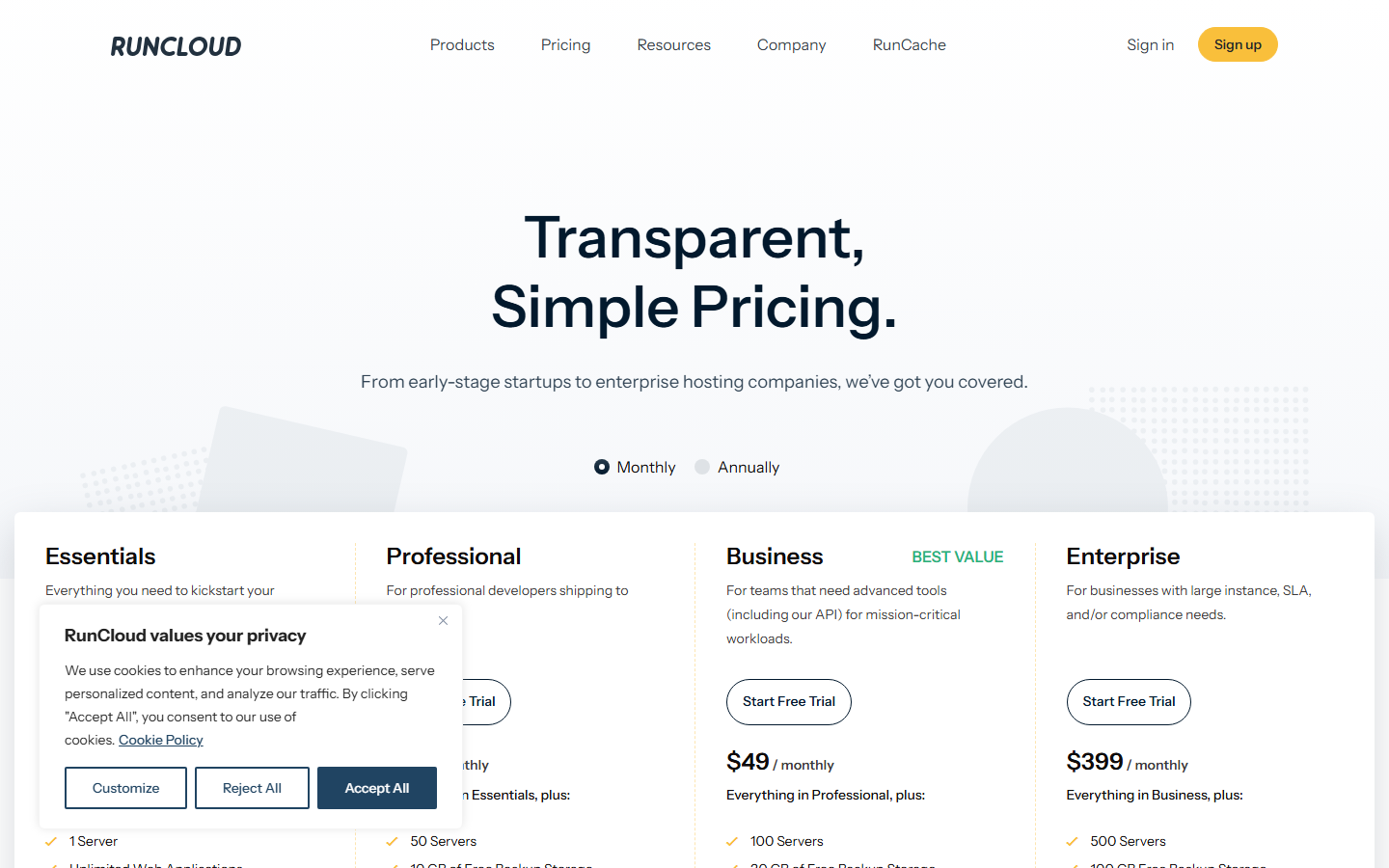
Sometime in 2024, RunCloud restructured. Basic became Essentials at $9. Pro became Professional at $19. Business went from $45 to $49. The plan names changed, the prices went up, and some features moved.
That's the part that matters: features moved.
WordPress staging — previously unlimited on Pro — got capped at 10. The direct WordPress Panel login through RunCloud Hub, which I used constantly to jump between client dashboards without storing wp-admin passwords, moved from Pro to Business. The application-level WAF that used to be included at lower tiers was removed. One long-time user on Trustpilot, a customer since 2017, put it bluntly: RunCloud removed the app WAF and was now charging $19/month for what used to cost less. They calculated that Ploi Pro and ServerAvatar Starter combined would cost about the same as RunCloud Professional alone — and give them more.
This isn't unusual in SaaS. Companies restructure pricing all the time. But RunCloud's restructuring has a consistent direction: features flow upward. Things that existed in mid-tier plans migrate to higher tiers. The entry point stays "affordable" because the bottom tier keeps getting lighter.
I pulled my invoices from the past 28 months. My effective cost for managing three servers went from $15/month to $19/month — a 27% increase — while the feature set I actually use got smaller. The WordPress direct login feature I relied on now requires a plan that costs $49. I adapted by bookmarking wp-admin URLs directly, but the principle bothers me. I paid for a capability. It was removed from my tier. I was told to upgrade.
Backup Math That Changes the Equation
RunCloud's backup system deserves its own section because it's where the "affordable alternative to Cloudways" narrative breaks down for anyone running more than a handful of sites.
Backups are priced per application. Not per server — per app. Each web application backup costs $0.05 per day. Sounds cheap in isolation. But that covers only the application files. If you want your database backed up too — and you do, because a WordPress site without its database is just a pile of PHP files — that's another $0.05 per day.
So one WordPress site with full backup coverage: $0.10/day, roughly $3/month.
Now scale it. I was managing 8 client WordPress sites across two Vultr instances. Full backups for all 8: $24/month just for RunCloud's backup service. My two Vultr 2GB instances cost $12 each — $24/month total. The backup add-on cost exactly as much as the servers themselves.
For context, DigitalOcean's automated weekly backups cost $1/month per droplet regardless of how many applications run on it. Vultr's automated backups are 20% of the instance cost — $2.40/month for a $12 VPS. GridPane includes local and remote backup capability in all plans. SpinupWP includes daily, weekly, and monthly backups on every plan.
I ended up doing what a lot of RunCloud users do: skipping RunCloud's backup system entirely and using DigitalOcean's native snapshots plus a manual database dump cron job. It works. But it means I'm paying for a server management panel and then managing a critical piece of server infrastructure — backups — outside of it. The panel that promised to handle everything is handling everything except the thing that matters most when something goes wrong.
RunCloud allocates backup storage by tier: 2GB for Essentials, 10GB for Professional, 30GB for Business. That 2GB on the entry plan is almost cosmetic — a single WordPress site with WooCommerce product images can blow past 2GB of backup storage in a month. The Professional plan's 10GB works for 3-4 small sites. If you're running the 8-site scenario I described, you're either on Business ($49/month) or you're managing your own backup infrastructure.
"We Only Support Panel Issues"
This was the line in a Trustpilot review that made me stop and reread. Multiple reviewers reported the same experience: they opened a support ticket about a server-level problem — a firewall rule blocking SMTP, a PHP-FPM crash, an SSH configuration that locked them out — and RunCloud's response was some version of "we can only help with problems related to the malfunctioning of their panel."
I've seen this firsthand. In February 2025, one of my client sites threw a 502 after a PHP version update. The site worked fine on PHP 8.1, but I'd toggled it to 8.2 through RunCloud's dashboard. Something in the php-fpm pool configuration wasn't restarting cleanly. I opened a ticket. The response, about 40 minutes later, was polite and unhelpful: they confirmed the toggle worked correctly on their end and suggested I check my application's PHP 8.2 compatibility.
The toggle did work. The problem was a stale PHP-FPM socket file that wasn't getting cleaned up during the version switch. I found the fix on a DigitalOcean community forum post from 2022. It took me about an hour and a half of troubleshooting that, on Cloudways, would have been a live chat message ending in "we've restarted the service for you."
RunCloud's support boundary makes logical sense for a $9-19/month product. They can't staff a 24/7 server administration team at that price point. But the marketing never mentions this boundary. The pricing page says "expert support" on the Business plan and "priority support" on Enterprise. It doesn't say "expert support for panel-related issues only; your server, your problem."
Some users on G2 report the opposite experience — quick, helpful responses that resolved their issues. I don't doubt it. Support quality varies by agent, by shift, by the nature of the problem. But the structural limitation is real: RunCloud's support scope is explicitly narrower than what Cloudways, Kinsta, or WP Engine provide. If your server crashes at 2 AM on a Saturday, RunCloud's official position is that server crashes aren't their department.
Whether that tradeoff makes sense depends on your skill level and your risk tolerance. If you can SSH into a server and debug a PHP-FPM issue yourself, RunCloud's support scope doesn't matter — you weren't going to open a ticket anyway. If you're a designer who learned enough Linux to deploy WordPress but not enough to diagnose a kernel panic, this is the gap that'll get you.
The Subscription Lapse Trap
This is the part of RunCloud's terms that I think every prospective user should read before entering their credit card.
A developer named Luke Harris wrote about his experience in detail. RunCloud changed their billing platform. They didn't send an email notification — they posted the change on a changelog page. His subscription expired over a weekend because his payment method wasn't migrated to the new system. When he logged in Monday morning, RunCloud had downgraded his account and deleted all his backups.
Not archived. Deleted.
He contacted support. Their position: the changelog post was sufficient notice. His backups were gone.
On BlackHatWorld, another user reported purchasing a Pro plan for $40/year (an old promotional rate). After a few months, their account showed "Basic Years Plans" — a downgrade to the 1-server tier. They hadn't requested a downgrade. They hadn't changed their payment method. Support's response, according to the user, was a "robotic answer" insisting the plan only included one server. The user pointed out that their PayPal receipt description said only "ITEM AMOUNT" without specifying which plan was purchased, and that RunCloud's invoices are HTML pages that can be modified at any time.
I can't verify every detail of these accounts. People who feel wronged sometimes omit context. But RunCloud's own Terms of Service confirms the structural risk. It states explicitly: "Downgrading or cancelling your subscription may cause a loss of content, features, or capacity of the Service available to you, and RunCloud does not accept any liability for such loss." Accounts downgraded to the Free plan get deleted after 90 days, and connected servers are locked and removed from their system.
This means your backups stored within RunCloud are not your backups in any meaningful sense. They're RunCloud's backups that you're renting access to. If your subscription lapses — because you missed a billing email, because they changed payment platforms, because your credit card expired — your safety net disappears with your subscription.
Every server management panel has terms like these to some degree. But combined with RunCloud's billing platform change without email notice, and the per-app backup pricing that pushes many users toward RunCloud's system as their only backup, the risk profile is higher than the $9/month price tag suggests.
Who Should Use RunCloud — and Who's Better Off Elsewhere
After 28 months, here's where I've landed.
RunCloud makes sense if you're a solo developer managing 2-5 WordPress or PHP sites. You're comfortable with basic Linux administration — not server hardening from scratch, but enough to read an error log and restart a service. You handle your own backups through your VPS provider's snapshot system or an external service like UpdraftPlus pushing to S3. You don't need 24/7 server-level support because you can troubleshoot most issues yourself, or they can wait until business hours. At $19/month for Professional, the UI is good enough and the feature set — OpenLiteSpeed, Git deployment, multiple PHP versions, basic monitoring — is worth the money. Especially if you're coming from Cloudways and want to cut your hosting bill by 40-60%.
RunCloud does not make sense if you're an agency managing 10+ client sites. The backup math breaks you — $30/month or more just for RunCloud backups, on top of the panel cost, on top of the VPS costs. Team management requires the $49/month Business plan. And the support boundary means you're the support team for everything below the panel layer, which is fine when you have one server but exhausting when you have five.
It doesn't make sense if you can't absorb the risk of the subscription lapse trap. If your business depends on backups being there when you need them, and you're using RunCloud's backup system as your primary safety net, you're one missed payment away from losing everything. That's not a theoretical risk — it's happened to documented, named users.
And it doesn't make sense if your stack isn't PHP. RunCloud is a PHP server management panel. It supports WordPress, Laravel, CodeIgniter, and generic PHP applications. If you're running Node.js, Python, or Go, RunCloud isn't built for you — look at Coolify, CapRover, or just learn Docker Compose.
The "graduation" from Cloudways is real, but the diploma comes with fine print. You do save money. You do get more control. But you also inherit responsibilities that Cloudways was handling invisibly — and RunCloud's own trajectory of feature-gating and pricing increases is closing the gap faster than most reviews acknowledge.
If RunCloud's trend continues — Essentials getting thinner, Professional creeping toward $25, more features migrating to Business — the value proposition narrows with every pricing cycle. At some point, the savings versus Cloudways won't justify the support gap and backup complexity. We're not there yet. But the direction is visible.
My own setup today: I still use RunCloud Professional for two personal projects where I want OpenLiteSpeed and don't mind managing my own backups through Vultr snapshots. For client work, I moved to GridPane's Core plan plus Vultr — the performance is better, the backup situation is less precarious, and I'd rather deal with GridPane's ugly UI than explain to a client why their backups vanished because I missed a RunCloud payment.
FAQ
Is RunCloud's free tier actually usable for production?
For a single low-traffic site, yes. You get one server, one web application, and the core panel features. I ran a personal blog on it for about six weeks to test stability — no issues. But the limitations are real: no backup integration, no staging, no team access. It's a sandbox that happens to work in production, not a production plan. If the site matters to anyone besides you, pay for at least Essentials.
RunCloud vs Cloudways — which one?
Different products. Cloudways is fully managed — you pay one bill, they handle the server, you get 24/7 support for everything. RunCloud is a panel — you pay your VPS provider separately, you manage the server through RunCloud's interface, and support stops at the panel boundary. Cloudways costs more because you're paying for someone else to handle the hard parts. RunCloud costs less because you're handling those parts yourself. If "who do I call when the server crashes at 2 AM" matters to your business, the answer is Cloudways. If you can fix it yourself and want to save 40-60%, RunCloud.
Does RunCloud support Redis?
Yes. You can install and configure Redis through the dashboard on all paid plans.
Can I migrate from Cloudways to RunCloud without downtime?
RunCloud doesn't offer a one-click migration tool from Cloudways specifically. The process is manual: set up a new server through RunCloud, create the web application, migrate the files and database using a plugin like All-in-One WP Migration or manually via SSH, update DNS. I've done it four times now. Expect 30-60 minutes per site depending on database size, plus DNS propagation time which is out of your control. You can minimize visible downtime by lowering TTL on your DNS records 24 hours before migrating and by keeping the Cloudways server running until you've confirmed everything works on RunCloud. Zero downtime? Not realistically, unless you're using a DNS-level failover — most people just accept a few minutes of propagation lag.
How does RunCloud compare to GridPane and SpinupWP?
Three different philosophies. RunCloud ($9-49/month) has the best UI and supports the widest range of web servers — Nginx, Apache, OpenLiteSpeed — plus multiple PHP frameworks. It's the generalist. GridPane (free Core plan, paid plans from $100/month) has the best WordPress-specific performance but only runs Nginx and only manages WordPress sites. It's the specialist. SpinupWP ($12-39/month) is the simplest — fewer features, cleaner interface, built by the Delicious Brains team who made WP Migrate. It includes backups on all plans, which neither RunCloud nor GridPane's free tier matches. For WordPress-only shops who want the fastest stack and don't mind paying more, GridPane. For PHP generalists who value UI and flexibility, RunCloud. For people who want the least complexity with decent performance, SpinupWP.