1. The 4 vs $9 question hides the real one
Last June a client emailed me a spreadsheet he had rebuilt four times trying to make a RunCloud-plus-DigitalOcean migration come out cheaper than his Cloudways plan. Nine dollars for the panel, six for the droplet, fifteen total. Cloudways' equivalent plan is fourteen. He had spent a week on Reddit getting ready to migrate over a dollar a month — and even that dollar wasn't actually there.
That's the level the public conversation operates at. SERP page one is a wall of feature checklists and "winner is X" verdicts. Almost no one writes the sentence I had to send back to him: RunCloud is not a cheaper Cloudways. It's a different product with a different responsibility contract. Cloudways is a babysitter that costs $14 and sometimes nags you about its own add-ons. RunCloud is a $9 control panel that hands you root and walks away.
Pick the wrong one and the cost isn't a few dollars a month. It's whether you spend a Saturday afternoon debugging an nginx config or a Saturday afternoon with your kids. That's the trade this article is about.
2. What you're actually paying for, side by side
Before any pricing makes sense, you have to know what each company is actually selling. They are not the same product.
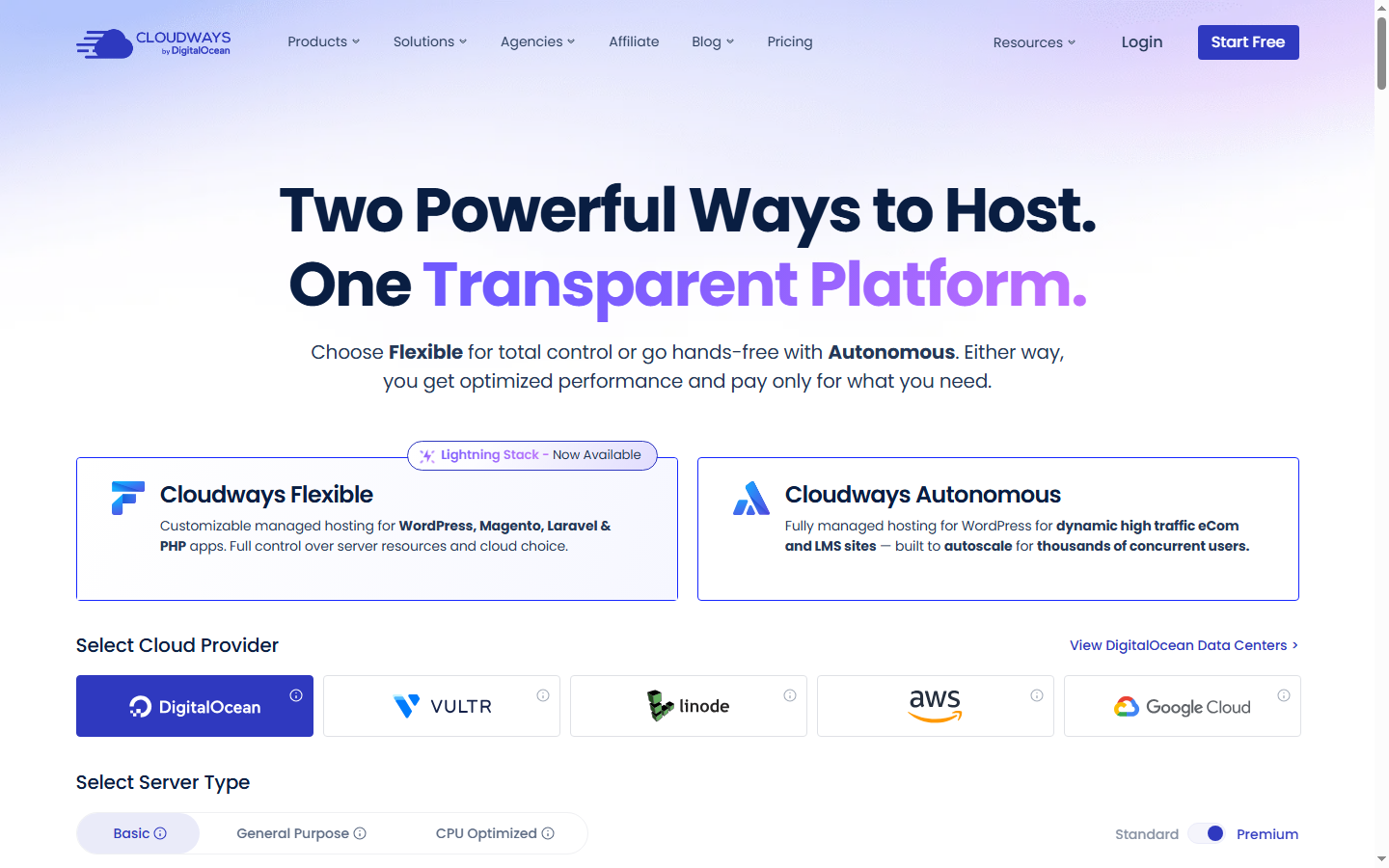
Cloudways is managed cloud hosting. When you click the Vultr 1GB plan at $14/mo, you are paying for the Vultr droplet, Cloudways' control panel on top of it, 24/7 chat support that will SSH into the box for you, automated server-level backups, a managed firewall, and a baseline of monitoring. DigitalOcean acquired the company in August 2022, which is how DO droplets got first-class status and Hetzner quietly disappeared from the supported IaaS list. Today Cloudways supports five clouds: DigitalOcean, Vultr, Linode, AWS, and GCP.
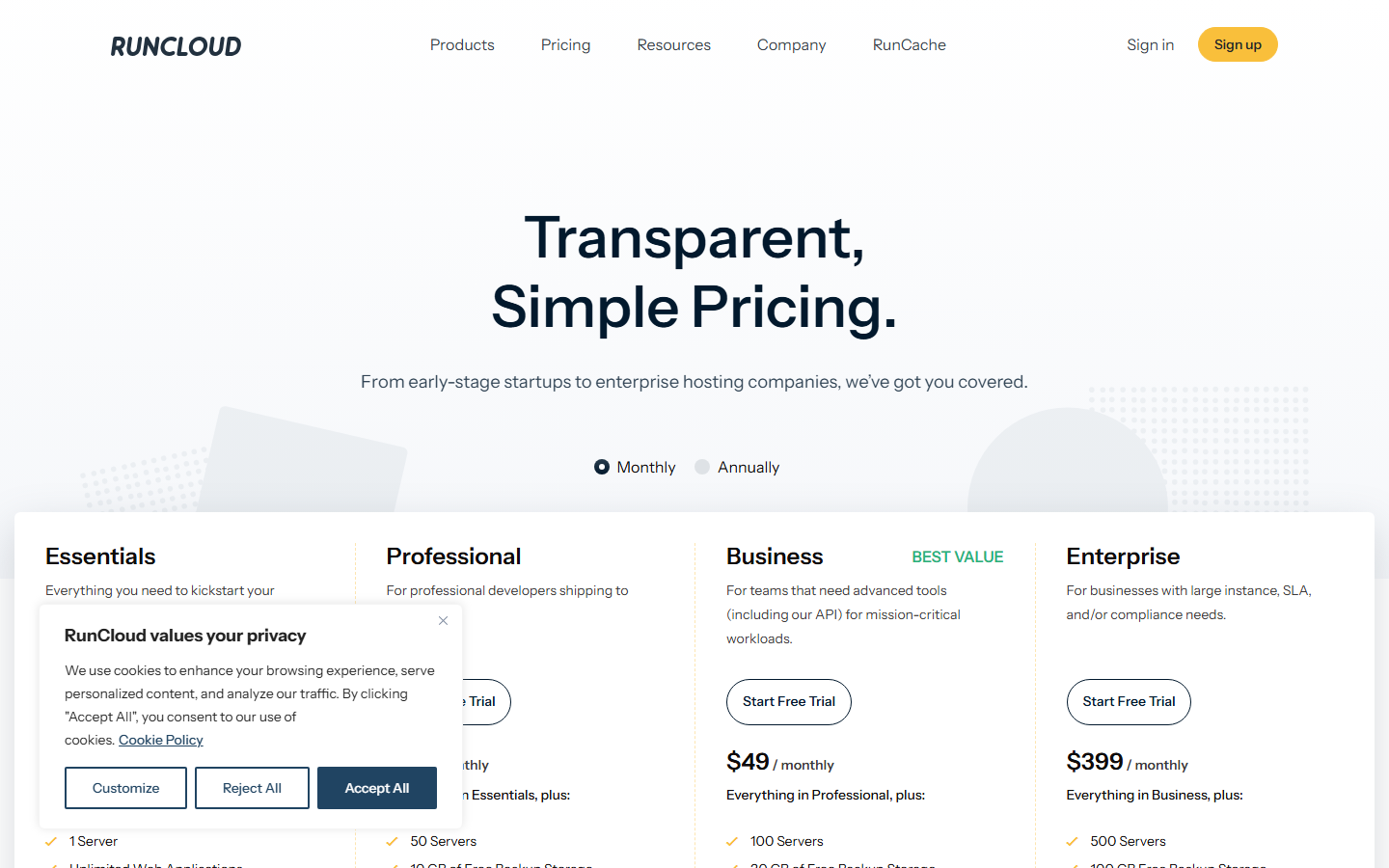
RunCloud is a SaaS control panel. The Essentials plan at $9/mo gives you a UI to manage one Linux server. You bring the server. Nothing runs on RunCloud's infrastructure because they don't have any to speak of — they were founded in Mauritius in 2015 and remain privately held. You point RunCloud at any Ubuntu box on DigitalOcean, Vultr, Linode, Hetzner, AWS, GCP, or your own metal, and it gives you nginx, PHP, MySQL, free SSL via Let's Encrypt, deployments, and a clean dashboard. What it does not give you, by design, is anyone who will SSH into your box at 2 AM.
Once you see this, the price gap reorganizes itself. The $5 you "save" by going from $14 Cloudways/Vultr to $9 RunCloud + $6 Vultr is not a discount on the same thing. It is the price of unbundling the on-call engineer.
3. The 12-month TCO table nobody shows you
Here's the table I wish someone had handed me before that first client migration. Cloudways numbers come from the official pricing page on April 26, 2026. RunCloud tier prices come from a PriceTimeline snapshot dated February 28, 2025 cross-checked against G2 and SoftwareWorld; the official runcloud.io pricing page should be confirmed before purchase. Add-on columns use Cloudways' lowest published "from" rate, so real bills can drift higher.
| Scenario | Cloudways list | Cloudways + typical add-ons | RunCloud + DigitalOcean | RunCloud + Hetzner |
|---|---|---|---|---|
| 1 WP site (2GB box class) |
DO Micro 2GB $11/mo = $132/yr |
$11 + CDN $4.99 + SafeUpdates $3 + Malware $4 = $22.99/mo = $275.88/yr |
Essentials $9 + DO Premium 2GB $18 = $27/mo = $324/yr |
Essentials $9 + Hetzner CX23 4GB $6.49 = $15.49/mo = $185.88/yr |
| 5 WP sites (8GB box class) |
DO Medium 8GB $88/mo = $1,056/yr |
$88 + CDN 5×$4.99 + SafeUpdates 5×$3 + Malware 5×$4 = $147.95/mo = $1,775/yr |
Pro $19 + appropriately sized DO box. Pro plan unlocks multi-server, atomic deploy, team. Pro line item alone = $228/yr | Pro $19 + Hetzner-class IaaS. Pro line item alone = $228/yr; full stack typically lands $300–$450/yr depending on box size |
| 10 WP sites (agency, 16–32GB) |
DO 8XL 128GB $342/mo (over-provisioned but it's what the published Cloudways table jumps to next) = $4,104/yr |
$342 + CDN 10×$4.99 + SafeUpdates 10×$3 + Malware 10×$4 = $461.90/mo = $5,543/yr |
Business $49 + sized IaaS. Business line item alone = $588/yr | Business $49 + Hetzner CCX-class. Panel line item alone = $588/yr. Note: after Hetzner's June 2026 increase a CCX13 is $50.49/mo ($605.88/yr) — the box now costs more than the panel, which is a reversal from when this table was first built. |
Three things jump out, and only one of them is the price gap.
First, the headline number is real. At 5 sites with the typical Cloudways add-on stack you're paying around $1,775/year. The same 5 sites on RunCloud Pro with a Hetzner box land in the $300–$450/year range. That's a delta north of $1,300.
Second, on a single small site RunCloud no longer wins at all — and that is new. RunCloud Essentials + DO Premium 2GB ($27/mo) was always more expensive than Cloudways' DO Micro list ($11/mo). The Hetzner route used to rescue it: Essentials $9 + a $5.20 Hetzner box came to $14.20/mo, close enough to call it a wash. After Hetzner's June 2026 price increase that same box is $6.49, putting the stack at $15.49/mo against Cloudways' $11. On one small site, Cloudways is now the cheaper bill outright. You are buying twice the RAM (4GB vs 2GB) for that $4.49 — a fair trade if you need it, but it is no longer a saving. RunCloud's cost advantage now starts at 5 sites, not at 1.
Third, the Cloudways column has a specific fragility: every add-on price is "from" pricing. Add a couple of mailboxes ($1 each) and DNS Made Easy ($0.50/domain) and the bill drifts up. The RunCloud column has a different fragility: the IaaS sizing is your call, and if you under-provision you eat it in support tickets nobody will answer.
4. The add-on stack: where Cloudways stops being cheap
The TCO table is abstract until you watch add-ons accrete on a real bill. Here is what each upsell costs and when I actually buy it for a client. The Advanced Support line is the published list price of $100/mo, currently advertised at 75% off to $25/mo as a limited promotion at the time of writing.
- Cloudflare Enterprise CDN — from $4.99/domain/mo. Worth it if you have an audience outside North America or any image-heavy WooCommerce store. Skip on a domestic blog under 30k visits.
- SafeUpdates — from $3/app/mo. Worth it once a site is generating revenue you can't lose for 24 hours. Skip on dev sites and content blogs you actively maintain.
- Malware Protection — from $4/app/mo. Worth it for any WooCommerce store or contact-form-heavy lead site. Skip on static-ish content sites already covered by Wordfence free.
- Advanced Support — $100/mo (limited $25/mo). This is the line that triggers the angry Trustpilot reviews. Cloudways uses it as a paywall on response time and on tasks like firewall edits and port openings.
- Rackspace Email — $1/mailbox/mo. Cheap. If you're not already on Google Workspace, fine.
- DNS Made Easy — $0.50/domain/mo. Skip. Cloudflare DNS is free and faster.
The structural problem isn't that any single add-on is overpriced. It's that the marketing price ($14/mo) and the operational price (with the add-ons real production sites need) are two different prices, and Cloudways doesn't tell you that until after migration.
"Cloudways asked me to pay $100/month for Advanced Support to handle basic operations like opening a port and adjusting firewall rules — tasks that take two minutes via SSH on a direct VPS." — Trustpilot review of Cloudways, paraphrased from a recurring complaint pattern in 2025–2026 reviews
Verdict on Cloudways add-ons: if you run a single site under $2K MRR, the Micro plan plus SafeUpdates is the entire correct stack. Skip the rest. If you run a WooCommerce store doing $5K+ MRR, the SafeUpdates + Malware + CDN bundle is genuinely cheaper than the alternative — Sucuri at $200+/yr per site plus Cloudflare Pro plus your own time. Above 5 sites the SafeUpdates × N math turns ugly fast and you should be reading Section 7.
5. The "support" word means two different things
Both companies' marketing pages say "24/7 support." They mean very different things by it. This is the matrix I keep on my second monitor when a client asks where the line is.
| Failure | Cloudways | RunCloud | IaaS provider (DO/Vultr/Hetzner) | You |
|---|---|---|---|---|
| OS security patches (kernel CVEs, package updates) | Handles | Not theirs | Not theirs (raw boxes only) | RunCloud users: you, via panel button or apt |
| Kernel upgrade requiring reboot | Scheduled, notified | Not theirs | Not theirs | RunCloud users: you schedule and reboot |
| Panel bug (UI broken, deploy fails inside the panel) | Their ticket queue | Their ticket queue | — | — |
| Application layer (PHP segfault, MySQL crash, plugin broke the site) | Chat will SSH and look | Explicitly out of scope | Out of scope | RunCloud users: you, with logs and Stack Overflow |
| SSL certificate renewal failed | They'll fix | Panel auto-renews; if it fails you investigate | — | RunCloud users: you when auto-renew breaks |
| DDoS / abnormal traffic mitigation | Basic; serious mitigation gated behind Advanced Support | Not theirs | DO and Hetzner offer basic edge mitigation; not aggressive | RunCloud users: you + Cloudflare |
The G2 review that captures RunCloud's design philosophy best, and that I now copy into client emails verbatim before any migration:
"Support is non-existent, and you will receive help only if something's wrong with the RunCloud panel, so you are on your own with your configuration and applications." — G2 review, RunCloud, 2025
That sentence isn't a complaint. It's an accurate description of the product. RunCloud sells you a panel. If your PHP-FPM pool is misconfigured, that's a configuration problem, which is your problem. If MySQL is OOM-killed because you under-provisioned the box, that's your problem. The panel is fine; the application is broken; the panel team has nothing to do.
Cloudways sells the opposite contract. Their chat will SSH into your droplet and read your nginx error log. In my experience they do this within ten or fifteen minutes at any hour. The frustration with Cloudways isn't that the support doesn't exist — it's that the boundary between "free chat support" and "$100/mo Advanced Support" lands in places that sometimes feel arbitrary, especially around firewall edits and email deliverability. I once opened a chat at 11 PM to whitelist a single outbound port for a client's transactional email, watched the polite agent type the words "for that level of access we'd recommend our Advanced Support plan," and felt the boundary move under my feet by about thirty dollars.
Read those two paragraphs again. That is what you are buying. Not features. Not panel screenshots. A contract about who answers the page at 3 AM.
6. RunCloud isn't a free lunch either
If I stopped at Section 5, this article would be a hit piece on Cloudways add-ons and a coronation for RunCloud. That's not what the data says. RunCloud has its own structural problems, and they have been getting worse, not better.
The pricing has drifted up. The Essentials/Pro/Business tiers at $9/$19/$49 are not the prices RunCloud launched with. The community has noticed:
"When RunCloud started, it was a good and cheap service, but right now they seem to care about only the profits." — Trustpilot review, RunCloud, 2025
Useful features keep migrating up the tier ladder. Memory and bandwidth telemetry, atomic deploy, and team permissions used to be more accessible. They are now distributed across Pro and Business in a way that pushes serious users off the $9 plan fast:
"Several features like memory usage stats and bandwidth are hidden behind a top-level paywall." — G2 review, RunCloud, 2025
If you run 5 sites and want atomic deploys plus a team seat, you are on Pro at $19/mo, not Essentials at $9. The headline price is rarely the price the actual reader pays.
The security track record has a real blemish. Multiple aggregated Trustpilot reviewers flagged a lengthy delay on a vulnerability in the RunCloud Hub's Stripe integration:
"RunCloud took over a year to fix high-level security issues that leaked customer details through the RunCloud Hub with Stripe integration." — Trustpilot, RunCloud (claim repeated across multiple reviewer accounts in 2024–2025)
I cannot independently audit that timeline, and I'm flagging it as a community claim rather than a confirmed CVE record. But it appears in enough independent reviewer accounts that it deserves a place in the decision, especially for anyone storing payment data anywhere near the panel.
The honest version of the comparison is not "RunCloud good, Cloudways gouging." It is this: both companies tax you. Cloudways taxes you in dollars (add-on creep). RunCloud taxes you in time and risk (you are the security team, you are the on-call, the panel vendor has missed a security window before). Pick the tax you can pay.
7. The three-threshold decision rule
Here is the framework I now use with every client. Three numbers. If two of them point the same way, that's your answer.
Threshold 1: MRR per site
- Under $2K MRR per site: the value of one hour of your time is roughly $50–$150. Cloudways' typical add-on stack ($23/mo with SafeUpdates + Malware + CDN) is cheaper than the labor cost of three monthly maintenance hours. Stay on Cloudways.
- $2K–$10K MRR per site: grey zone. The deciding factor is Threshold 3.
- Over $10K MRR per site: if the site is not WooCommerce-heavy and you have or will hire competent ops, RunCloud + a properly sized Hetzner CCX or DO box and Cloudflare Pro is materially cheaper, and you can afford the on-call response yourself. Above $50K MRR, neither panel is the right answer — you're hiring DevOps.
Threshold 2: Number of sites
- 1–4 sites: Cloudways' fixed per-app add-on math is still tolerable. Stay.
- 5+ sites: per-app add-ons multiply. SafeUpdates 10×$3 + Malware 10×$4 = $70/mo just for two boxes ticked. RunCloud's tier-based pricing flatlines here. Lean RunCloud unless Threshold 3 vetoes.
Threshold 3: SSH self-rating (1–5)
Score yourself honestly:
- "What's SSH?" → Cloudways or a fully-managed WP host. Don't read further.
- "I can
ssh user@ipand run a few commands a coworker gave me." → Cloudways. - "I can edit nginx configs, read MySQL slow logs, write a basic
iptablesrule." → either side, lean by Thresholds 1 and 2. - "I've debugged a PHP-FPM pool, tuned a MySQL
my.cnf, automatedcertbotrenewals." → RunCloud is fine. - "I have a Hetzner box with my own Ansible playbook." → why are you paying for either panel? But if you must: RunCloud.
Five-question gut check. (1) Is your site revenue >$2K/mo? (2) Do you run 5+ sites? (3) Can you SSH and edit a config? (4) Are you OK being paged at 3 AM if MySQL crashes? (5) Is saving ~$1,000/year worth 10–20 hours of new ops work? Three or more "yes" → RunCloud. Three or more "no" → Cloudways. Two and two means whichever you'd rather explain to yourself in six months.
8. If you're already on Cloudways: the migration math
Most readers of this article are on Cloudways and weighing the move. Here is the realistic time budget for one site, based on three migrations I've done for clients in the past 18 months.
- Spin up the new IaaS box and connect RunCloud (15–30 min). Pick your provider, deploy Ubuntu LTS, point RunCloud at it, install nginx + PHP + MySQL via the panel.
- Database export (20–40 min). Cloudways admin → Application → Backup → SFTP credentials →
mysqldumpvia the panel or download the SQL. WooCommerce stores with a bloatedwp_optionstable take longer. - File copy (1–3 hours real, mostly idle). SFTP from Cloudways to local, rsync up to the new box. Or, if both boxes have outbound SSH, rsync directly. A 12 GB media library at typical home connection speeds is the bottleneck — start it before lunch.
- DNS cutover (1 hour active + up to 24 hours propagation). Lower TTL to 300 the day before. Repoint A record. Watch
digfrom a couple of regions until propagation looks done. - SSL re-issue (10–20 min). RunCloud's Let's Encrypt button. Verify with
curl -Iand a browser. - Cron + email + smoke test (45–90 min). Wp-cron, scheduled tasks, transactional email config, contact form test, checkout test if WooCommerce. This is the step everyone underestimates.
Realistic per-site total: 4–7 active hours plus a half-day of waiting. Not 30 minutes, not two days. If you bill yourself at $100/hr internally, that's $400–$700 of opportunity cost per site.
Here's the math that matters. At 5 sites with the Cloudways add-on stack ($1,775/year) versus RunCloud Pro + Hetzner ($300–$450/year), you're saving roughly $1,300/year. Migration cost: 5 sites × 5 hours × $100 = $2,500 of your time. Payback period: about 23 months. That's worth it if you plan to run those 5 sites for two more years. It is not worth it if half your client list is on month-to-month retainers and might churn before you cross break-even.
9. Verdict: who should pick what
Pick Cloudways if you are any of these:
- Running 1–4 sites with an SSH self-rating of 2 or below.
- An agency where the client pays the bill and "fast support" is a feature you bill back.
- A WooCommerce operator under $20K MRR per site who can't afford a 30-minute outage and doesn't want to own the on-call.
Pick RunCloud if you are any of these:
- An agency or developer running 5+ sites where SafeUpdates × N is eating real margin.
- A solo developer comfortable with Linux, where the $1,000+/year saved funds something else (better hardware, ads budget, a Sunday off).
- Someone consciously trading dollars for control because you need to install something Cloudways won't let you (custom PHP modules, an unusual database, a non-standard cache layer).
Don't pick either of these if:
- You've never opened a terminal — go to a fully-managed WordPress host (Kinsta, WP Engine, Pressable). Different conversation, different article.
- You're running a single $50K+/mo store. Hire DevOps. The bottleneck stops being the panel.
One scope note before the framework gets misapplied: this whole comparison assumes a WordPress / WooCommerce / generic LAMP stack. If you're running Laravel with queue workers and Redis pub/sub, a Node app behind PM2, or anything that needs you to install custom system services, RunCloud's panel will fight you on the periphery and Cloudways will simply not run it. Both answers are wrong; the right answer is a vanilla VPS with your own provisioning. This article doesn't help you there.
The RunCloud-vs-Cloudways debate doesn't end with "winner is X." It ends with two questions a panel can't answer for you: how much is your sleep worth, and how much do you trust your own ops? Answer those honestly and the price tag becomes the easy part — which is exactly what the $14-vs-$9 framing tries to hide.
10. FAQ
If I leave Cloudways for RunCloud, will my SSL certs and cron jobs come over automatically?
No. SSL has to be re-issued — RunCloud's Let's Encrypt integration is one click but it's a fresh cert, not a transfer. Cron jobs on Cloudways live inside their panel and don't export to anything readable; you re-create them in RunCloud's scheduler manually. Plan 30–45 minutes for cron and another 15 for SSL plus DNS revalidation. wp-cron in particular is the silent killer — half the failed migrations I see are sites where someone forgot to wire up the system cron call to wp-cron.php, and scheduled posts stopped publishing for two weeks before anyone noticed.
Does RunCloud's "panel-only support" mean I have to fix MySQL crashes alone?
Yes. That's the deal. If MySQL is OOM-killed because the box is undersized, neither RunCloud nor your IaaS provider will fix it for you — RunCloud's ticket queue is for panel bugs, and DigitalOcean or Vultr sells you the hardware, not the database operator. You read journalctl, you read /var/log/mysql/error.log, you tune innodb_buffer_pool_size, and you reboot. If that paragraph sounds unfamiliar, you should be on Cloudways.
What's the cheapest way to run 5 WordPress sites: Cloudways Medium, RunCloud Pro + DO, or RunCloud Pro + Hetzner?
Hetzner wins on raw price by a wide margin. RunCloud Pro at $19/mo plus a Hetzner box in the CX23-to-CCX class lands somewhere between $25 and $40/mo all-in for 5 sites — call it $300–$450/year. RunCloud Pro + DO (assuming a Premium tier sized for 5 sites) is meaningfully more, since DO's per-GB pricing is roughly 2–3× Hetzner's. Cloudways Medium at $88/mo list, before any add-ons, is $1,056/year — and the moment you add SafeUpdates and CDN per app it climbs past $1,700. The cheapest realistic stack for 5 sites is RunCloud Pro + Hetzner. The cheapest stack that includes someone else handling MySQL crashes is Cloudways Medium.
Is Cloudways' markup over DigitalOcean justified by the managed support?
Pricing studies have pegged Cloudways' typical markup around 220% over the equivalent direct DigitalOcean droplet. The right framing isn't "is the markup fair" — markup is how SaaS works, not a moral question. The right question is whether the bundled services (24/7 chat that will actually look at your nginx logs, automated server backups, managed firewall, kernel patching) are worth the dollar gap to you. For a solo blogger on a $6 droplet, almost certainly not. For a 5-store agency where one outage costs more than a year of markup, almost certainly yes.
Why did RunCloud's pricing go up in 2024–2025, and is it still cheaper than Cloudways?
RunCloud has been moving features up the tier ladder and raising headline numbers — that's the substance of the Trustpilot complaints quoted in Section 6. Memory and bandwidth telemetry that used to be more accessible now sit behind Pro or Business. Yes, it's still meaningfully cheaper than Cloudways at 5+ sites once add-ons are factored in — that's not even close. But the gap is narrower than the $9-vs-$14 marketing comparison suggests, especially after you realize most serious users end up on Pro at $19/mo, not Essentials at $9.
If your renewal is in the next 90 days, here's the rule I use. Pull your last three Cloudways invoices and add up the add-on lines. If add-ons are under $15/mo total, the marginal savings of moving don't beat the migration time — renew Cloudways and revisit next year. If add-ons are over $40/mo, the savings cover migration labor inside 18 months and you should price out RunCloud Pro plus Hetzner before renewing. Between $15 and $40 is the genuinely ambiguous zone, and the tiebreaker is your SSH self-rating from Section 7, not the price.
Can I run RunCloud on Hetzner to cut costs further, or are there hidden compatibility issues?
Yes, Hetzner is officially supported. RunCloud needs Ubuntu — Hetzner offers Ubuntu LTS as a one-click image and the panel attaches cleanly. Two real friction points worth knowing about: Hetzner's US footprint is smaller than DigitalOcean's (their primary US regions are Hillsboro, OR and Ashburn — fine for most US audiences but not the geographic spread DO has), and Hetzner's account verification is stricter than US providers. Expect to upload an ID document, occasionally with a delay before the first box can launch. Once verified, the per-GB price is roughly a third of DigitalOcean's and the panel doesn't notice the difference.
About this review: Cloudways pricing verified against the official pricing page on April 26, 2026. RunCloud tier prices come from a PriceTimeline snapshot dated February 28, 2025 cross-checked against G2 and SoftwareWorld; the official runcloud.io pricing page should be confirmed before purchase. L3 community quotes are sourced from Trustpilot and G2 reviews dated 2024–2025. The author has migrated three client sites between these two stacks in the past 18 months and is not an affiliate of either company at the time of writing.