Affiliate disclosure: this page contains affiliate links. If you sign up through one of them, I may earn a commission at no extra cost to you. I only recommend hosts I'd put a client on, and I name the ones I wouldn't.
Two invoices, same quarter, same kind of WooCommerce store. One client paid $760 in surprise overage. The other lost 40 minutes of checkout during her second-biggest sales hour of the year. Both bills came from doing exactly what their host's marketing page said they could do.
The first came from a client on WP Engine Startup at $30/month — the entry-level managed WordPress plan, capped at 25,000 visits per billing period. Black Friday did what Black Friday does. The cap broke open mid-morning on Day 1, right inside the email-blast window she'd spent three weeks planning. The overage meter at $2 per 1,000 extra visits started clicking and didn't stop until the weekend did.
She's not alone. The WP Engine complaint archive on BBB has a filing from a merchant who was billed $790.28, with $740 of it claimed as overage, against their own analytics showing fewer than 1,000 visitors. That specific discrepancy — WP Engine's visit count versus third-party analytics — used to be the #1 shape of complaint. WP Engine fixed part of it in September 2025 by excluding suspected bot traffic from billing. The meter is more honest now. It's still a meter.
The second client, same quarter, ran SiteGround GoGeek at $44.99/month renewal. His Black Friday traffic graph looked almost identical to hers. He didn't get a scary bill. He got a 503 Service Unavailable during his second-biggest sales hour of the year. CPU throttling triggered — the "no account is allowed to use more than 20% of the CPU for more than 10 seconds" rule straight out of SiteGround's own fair-use KB — and his checkout page went dark for roughly 40 minutes while his dev scrambled.
Two invoices. Two pains. The 2.5x price gap between SiteGround GoGeek at $44.99 and WP Engine Growth at $109 isn't the story. The story is what each host does when your traffic misbehaves — and once you see that, you'll stop asking which one is "better."
The real split: revenue-centered metering vs resource-centered metering
Most comparisons of these two treat price like a feature. One costs more, one costs less, pick based on budget. That framing isn't useful — it's actively backwards.
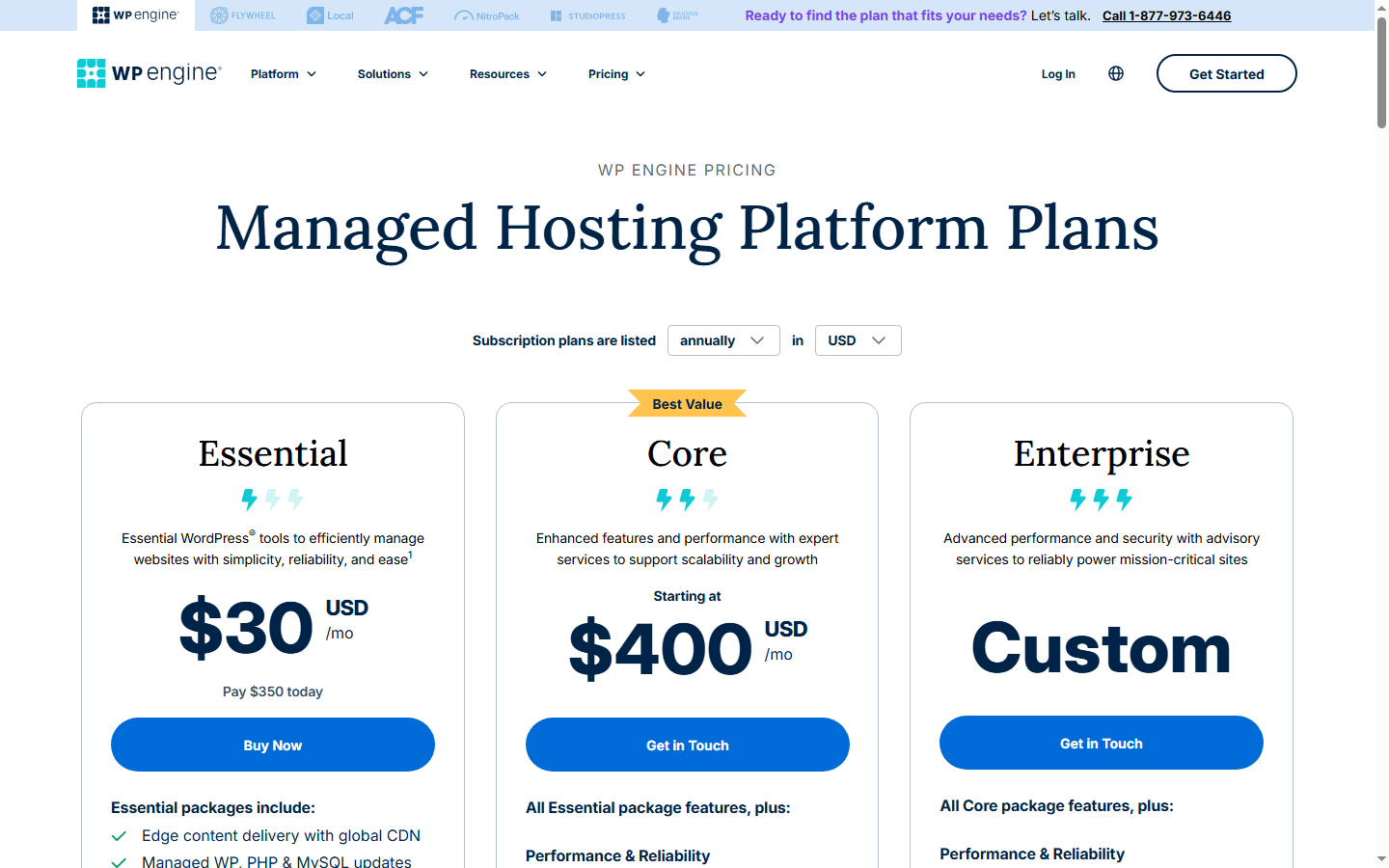
WP Engine meters you by visitors. Startup is $30/month on annual billing and gives you 25,000 visits. Professional at $55 gets you 75,000. Growth at $109 — the tier closest in feature surface to SiteGround GoGeek — gets you 100,000. Scale is $276 for 400,000. Past Scale, the Core tier starts around $400/month on custom quotes. Every visit beyond your cap is $2 per 1,000, no throttling, no downtime. Since September 2025, suspected bot hits don't count toward your bill anymore, so the meter isn't penalizing you for being crawled by Ahrefs and Semrush on the same afternoon. The arrangement is: your site stays up, and the bill absorbs the surprise.
SiteGround takes a fundamentally different approach. They don't meter visitors directly — they meter CPU seconds. GoGeek at $44.99/month renewal gets you 4,000 CPU seconds per hour, 40,000 per day, 800,000 per month. Layered on top of that quota is the fair-use rule from their own KB: no account uses more than 20% of CPU for more than 10 seconds. Hit that wall, and you get throttled. Hit it repeatedly, and the "we suggest moving to Cloud hosting" email shows up in your inbox — SiteGround Cloud starts meaningfully above the shared tier you're leaving.
So it's not cheaper-versus-more-expensive. It's revenue-centered metering versus resource-centered metering. WP Engine protects your uptime and sends you a bill. SiteGround protects their hardware and hands you the slowdown. Both are choices with costs attached. Neither is free.
What annoys me about both companies' marketing pages is that neither of them tells you which kind of cost they're handing you. Both pages talk about "powerful" and "fast." Neither says "we will charge you for your own success" or "we will throttle you to protect our hardware margin." You have to dig into the KB articles to find out, and most buyers don't — they read the pricing grid, pick a tier by the dollar sign, and meet the real trade-off the first time their traffic misbehaves.

48 hours of Black Friday, run through both systems
Abstract arguments about metering philosophy don't land until you put concrete numbers against them. So take this scenario: one WooCommerce store, 20,000 visits per day for 48 hours, concentrated unevenly in peak shopping windows. Not enormous. A realistic spike for a small store with a decent email list.
On WP Engine Startup, the 25,000-visit monthly cap absorbs Day 1 with room to spare. Day 2 pushes another 20,000 visits and puts you roughly 15,000 over the cap. At $2 per 1,000 overage visits, that's $30 added to your monthly bill. Annoying, not catastrophic. If the same site were on Professional with its 75,000 cap, the entire 48-hour spike is covered inside the envelope and no overage fires at all. The system stays up. Nobody calls you at 2am.
On SiteGround GoGeek, the visit counter is almost irrelevant — their marketing page claims 400K visits for GoGeek, but that number is advisory, not enforced. What's enforced is the CPU quota. Twenty thousand daily visits, concentrated in peak hours, can easily mean 3,000 to 4,000 visits per hour during those windows. A typical WooCommerce checkout path — cart queries, session handling, shipping API calls, payment gateway handoff — eats 2 to 4 CPU seconds per dynamic request even with SuperCacher sitting in front of the static assets. If a third of your peak-hour visits hit dynamic paths (cart, checkout, account), you're pushing 2,000 to 4,000 CPU seconds per hour. That's right at the 4,000/hour ceiling, and on the wrong side of it during the spikiest hours. Throttling triggers. Requests queue. Some time out. Some 503.
A long-running community post at onlinemediamasters.com puts it like this: users report their $14.99/month GoGeek plans turning into $120+/month cloud hosting costs because of forced upgrades through artificial CPU limits. (That $14.99 is an older renewal price — today's GoGeek renews at $44.99 — but the mechanism is identical.) The same site notes a pattern: when accounts migrate off SiteGround to other hosts, the CPU issues tend to vanish, which reads to them as a funnel dressed up as resource accounting.
I'm not going to claim that's proven. What I'll say is this: over the years I've watched two clients on SiteGround get pushed toward exactly that upgrade path. Both were WooCommerce. Both had traffic that spiked seasonally. Both ended up with quotes for SiteGround Cloud or were told, politely, that their site didn't fit the shared tier anymore. That pattern is consistent with what the community has been saying for five years.
This is the reversal the cheaper price hides. If your traffic is predictable — content site with steady organic, membership site with known member count — SiteGround's CPU model almost never bothers you. You'll live your whole hosting life without hitting the 20%/10-second line. If your traffic is bursty — launches, Black Friday, a Reddit front page, unexpected newsletter pops — SiteGround bills you in outages while WP Engine bills you in dollars. Which pain your business can absorb is the actual decision.
Developer freedom: one host has a list, the other has a meter
Same split, different dimension. Both hosts restrict what you can do on the server. They restrict different things, and they tell you about it differently.
WP Engine publishes a disallowed plugins list. W3 Total Cache and WP Super Cache are blocked because WP Engine runs its own EverCache layer and two caches colliding produces messy cache-invalidation bugs. BackupWordPress, WP DB Backup, WP DB Manager, and VersionPress are banned because WP Engine handles backups at the platform level and these plugins either conflict with or actively interfere with restore processes. For a solo blogger, the list is invisible — the defaults work fine. For an agency standardizing a plugin stack across dozens of client sites, the list can blow up a migration plan the week before go-live.
SiteGround doesn't publish a disallowed plugins list. You can install almost anything. The catch: the CPU meter is watching. Run a heavy Elementor page with a dozen third-party plugins and one poorly-coded search plugin that misses cache on every query, and you're back at the 20%/10-second line whether you saw it coming or not. The restriction isn't a policy doc. It's a background process.
So the real developer-freedom question isn't which one lets you do more. It's which one tells you the limits up front versus which one lets you find out on a Tuesday afternoon. WP Engine is a guardrail with a sign bolted to it. SiteGround is a cliff with thin caution tape. For agencies running complex stacks with custom plugins, staging pipelines, and CI/CD, WP Engine's constraints are usually easier to plan around because they're written down somewhere you can grep. For freelancers shipping simpler sites, SiteGround's silent meter rarely bothers you until one client's site outgrows it.
30-second verdict: three lanes, not two winners
Forget the Winner/Loser frame. The decision splits into three concrete lanes depending on your traffic shape, and the usual comparison articles get lane two wrong about 80% of the time.
Lane one: if your traffic stays under 10,000 visits a month and you can predict it within ±30%, SiteGround StartUp at $17.99/month renewal is the better buy, full stop. You'll never hit the CPU limits at that load. SuperCacher is fast on the front end. The feature set covers the real basics. StartUp is the single product across either lineup where "cheap" is actually cheap and not bait pricing with a harsh renewal.
Lane two is where SERP-front-page comparisons get this wrong most often, so it gets the most weight here. If your traffic lives between 10,000 and 100,000 per month and has real spikes — product launches, sale events, content that occasionally pops — WP Engine Startup at $30/month with a known overage rate is the lower-stress bet. You'll pay maybe $70 to $200 in overage during a big month, and you'll hate that line on the bill, but your checkout won't 503 during the sale. Budget for the overage before the event, not after it lands. I've moved a client off SiteGround mid-Black-Friday weekend before, after throttling started queuing up requests on Saturday morning — don't be the dev doing the migration during the sale you spent three months building toward.
Lane three: if you're an agency running 20+ client sites, neither host is optimal. WP Engine's per-site counting and SiteGround's CPU metering both scale badly against portfolio economics. GridPane and Cloudways let you pay per server and stack as many small sites on each one as your RAM allows. Somewhere around 40 to 50 client sites, the agency math crosses hard in that direction.
The single most common mistake I watch people make in this comparison: picking SiteGround GoGeek at $44.99 because it looks cheaper than WP Engine Growth at $109, and that's how you end up paying for downtime instead of paying for headroom. Those two tiers are not the same product. GoGeek is a CPU-rationed shared plan with agency-adjacent features. Growth is a managed WordPress environment with real isolation. The $64 monthly gap buys architectural separation, not a longer spec sheet — and whether that gap earns its keep depends entirely on lane two versus lane one, which is why the lane question comes first.
When I tell clients to skip both hosts entirely
Several kinds of sites are wrong for both WP Engine and SiteGround, and saying so matters more than the affiliate payout on either one.
If your budget is $5/month and you're starting a personal blog, don't shop this comparison. Look at Hostinger's intro pricing around $1.99/month or Bluehost at $3.99. Neither managed WordPress host is in your tier, and the SiteGround GoGeek "deal" at $7.99 intro / $44.99 renewal is not a beginner purchase, whatever the roundup blogs tell you.
If you're an agency running 50+ client sites, both hosts will bleed you — WP Engine on per-site counting, SiteGround on forced Cloud upgrades whenever a client's site actually grows. GridPane starts around the cost of a single WP Engine Growth plan and hosts dozens of sites per server once you get the stack tuned.
If you need real server-level control — custom nginx directives, non-standard PHP extensions, specific OS packages — skip both immediately. Cloudways, Hetzner Cloud, or a Vultr HF instance with RunCloud gives you that control, and the hosting piece of your work is smaller than it looks from the outside.
What do I actually run? I split my own portfolio. Projects with unpredictable traffic — a site that could get linked from anywhere — sit on WP Engine Startup. I'd rather swallow an overage line on my card statement than explain a 503 to a client who's watching their ad-spend burn during the outage. Predictable-traffic projects stay on SiteGround GrowBig at $29.99 renewal because the $12 gap from StartUp buys me the on-demand backup button I actually use, and my predictable-traffic sites stay predictable. I don't personally run anything on GoGeek at $44.99 — by the time a site needs what GoGeek offers, I'm already at the point where Growth's architecture earns its price difference. Your calculus may end up different. The lane question drives it.
Looking for simpler shared hosting on a smaller budget? We cover beginner-level plans on BestWebHostingUSA. If you're ready for a raw VPS rather than managed WordPress, BestUSAVPS is where we dig into that tier.
Questions that come up after this decision
How much overage do WP Engine customers actually pay in a bad month?
At $2 per 1,000 visits over cap, the linear math is easy: 60K on a Startup account costs you $70, 200K on a Professional account costs you $250. The non-linear part is what kills people. A site that does 30K one month and 80K the next doesn't pay the average — it pays the spike, fully, both times. The decision rule I give clients: if you blow past your cap by 50% or more twice in any rolling three-month window, upgrade the tier now rather than after the third one. The overage math stops working in your favor around 2x the cap, and the cost of being surprised twice is roughly the cost of being right once. Above 3x, you've been paying the upgrade in installments anyway — you just haven't admitted it yet.
How fast does SiteGround CPU throttling actually kick in?
The hard rule in SiteGround's own fair-use KB is 20% of CPU used continuously for more than 10 seconds. In practice, on a shared account, that translates to a single sustained burst of uncached dynamic requests — a crawler hitting your search endpoint, a misfiring cron, a plugin that processes images in the request cycle. First-time throttle events usually show up as slowdowns rather than outright outages. Repeat offenders get the warning email and, eventually, the upgrade recommendation.
Do the WP Engine disallowed plugins have workarounds?
Mostly yes, at the cost of some friction during migration. The caching plugins (W3 Total Cache, WP Super Cache) are replaced by WP Engine's EverCache, which runs at the platform layer — you don't need them installed, and having them active would actively conflict with the platform cache. The backup plugins are replaced by WP Engine's daily automatic backups with a one-click manual trigger. VersionPress is the trickier case; if you built a workflow around its Git-style version control, you'll need a different approach on WP Engine (staging environments plus external VCS for theme and plugin code). The friction case is when a client hands you a site that depends on one of these banned plugins and you have to rewrite their deployment docs before migration day. If that's your world, the list is worth reading carefully before you commit.
Is the free migration really free?
SiteGround offers an automated Migrator plugin that handles most WordPress sites at no cost. WP Engine offers free migrations on all paid plans, and their team handles the complicated pieces — serialized data in the database, staging setup, SSL cutover. Neither is free in the sense that you won't spend an hour staging and testing the result.
Does SiteGround's removal from the WordPress.org recommended hosts list matter for my decision?
For the hosting choice itself? Barely. It was a political fight between SiteGround and Automattic in 2022, not a technical judgment — your site runs the same whether SiteGround sits on that list or not.
Back to the two invoices at the start. One client paid the surprise in dollars. The other paid it in downtime during the sale window she'd spent three months planning. Both of them, at the end of that Black Friday weekend, would have switched places with the other if they could. Nobody likes either kind of bill. The only decision you get to make up front is which kind you'd rather pay when the day comes — and that decision comes from your traffic shape, not from anyone's feature comparison table.
If your traffic is predictable: SiteGround StartUp or GrowBig, and you can largely stop worrying about this question. If your traffic is bursty: WP Engine Startup with a budgeted overage line. If you're an agency past 20 sites: neither, look at GridPane. That's the whole framework. The rest is which color the dashboard is.